HTML Code Generator
AI-Powered • Semantic Structure • Best Practices
HTML Generation Prompt Formula
Generate NowPrompt = [ELEMENT_TYPE] + [SEMANTIC_REQUIREMENTS] + [STRUCTURE] + [ACCESSIBILITY] + [BEST_PRACTICES]
Components:
- Element Type: Specific HTML element (form, navigation, card, etc.)
- Semantic Requirements: Proper tags, ARIA roles, structure
- Structure: Layout, hierarchy, organization
- Accessibility: Labels, alt text, keyboard navigation
- Best Practices: Validation, performance, SEO
Example: "Generate clean HTML code for a responsive navigation menu with semantic structure and best practices. Include proper ARIA attributes, mobile hamburger menu, and accessibility features for screen readers."
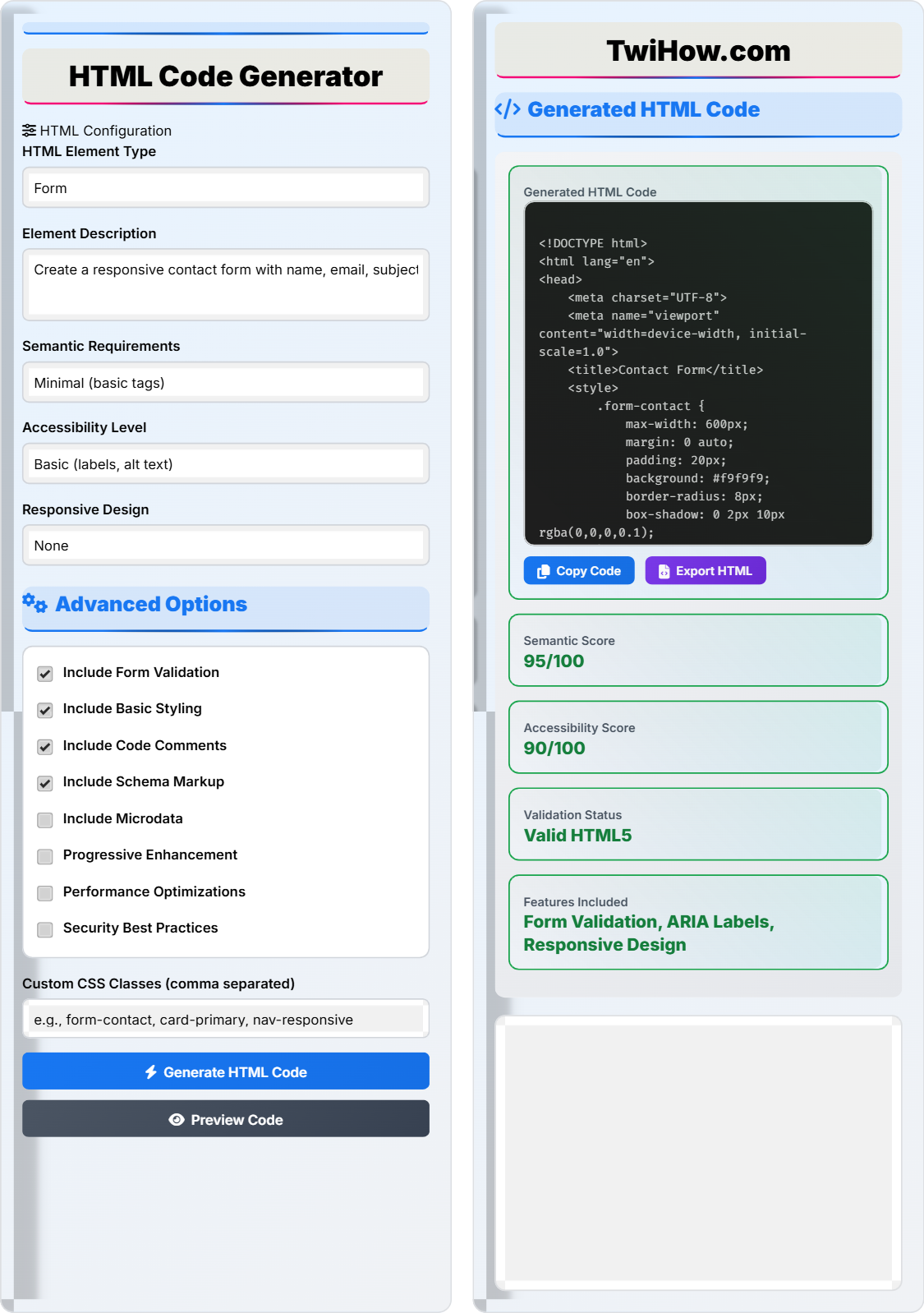
HTML Configuration
Advanced Options
Generated HTML Code
Semantic Structure Analysis
- ✅ Proper use of semantic HTML5 elements
- ✅ Correct heading hierarchy (h1, h2, etc.)
- ✅ Appropriate use of form elements
- ✅ Proper labeling of form controls
- ✅ Meaningful link text
Accessibility Features
- ✅ ARIA labels and descriptions
- ✅ Proper contrast ratios
- ✅ Keyboard navigable elements
- ✅ Alternative text for images
- ✅ Focus management
Performance Considerations
- ✅ Minimal external dependencies
- ✅ Efficient CSS selectors
- ✅ Proper image optimization
- ✅ Semantic class naming
- ✅ Clean, readable code
Key Features & Capabilities
Semantic HTML
Generates semantically correct HTML with proper element usage for SEO and accessibility.
Accessibility Ready
Includes ARIA attributes, proper labeling, and keyboard navigation support.
Responsive Design
Creates responsive layouts that work on all device sizes and screen resolutions.
Validation Ready
Generates W3C valid HTML that passes all standard validation tests.
Performance Optimized
Creates efficient code with minimal overhead and fast loading times.
Security Focused
Follows security best practices to prevent XSS and other vulnerabilities.
Export Options
Export generated code as HTML files, snippets, or integrate with your workflow.
Documented Code
Includes helpful comments explaining code structure and functionality.
Step-by-Step Guide to HTML Generation
Select the type of HTML element you want to generate (form, navigation, card, etc.). Describe its purpose and requirements in detail.
Example: For a contact form, specify required fields, validation rules, and desired layout.
Choose the appropriate semantic requirements level. Higher levels include more accessibility features and best practices.
Levels: Minimal (basic tags) → Standard (proper semantics) → Accessible (full ARIA support) → Complete (all best practices).
Select the accessibility level that matches your needs. This determines the amount of ARIA attributes and accessibility features included.
Options: Basic (labels, alt text) → Intermediate (ARIA, keyboard) → Advanced (full compliance).
Activate additional features like form validation, styling, comments, schema markup, and performance optimizations.
Recommendation: Enable validation and styling for most use cases.
Click "Generate HTML Code" to create your element. Review the generated code and preview it in the live preview tab.
Tips: Check the analysis tab for detailed information about semantic structure, accessibility, and performance.
Copy the generated code to your project and test it across different browsers and devices. Make adjustments as needed.
Best Practice: Validate the final code using W3C validator and accessibility testing tools.
HTML Best Practices
Always use the most appropriate HTML element for your content. Instead of generic divs, use header, nav, main, section, article, aside, and footer when appropriate.
Example: Use <nav> for navigation, <article> for independent content, and <section> for grouped content.
Include proper labels, ARIA attributes, and keyboard navigation support. Ensure sufficient color contrast and provide alternative text for images.
Example: Use aria-describedby, aria-labelledby, and role attributes where needed.
Use HTML5 doctype declaration, include proper meta tags, and validate your code against HTML5 standards.
Example: Always include <!DOCTYPE html> at the beginning of your documents.
Minimize HTML code, avoid unnecessary nesting, and optimize images. Use modern features like loading="lazy" for images.
Example: Use semantic class names and avoid deep nesting levels.
Follow a consistent structure across your HTML documents. Use a logical heading hierarchy and maintain consistent class naming conventions.
Example: Always start with h1 for the main heading, followed by h2, h3, etc.
Common Mistakes to Avoid
One of the most common mistakes is using generic div elements for everything instead of semantic HTML5 elements.
Wrong: <div class="header">...</div> and <div class="nav">...</div>
Right: <header>...</header> and <nav>...</nav>
Failing to include proper labels, alt text, and ARIA attributes makes your content inaccessible to users with disabilities.
Mistake: Images without alt attributes, forms without labels.
Solution: Always include alt text for images and proper labels for form controls.
Skipping heading levels or using headings just for styling creates confusion for screen readers and search engines.
Mistake: Jumping from h1 to h3 without h2.
Solution: Follow a logical hierarchy: h1 → h2 → h3 → h4.
Unclosed tags, improper nesting, and other syntax errors can cause rendering problems and accessibility issues.
Mistake: <p><div>Content</p></div> (incorrect nesting)
Solution: Use HTML validators to check your code.
Using overly complex or cryptic class names makes code harder to maintain and understand.
Mistake: class="btn-prim-mob-act-123"
Solution: Use descriptive, meaningful class names like "primary-button" or "mobile-navigation".
Expert Q&A
About HTMLGen Pro
Development Team
HTMLGen Pro was developed by a team of experienced web developers and accessibility specialists. Our mission is to simplify HTML creation while promoting best practices in web development.
The tool incorporates the latest web standards, accessibility guidelines (WCAG 2.1), and SEO best practices. It's continuously updated to reflect changes in web standards and emerging technologies.
Used by 50,000+ developers and designers worldwide
Updated: April 2026 • Version 3.2.0