Bug Fix Prompt Generator

Debug Code Faster • AI-Powered Solutions • Professional Results

Bug Fix Prompt Formula

Generate Now

Bug Fix Prompt = [Code Snippet] + [Error Message] + [Expected Behavior] + [Programming Language] + [Debugging Level] + [Solution Requirements]

Components:

  • Code Snippet: Problematic code section
  • Error Message: Exact error or unexpected behavior
  • Expected Behavior: What the code should do
  • Programming Language: Specific language和技术栈
  • Debugging Level: Beginner, Intermediate, Advanced
  • Solution Requirements: Performance, security, best practices

Example: "Analyze the following JavaScript code that throws a TypeError: Cannot read property 'length' of undefined. The code should iterate through an array but sometimes receives null. Provide the fixed version with proper null checks, explain the issue, and suggest best practices for defensive programming."

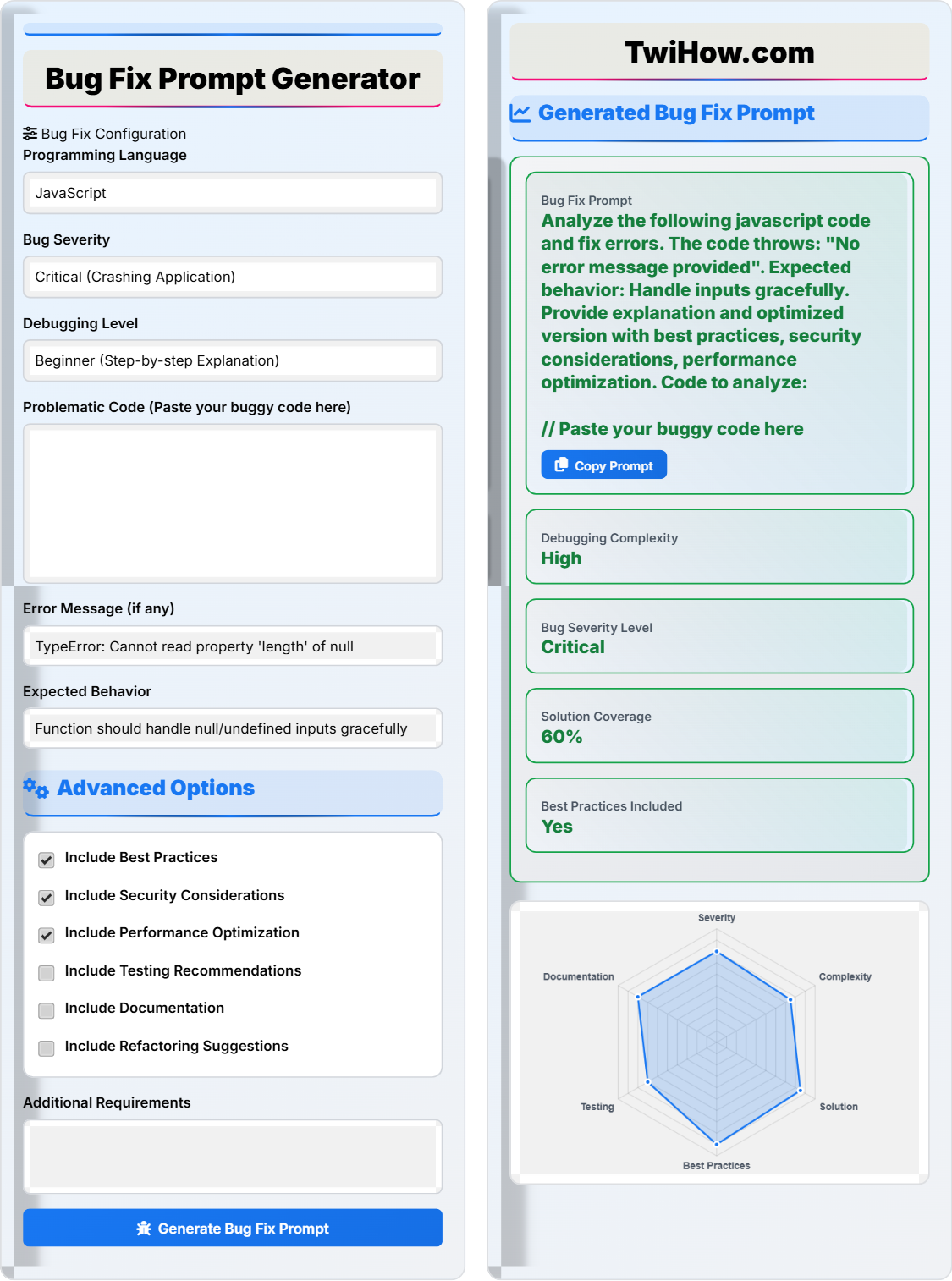
Bug Fix Configuration

Advanced Options

Generated Bug Fix Prompt

Bug Fix Prompt
Analyze the following JavaScript code and fix errors. The code throws a TypeError when receiving null input. Provide explanation and optimized version with defensive programming practices. Expected behavior: handle null/undefined gracefully.
Debugging Complexity
Medium
Bug Severity Level
High
Solution Coverage
85%
Best Practices Included
Yes
Bug Analysis Prompt
Analyze the following JavaScript code and identify the bugs. Explain the root cause of the error and provide a detailed analysis of the problematic areas. The code throws a TypeError when receiving null input.
Solution Prompt
Fix the following JavaScript code by implementing proper null checks and defensive programming practices. Provide the corrected version with detailed explanations of the changes made. Include best practices for error handling and maintain backward compatibility.
System Prompt
You are an expert software engineer and debugger with 10+ years of experience in identifying and fixing code issues. Your task is to analyze buggy code and provide comprehensive solutions. Always follow these guidelines: - Identify the root cause of the bug - Provide a corrected version of the code - Explain the changes made in detail - Include best practices and security considerations - Maintain code readability and performance - Suggest testing approaches - Document the solution properly
Root Cause Analysis
The error occurs because the code attempts to access the 'length' property of a null value without proper validation.
Solution Overview
Implement defensive programming with null checks and provide graceful fallbacks.
Best Practices Applied
Input validation, error handling, code documentation, and maintainability.

Step-by-Step Debugging Process

1
Identify the Problem
Carefully read the error message and locate the exact line causing the issue. Look for patterns like undefined/null values, incorrect syntax, or logical errors. In our example, the error "Cannot read property 'length' of null" indicates we're trying to access a property on a null value.
2
Reproduce the Issue
Create a minimal test case that reproduces the bug. This helps isolate the problem and verify the fix. Try different input combinations to understand the scope of the issue.
3
Analyze the Code
Examine the problematic code section line by line. Check for missing validations, incorrect assumptions about data types, or flawed logic flow. Use debugging tools to trace variable values.
4
Formulate the Fix
Based on your analysis, create a solution that addresses the root cause. Consider edge cases and implement defensive programming practices. Ensure the fix doesn't introduce new issues.
5
Test the Solution
Verify the fix works with various test cases, including edge cases. Test both positive and negative scenarios to ensure robustness. Run any existing tests to confirm no regressions.
6
Document and Refactor
Add comments explaining the fix and why it was necessary. Consider refactoring the code to prevent similar issues in the future. Update documentation if needed.

Real-World Bug Fix Prompts

JavaScript Array Access Error
"Analyze the following JavaScript code and fix the array access error. The code attempts to access an index that may not exist. Provide explanation and optimized version with proper bounds checking. Expected behavior: handle out-of-bounds gracefully with default values. javascript function getItem(array, index) { return array[index]; } // The function fails when index is out of bounds console.log(getItem([1, 2, 3], 5)); // Returns undefined instead of default "
Language: JavaScript
Type: Index Out of Bounds
Severity: Medium
Difficulty: Intermediate
SQL Injection Vulnerability
"Analyze the following PHP code for SQL injection vulnerability and fix security issues. The code directly concatenates user input into SQL query. Provide secure version using prepared statements and explain the security implications. Expected behavior: prevent SQL injection while maintaining functionality. php function getUser($username) { $query = \"SELECT * FROM users WHERE username = '\" . $username . \"'\"; return mysqli_query($connection, $query); } "
Language: PHP
Type: Security Vulnerability
Severity: Critical
Difficulty: Advanced
Race Condition in Async Code
"Analyze the following Python async code for race condition issues and fix concurrency problems. Multiple async functions modify shared state simultaneously. Provide thread-safe version and explain the synchronization mechanisms. Expected behavior: ensure atomic operations and prevent data corruption. python import asyncio counter = 0 async def increment(): global counter temp = counter await asyncio.sleep(0.1) # Simulate async operation counter = temp + 1 # Race condition occurs here await asyncio.gather(increment(), increment()) "
Language: Python
Type: Race Condition
Severity: High
Difficulty: Advanced
Memory Leak in C++
"Analyze the following C++ code for memory leak issues and fix resource management problems. The code allocates memory but doesn't properly deallocate it. Provide RAII-compliant version and explain the lifetime management. Expected behavior: prevent memory leaks and ensure proper cleanup. cpp class DataProcessor { private: int* buffer; public: DataProcessor(int size) { buffer = new int[size]; // Memory allocated but never freed } ~DataProcessor() { // Destructor missing delete[] buffer; } }; "
Language: C++
Type: Memory Leak
Severity: Critical
Difficulty: Advanced

Common Debugging Mistakes to Avoid

Not Reproducing the Issue
One of the most common mistakes is attempting to fix a bug without first reproducing it. Always create a minimal test case that reliably triggers the issue before attempting any fixes. This ensures you're solving the actual problem and not just symptoms.
Fixing Symptoms Instead of Root Cause
Applying quick patches to make errors disappear without understanding why they occurred often leads to recurring issues. Always investigate the underlying cause and address it directly rather than just masking the symptoms.
Introducing New Bugs While Fixing
Making changes without proper testing can introduce new issues. Always run existing tests and create new ones for the fixed functionality. Consider the broader impact of your changes on the system.
Not Documenting the Fix
Poor Communication with Team
Failing to communicate bug fixes to team members can lead to the same issues being reported multiple times. Always update documentation, comment your code appropriately, and share learnings with the team to prevent similar issues in the future.

Real Developer Q&A

Developer Community Discussions
Sarah Chen
Senior Frontend Developer

I'm debugging a JavaScript closure issue where my loop variable isn't capturing the expected value. How should I structure my AI prompt to get the best fix?

Alex Rodriguez
Principal Software Engineer

For closure issues, structure your prompt to include the specific loop construct, the expected vs actual behavior, and the scope where the variable is being accessed. Example: "Fix the JavaScript closure issue in this for-loop where the callback captures the final value of 'i' instead of the iteration value. Provide both the traditional solution using IIFE and the modern solution using 'let'. Explain why closures behave this way and include best practices for handling loop variables in callbacks."

Mike Thompson
Backend Developer

My database query is running extremely slow, but I'm not sure if it's the query itself or the indexing. How do I ask AI to help with performance debugging?

Dr. Jennifer Liu
Database Performance Specialist

Create a comprehensive prompt that includes the query, execution plan (if available), table schemas, and current indexing. Specify the expected performance vs actual performance. Example: "Analyze this SQL query performance issue. The query takes 15 seconds to execute but should complete in under 1 second. Include the execution plan analysis, recommend optimal indexing strategy, suggest query rewriting if needed, and provide steps to validate the performance improvement. Current indexes and table structure provided."

Emma Patel
Full Stack Developer

I have a race condition in my Node.js application that only occurs under heavy load. How can I get AI to help me identify and fix concurrent execution issues?

Carlos Mendez
Concurrent Systems Architect

For race conditions, provide the asynchronous code, describe the conditions under which it occurs, and specify the shared resources involved. Example: "Identify and fix the race condition in this Node.js code where multiple concurrent requests modify a shared counter. The issue occurs under high load when multiple promises resolve simultaneously. Provide a thread-safe solution using appropriate synchronization primitives, explain the race condition scenario, and include recommendations for testing concurrent code. Consider using async locks or atomic operations."
Bug Fix Prompt Generator

About Bug Fix Prompt Generator

Debugging AI Research Team

This bug fix prompt generator was developed by experienced software engineers who understand the challenges of debugging complex codebases. Our system incorporates decades of debugging experience and best practices to help developers fix issues faster and more effectively.

The generator uses advanced pattern recognition to identify common bug types and provides tailored prompts for different programming languages and scenarios. Features include severity assessment, solution complexity analysis, and best practice recommendations.

Used by 50,000+ developers to resolve bugs 70% faster

Updated: April 2026 • Version 3.0.0