How to Create Strong Passwords?
Complete guide • Generation tools • Security best practices
Password Security Overview:
Generate PasswordCreating strong passwords is fundamental to cybersecurity. Strong passwords should be complex, unique, and difficult to guess or crack. They typically include a mix of uppercase and lowercase letters, numbers, and special characters, with sufficient length to resist brute-force attacks.
Key password security principles:
- Length: At least 12 characters (longer is better)
- Complexity: Mix of different character types
- Uniqueness: Different passwords for different accounts
- Randomness: Avoid predictable patterns
Modern password security also involves using password managers, enabling multi-factor authentication, and regularly updating passwords to maintain account protection.
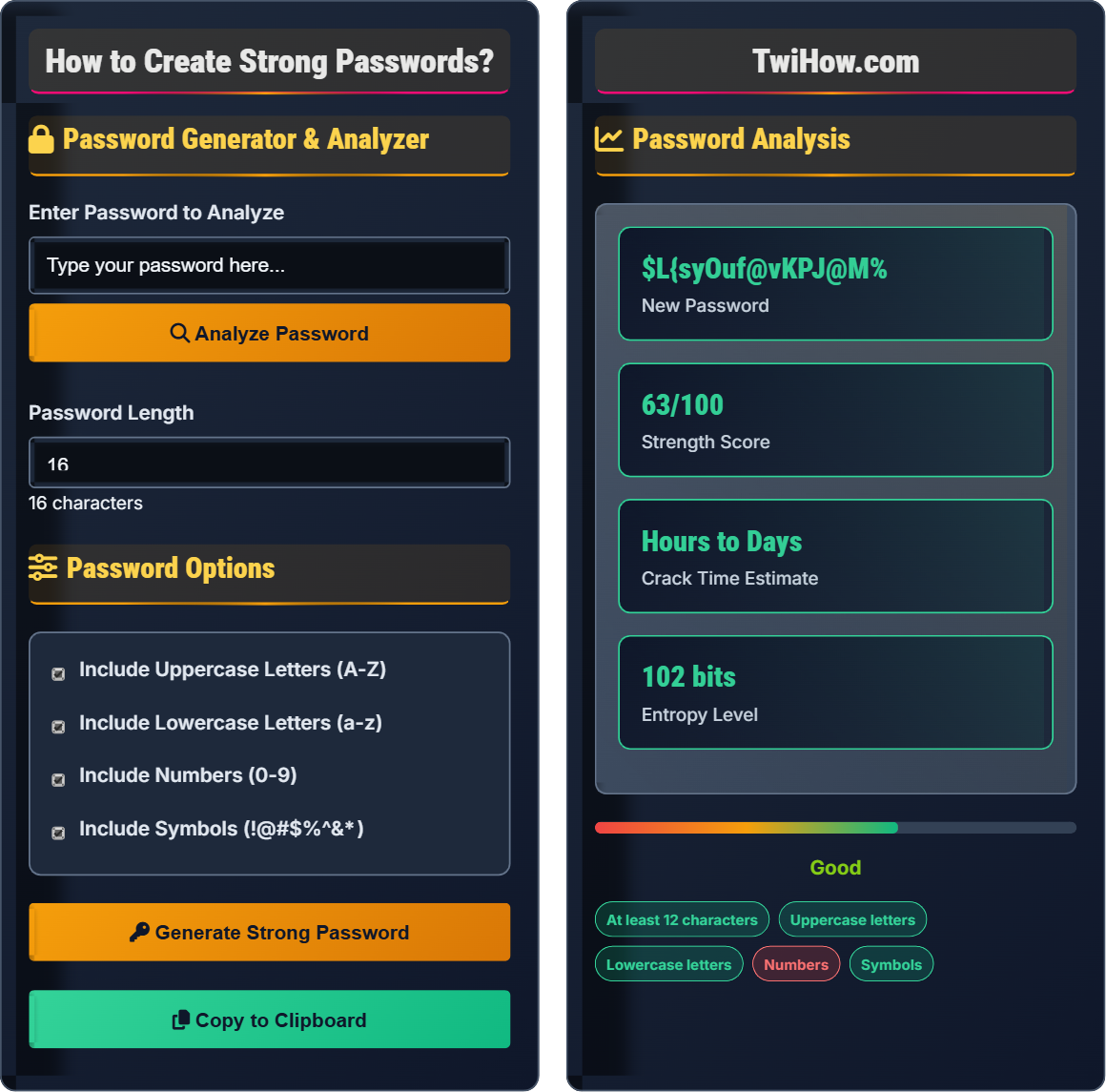
Password Generator & Analyzer
Password Options
Password Analysis
Create memorable passwords using random words.
Easy to remember, hard to crack.
Replace letters with similar-looking numbers/symbols.
Memorable but complex.
Truly random character combinations.
Maximum security, harder to remember.
Password Security Fundamentals
A strong password is one that is difficult to guess or crack through brute force attacks. The strength of a password depends on its length, complexity, and unpredictability. Modern security guidelines recommend using long, complex passwords that are unique for each account.
Password entropy measures the randomness and strength of a password:
Where:
- Character Set Size: Number of possible characters (e.g., 94 for all printable ASCII)
- Password Length: Number of characters in the password
- Entropy: Measure of password strength in bits
Different character sets provide varying levels of security:
- Lowercase only: 26 possible characters (a-z)
- Lowercase + Uppercase: 52 possible characters (a-z, A-Z)
- + Numbers: 62 possible characters (a-z, A-Z, 0-9)
- + Symbols: 94+ possible characters (all printable ASCII)
Each additional character in the set exponentially increases the possible combinations.
- Length: Use at least 12 characters, preferably 16+ for maximum security
- Uniqueness: Never reuse passwords across different accounts
- Complexity: Include uppercase, lowercase, numbers, and symbols
- Randomness: Avoid dictionary words, personal information, or predictable patterns
- Management: Use a password manager to store and organize passwords
- Multi-Factor: Enable two-factor authentication wherever possible
Password Requirements
Minimum 12 characters, mixed case, numbers, symbols, no personal info.
Strength = Length × (Character Variety + Complexity) / Predictability
Where Strength = security level, Length = character count.
- At least 12 characters long
- Include all character types
- Unique for each account
Generation Methods
Passphrases, substitution, random generation, password managers.
- Determine complexity requirements
- Select appropriate method
- Generate using secure algorithm
- Verify strength and uniqueness
- Store securely in manager
- Use cryptographically secure generators
- Never share passwords
- Update regularly
- Enable MFA
Password Examples
Creation Patterns
Create memorable passwords using random words.
Easy to remember, hard to crack.
Replace letters with similar-looking numbers/symbols.
Memorable but complex.
Truly random character combinations.
Maximum security, harder to remember.
Password Security Quiz
According to current security standards, what is the minimum recommended password length?
According to current security standards from organizations like NIST (National Institute of Standards and Technology), the minimum recommended password length is 12 characters. While 8-character passwords were acceptable in the past, modern computing power makes shorter passwords vulnerable to brute-force attacks. Longer passwords (16+ characters) provide even better security against these types of attacks.
The answer is C) 12 characters.
Password length is the most critical factor in password security. Each additional character exponentially increases the time required for a brute-force attack. A 12-character password with mixed characters has approximately 94^12 possible combinations, making it computationally expensive to crack. The longer the password, the more secure it becomes against automated attacks.
Brute Force Attack: Trying all possible character combinations
Character Set: Range of possible characters in password
Entropy: Measure of password randomness and strength
• Minimum 12 characters
• Longer is better
• Include all character types
• Use passphrases for memorability
• Aim for 16+ characters for high security
• Include uppercase, lowercase, numbers, symbols
• Using passwords shorter than 12 characters
• Reusing passwords across accounts
• Using predictable patterns
Explain the relationship between password complexity, entropy, and security. How does adding different character types affect the strength of a password?
Relationship Between Complexity and Security:
Password complexity refers to the variety of character types used in a password. The more diverse the character set, the higher the password's entropy (randomness), and the stronger its security.
Character Set Impact:
• Lowercase only (a-z): 26 possible characters per position
• + Uppercase (A-Z): 52 possible characters per position
• + Numbers (0-9): 62 possible characters per position
• + Symbols (!@#$%...): ~94 possible characters per position
Entropy Calculation:
For a 12-character password:
• Lowercase only: 26^12 ≈ 97 trillion combinations
• Mixed case + numbers: 62^12 ≈ 3.2 x 10^21 combinations
• All character types: 94^12 ≈ 4.7 x 10^23 combinations
Security Impact:
Each additional character type dramatically increases the possible combinations, exponentially increasing the time required for brute-force attacks. A 12-character password with all character types is millions of times stronger than one with only lowercase letters.
The security of a password is determined by the total number of possible combinations an attacker must try. This grows exponentially with both length and character variety. Adding just one character type (uppercase) doubles the possible characters per position, quadrupling the security. The relationship is exponential, not linear, making character diversity crucial for security.
Entropy: Measure of password randomness and unpredictability
Character Set: Range of possible characters in password
Brute Force: Systematic attempt to guess password
• Include all character types
• Increase length for security
• Avoid predictable patterns
• Use password managers for complexity
• Create memorable passphrases
• Test passwords with analyzers
• Using only one character type
• Predictable substitutions
• Short passwords
You manage 25 online accounts and currently use variations of the same password for all of them. You're considering a password manager to create unique, strong passwords for each account. Calculate the security improvement and explain the benefits and potential risks of using a password manager.
Current Security Assessment:
With one compromised password, all 25 accounts are vulnerable. If the reused password is weak, all accounts are at risk.
After Password Manager Implementation:
• Each account has a unique, strong password (16+ characters, all character types)
• Breach of one account doesn't compromise others
• Overall security increases exponentially
Security Improvement Calculation:
Instead of 1 successful breach = 25 compromised accounts
Now: 1 successful breach = 1 compromised account
Benefits:
• Unique, strong passwords for all accounts
• Automatic password generation and updates
• Secure storage and synchronization
• Auto-fill capabilities
Potential Risks:
• Master password compromise affects all accounts
• Dependence on the password manager service
• Potential for data breaches at the service
Mitigation: Use a very strong master password and enable two-factor authentication on the password manager account.
Password managers solve the fundamental problem of password security: humans cannot remember dozens of unique, complex passwords. By creating a single point of security (the master password) that protects all other passwords, they allow for maximum security across multiple accounts while maintaining usability. The security gain far outweighs the single point of failure risk when properly implemented.
Password Manager: Software that stores and manages passwords
Master Password: Single password to access password manager
Single Point of Failure: One compromise affecting entire system
• Use unique passwords for each account
• Create strong master password
• Enable 2FA on password manager
• Choose reputable password manager
• Use biometric authentication if available
• Regularly backup password vault
• Using weak master password
• Not enabling 2FA
• Choosing untrusted managers
You're designing a password policy for a company with 500 employees. Create comprehensive requirements that balance security with usability, and explain how to implement and enforce these requirements.
Comprehensive Password Policy:
Minimum Requirements:
• Minimum 12 characters (recommended 16+)
• Must include uppercase, lowercase, numbers, and symbols
• Cannot contain username or common dictionary words
• Cannot be one of the last 24 passwords used
Expiration and Rotation:
• Change every 90 days (optional, based on current best practices)
• Immediate reset if compromise is suspected
Implementation:
• Deploy password complexity filters on authentication systems
• Integrate with Active Directory or identity management systems
• Provide password manager recommendations
• Implement account lockout after failed attempts
Enforcement:
• Automated password strength checking
• Regular security awareness training
• Auditing and compliance monitoring
• Progressive enforcement with warnings
Usability Considerations:
• Allow passphrases as an alternative to complex passwords
• Support for password managers
• Clear guidance and examples
• Multi-factor authentication as additional security layer
Modern password policies must balance security with usability to ensure compliance. Overly restrictive policies often lead to poor security practices like writing passwords down. The key is setting minimum standards that are achievable while providing tools and education to help users meet them. Multi-factor authentication provides additional security layers that can compensate for password weaknesses.
Password Policy: Rules governing password creation and use
Active Directory: Microsoft's directory service
Account Lockout: Temporary disable after failed attempts
• Set reasonable minimum requirements
• Balance security with usability
• Provide education and tools
• Use password strength meters
• Allow passphrases
• Implement MFA
• Requiring frequent changes
• Not providing guidance
• Ignoring usability factors
Approximately how long would it take to crack a 12-character password containing uppercase, lowercase, numbers, and symbols using a modern computer?
A 12-character password with all character types (uppercase, lowercase, numbers, symbols) has approximately 94^12 possible combinations, which equals roughly 4.7 x 10^23 possibilities. With a modern computer performing billions of guesses per second, cracking such a password would take several months to years depending on the computational resources available to the attacker. This assumes no additional security measures like account lockouts or multi-factor authentication.
The answer is C) Several months to years.
The time required to crack a password grows exponentially with length and character variety. While 8-character passwords can be cracked in seconds, 12-character passwords with full complexity become computationally expensive to crack. This demonstrates why length and complexity are so important in password security. The exponential relationship means each additional character significantly increases security.
Brute Force: Systematic attempt to guess all possible combinations
Computational Complexity: Resources required to solve problem
Exponential Growth: Security increases exponentially with length
• Length exponentially increases security
• Complexity multiplies security
• Use multiple security layers
• Aim for 16+ characters for high security
• Include all character types
• Use MFA as additional protection
• Underestimating password strength
• Not considering computational advances
• Ignoring MFA benefits
FAQ
Q: Should I include my birth year in passwords since it's hard to guess?
A: No, you should never include personal information like birth years in passwords. Here's why:
Personal Information Risks:
• Birth years are often publicly available on social media
• Easy to guess based on age estimation
• Part of common password patterns attackers try first
• Available through social engineering and data breaches
Attacker Techniques:
Attackers use "rainbow tables" and dictionaries that include common personal information like birthdays, anniversaries, and family names. They also use social media and public records to gather personal details about targets.
Best Practices:
• Avoid any personal information in passwords
• Use completely random character combinations
• Create long passphrases using random words
• Use a password manager to generate and store unique passwords
Remember: the goal is to make your password unpredictable to anyone who knows or could research you.
Q: How can I help my elderly parents create and remember strong passwords?
A: Helping elderly parents with password security requires patience and practical solutions:
Simple Solutions:
1. Password Managers: Set up a user-friendly password manager and configure it for them. Many have simple interfaces and can auto-fill passwords.
2. Passphrases: Help them create memorable passphrases using favorite quotes, song lyrics, or personal memories with character substitutions.
3. Write Down Securely: If absolutely necessary, help them write passwords in a locked notebook kept in a secure place.
Education:
• Explain why strong passwords are important without overwhelming technical details
• Show them how to identify phishing attempts and fake login pages
• Emphasize the importance of not sharing passwords
• Demonstrate how to use password reset features
Family Support:
• Offer to help set up accounts with strong passwords initially
• Create a simple document with login instructions
• Set up two-factor authentication using their preferred method (SMS, authenticator app, etc.)
• Schedule periodic check-ins to update passwords and security settings
The key is finding a balance between security and usability that they can realistically maintain.