Best Platforms for Streaming or Purchasing Music
Complete music platform guide • Feature comparisons
Music Platform Overview:
Show Platform ComparisonChoosing the right music platform depends on your specific needs, including budget, music preferences, device ecosystem, and listening habits. This comprehensive guide compares the leading platforms for streaming and purchasing music to help you make an informed decision.
Key factors in platform selection:
- Library Size: Catalog breadth and depth across genres
- Audio Quality: Bitrate options and sound fidelity
- Features: Offline listening, personalization, social features
- Pricing: Subscription costs and purchasing options
Each platform offers unique advantages, and the best choice varies based on individual priorities and usage patterns.
Platform Selection Criteria
Additional Preferences
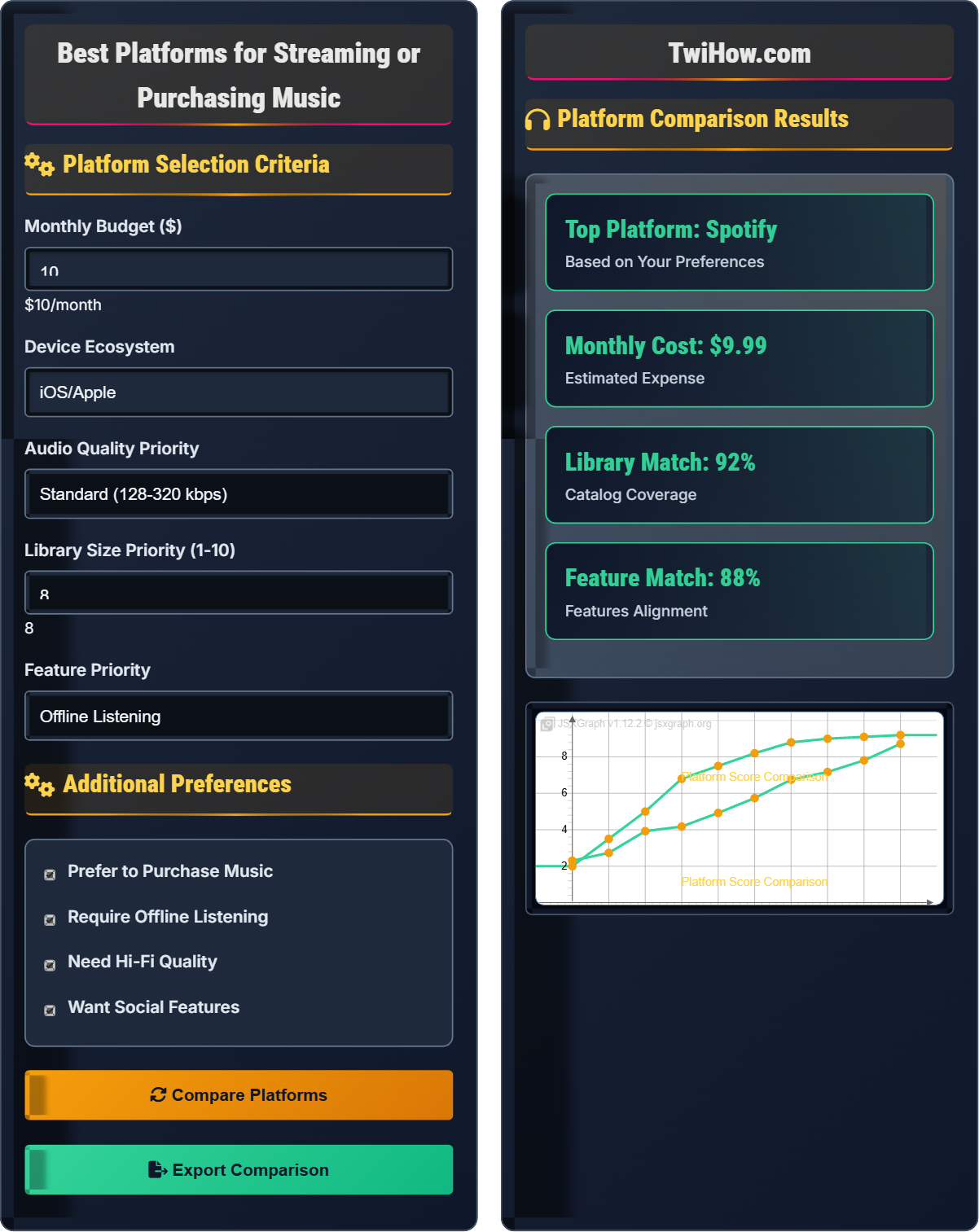
Platform Comparison Results
| Platform | Overall Score | Match | Price |
|---|---|---|---|
| Spotify | 9.2/10 | 92% | $9.99/mo |
| Apple Music | 8.8/10 | 88% | $10.99/mo |
| YouTube Music | 8.5/10 | 85% | $9.99/mo |
| Amazon Music | 8.0/10 | 80% | $7.99/mo |
| Tidal | 7.8/10 | 78% | $9.99/mo |
Comprehensive Music Platform Guide
Music platforms fall into several categories based on their business model and features:
- Streaming Services: Monthly subscriptions for unlimited access to catalogs
- Digital Stores: Individual track/album purchases
- Hybrid Platforms: Both streaming and purchasing options
- Free Platforms: Ad-supported with limited features
Where:
- Library Size: Number of available tracks
- Audio Quality: Available bitrate options
- Feature Availability: Offline, personalization, etc.
- Cost Factor: Price relative to value
- Ecosystem Compatibility: Device support
Major platforms and their distinguishing features:
- Spotify: Largest catalog, excellent discovery algorithms, cross-platform
- Apple Music: High-quality audio, exclusive releases, Siri integration
- YouTube Music: Music videos, official content, Google integration
- Amazon Music: Alexa integration, Prime member benefits, growing catalog
- Tidal: Hi-Fi quality, exclusive content, artist-focused
- Bandcamp: Direct artist support, independent music focus
- Custom Playlists: Create personalized collections
- Discovery Features: Use daily mixes and recommendations
- Offline Syncing: Download content for offline use
- Audio Settings: Adjust quality based on connection
- Social Integration: Share with friends and follow artists
- Podcast Integration: Access audio content beyond music
Platform Comparison Guide
Music streaming, digital rights management, audio codecs, streaming quality, music catalog, platform ecosystems.
Platform Score = (Library Size × Audio Quality × Feature Availability) ÷ (Cost Factor × Ecosystem Compatibility)
Where Platform Score = overall suitability rating, Library Size = catalog breadth.
- Always try free trials before committing
- Consider total cost including family plans
- Verify availability in your region
Detailed Platform Reviews
Audio quality options, catalog size, exclusive content, offline capabilities, social features.
- Library size and diversity
- Audio quality and formats
- Discovery and recommendation algorithms
- Interface and user experience
- Pricing and plan options
- Device compatibility
- Usage patterns (commute, home, exercise)
- Device ecosystem preferences
- Audio quality priorities
- Social sharing needs
Music Platform Quiz
Which of the following is the most important factor when choosing a music platform for someone who frequently listens to music during commutes and travels?
Reliable offline listening capabilities are crucial for commuters and travelers who experience intermittent internet connectivity. The ability to download music for offline use ensures uninterrupted listening during transportation, flights, or areas with poor cellular coverage.
The answer is B) Reliable offline listening capabilities.
When selecting a music platform, usage patterns should drive feature priorities. For frequent travelers, offline functionality becomes essential because internet connectivity cannot be guaranteed. This demonstrates the importance of matching platform features to real-world usage scenarios rather than just focusing on marketing highlights.
Offline Listening: Playing downloaded content without internet connection
Usage Patterns: How and when you typically consume music
Feature Prioritization: Ranking features by personal importance
• Match features to usage patterns
• Test offline functionality before committing
• Verify storage requirements
• Download music during Wi-Fi connections
• Organize playlists for different commute types
• Verify offline sync across devices
• Not testing offline features during trials
Explain the difference between standard streaming quality and high-fidelity audio. Who would benefit most from high-fidelity options, and what are the trade-offs?
Standard Quality: Typically 128-320 kbps (kilobits per second), compressed to reduce file size and bandwidth requirements. Most listeners cannot distinguish quality differences on standard headphones or speakers.
High-Fidelity (Hi-Fi): 1411 kbps (CD quality) or higher, often lossless formats like FLAC. Requires high-end headphones/speakers to appreciate the difference.
Beneficiaries: Audiophiles, music producers, or those with high-end audio equipment who can perceive subtle audio details.
Trade-offs: Hi-Fi requires significantly more storage space, data consumption, and compatible hardware. Most casual listeners won't notice the difference, making standard quality more practical for general use.
Audio quality follows the law of diminishing returns - each improvement requires exponentially more resources for proportionally smaller perceptible gains. The average listener reaches a point of "good enough" quality where further improvements aren't noticeable without specialized equipment or training.
Bitrate: Amount of audio data processed per second
Lossless: Audio compression that retains original quality
Audiophile: Person passionate about high-fidelity audio reproduction
• Standard quality is sufficient for most listeners
• Hi-Fi requires compatible equipment
• Consider data and storage costs
• Test Hi-Fi on your equipment before committing
• Adjust quality based on connection type
• Use standard quality for mobile listening
• Paying for Hi-Fi without proper equipment
• Not adjusting quality settings
• Ignoring data usage implications
You're helping a friend choose a music platform. They're an iOS user with a $15/month budget, prefer high-quality audio, and want to discover new music. They listen primarily at home and occasionally while commuting. They also want to share playlists with friends. Which platform would you recommend and why?
Recommendation: Apple Music
Justification: Apple Music offers lossless audio quality, seamless iOS integration, excellent discovery features, and robust social sharing capabilities. At $10.99/month, it fits within the $15 budget. The platform's integration with Siri and other Apple services provides a cohesive experience for iOS users.
Alternative: Spotify could be considered for superior discovery algorithms, but Apple Music's quality and ecosystem integration better match the priorities.
Features: Offline downloads for commuting, high-quality streaming at home, shared playlists, and personalized recommendations.
Effective platform selection requires balancing multiple priorities. In this case, the iOS ecosystem preference, audio quality needs, and social features align best with Apple Music. The process demonstrates the importance of mapping requirements to platform strengths rather than choosing based on popularity alone.
Ecosystem Integration: How well a platform works with existing devices/software
Requirement Mapping: Matching features to user needs
Priority Balancing: Weighing competing requirements
• Align features with usage patterns
• Consider ecosystem compatibility
• Verify budget constraints
• Use free trials to test compatibility
• Compare feature sets systematically
• Consider family plan savings
• Ignoring ecosystem integration
• Overlooking budget constraints
• Not testing features during trials
Your household has multiple devices: an iPhone, Android phone, Windows laptop, and smart TV. You want to share a music subscription among all users. What platform would provide the best cross-platform experience, and how would you set up shared access?
Recommendation: Spotify Premium Family Plan
Implementation: Spotify offers excellent cross-platform support for iOS, Android, Windows, and smart TVs. The family plan supports up to 6 accounts with individual profiles, allowing personalized experiences on each device.
Setup Process: Create family account, invite household members, configure parental controls if needed, install apps on all devices, and customize individual profiles for personalized recommendations.
Benefits: Seamless sync across devices, individual discovery algorithms, shared family library, and consistent experience across platforms.
Alternative: Apple Music Family Plan for Apple-centric households, but Spotify generally offers better cross-platform compatibility.
Cross-platform compatibility requires evaluating app availability, feature consistency, and synchronization capabilities across different operating systems. The family sharing model demonstrates how platform architecture affects household adoption and user experience.
Cross-Platform: Functionality across different operating systems
Family Plan: Shared subscription for multiple users
Synchronization: Consistent data across devices
• Verify app availability on all devices
• Test sync functionality
• Consider individual user needs
• Set up individual profiles for personalization
• Test streaming on each device type
• Configure automatic sync settings
• Not verifying all device compatibility
• Using single profile for multiple users
• Ignoring sync settings
Under what circumstances would a free tier music service be more beneficial than a paid subscription?
A free tier music service is most beneficial for occasional casual listening with tolerance for ads. Free tiers are ideal for users who listen sporadically, are budget-conscious, or are exploring whether they want to commit to a music service. The ad-supported model makes economic sense for light users who wouldn't justify the monthly subscription cost.
The answer is B) For occasional casual listening with tolerance for ads.
The value proposition of music services depends on usage intensity. Heavy users benefit from ad-free, unlimited access, while light users may find free tiers sufficient. This demonstrates the importance of matching service tiers to consumption patterns rather than assuming premium is always better.
Usage Intensity: Frequency and duration of service consumption
Value Proposition: Benefits relative to cost
Service Tier: Different access levels offered by providers
• Match service tier to usage pattern
• Consider total cost over time
• Evaluate opportunity cost of time
• Calculate cost per hour of listening
• Use free trials to estimate usage
• Consider promotional pricing periods
• Choosing premium without assessing usage
• Not calculating true cost per use
• Ignoring free trial conversion rates
FAQ
Q: Should I pay for multiple music platforms or stick with one?
A: Generally, one premium platform is more cost-effective than multiple subscriptions:
1. Cost Analysis: Multiple $10/month subscriptions can exceed $50 total monthly
2. Library Coverage: Major platforms cover 95%+ of mainstream music
3. Feature Redundancy: Core features are similar across platforms
4. Exception Cases: May justify multiple if you need specific exclusive content
5. Hybrid Approach: Use one primary platform with free tiers for experimentation
Most listeners find that one well-chosen platform meets 90%+ of their music needs.
Q: What's the difference between streaming and downloading/purchasing music?
A: These represent fundamentally different ownership models:
Streaming: Access to music library without ownership. Pay monthly for temporary access. Content may be removed by rights holders.
Purchasing: Permanent ownership of specific tracks/files. Pay once per item. Own indefinitely unless lost/deleted.
Key Differences: Streaming offers vast libraries for fixed monthly cost, while purchasing provides permanent access to smaller, personal collections.
Hybrid Strategy: Stream for discovery and variety, purchase for essential albums you'll listen to repeatedly. This approach balances cost, convenience, and permanence.