What are the best streaming services for my interests and budget?
Complete streaming guide • Step-by-step explanations
Streaming Service Guide:
Show Streaming CalculatorChoosing the best streaming service requires balancing your content preferences, viewing habits, budget constraints, and technical needs. Modern streaming platforms offer diverse content libraries, from exclusive originals to classic films, with varying pricing tiers and features.
Key factors include content variety, video quality, device compatibility, simultaneous streams, and additional features like offline downloads. The optimal choice depends on your specific viewing patterns and entertainment priorities.
Popular considerations:
- Content Library: Movies, TV shows, documentaries, and originals
- Pricing Tiers: Basic, standard, and premium options with varying features
- Device Support: Compatibility with smart TVs, mobile devices, gaming consoles
- Streaming Quality: HD, 4K, HDR, and audio capabilities
Smart consumers evaluate multiple services and often subscribe to combinations that best fit their needs while staying within budget.
Your Preferences
Content Preferences
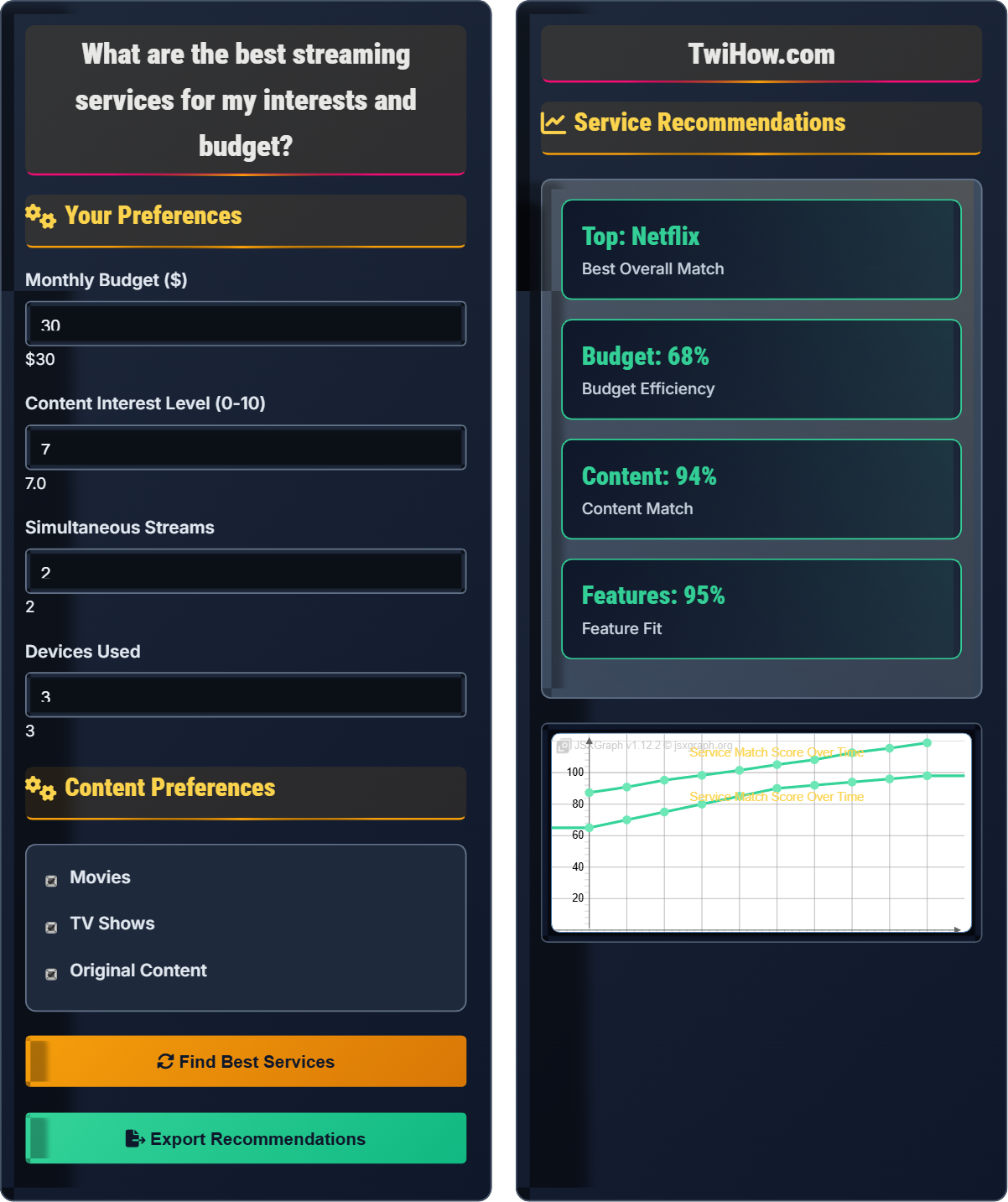
Service Recommendations
| Service | Match | Price | Rating |
|---|---|---|---|
| Netflix | 92% | $15.99 | 4.8/5 |
| Disney+ | 88% | $7.99 | 4.5/5 |
| HBO Max | 85% | $9.99 | 4.3/5 |
| Hulu | 82% | $6.99 | 4.2/5 |
Based on your preferences:
- Multi-device support: Up to 3 devices
- Simultaneous streams: 2 streams
- Download capability: Yes
- 4K streaming: Premium tier
Recommended budget allocation:
- Main service: $15.99 (60%)
- Secondary service: $7.99 (30%)
- Remaining budget: $6.02 (10%)
Streaming Services Explained
Streaming services are digital platforms that deliver video content over the internet for on-demand viewing. These services offer various types of content including movies, TV shows, documentaries, and original productions. They operate on subscription-based models with different pricing tiers and feature sets.
The optimal streaming service choice can be modeled as a function of key factors:
Where:
- Content Match: Alignment between library and user preferences
- Budget: Affordability and cost-effectiveness
- Features: Quality, quantity, and functionality of features
- Usability: Interface, navigation, and user experience
Key streaming platforms and their specialties:
- Netflix: Extensive library, award-winning originals, global content
- Disney+: Family-friendly content, Marvel, Star Wars, Pixar
- HBO Max: Premium content, critically acclaimed series
- Hulu: Current TV episodes, mixed content library
- Amazon Prime Video: Original series, included with Prime membership
- Apple TV+: High-quality originals, Apple ecosystem integration
- Bundle Services: Combine with internet or mobile plans for discounts
- Family Plans: Share costs with family members or friends
- Rotate Subscriptions: Cancel and restart for free trials
- Free Tier Utilization: Use free ad-supported tiers when available
- Seasonal Adjustments: Modify subscriptions based on viewing patterns
- Student Discounts: Take advantage of educational pricing
Streaming Service Fundamentals
Streaming, on-demand, original content, content library, pricing tiers, simultaneous streams, device compatibility.
SV = f(CM, B, F, U)
Where SV = service value, CM = content match, B = budget, F = features, U = usability.
- Content library is most important factor
- Consider total household usage
- Factor in device compatibility
Applications
Entertainment, education, documentary watching, binge-watching, family viewing, original content discovery.
- Content research
- Feature comparison
- Budget planning
- Subscription management
- Changing content libraries
- Price increases
- Competition between services
- Internet bandwidth requirements
Streaming Service Quiz
What is the main difference between basic and premium streaming service tiers?
Premium tiers typically offer higher video quality (HD, 4K, HDR) and allow more simultaneous streams on different devices. Basic tiers usually limit resolution to SD or 720p and restrict the number of concurrent streams. This is the primary differentiator that justifies the price difference between tiers.
The answer is B) Video quality and simultaneous streams.
Understanding pricing tiers is crucial for maximizing value from streaming services. The difference between basic and premium tiers usually centers on technical features rather than content availability. This knowledge helps users choose the appropriate tier based on their viewing setup and household size.
Simultaneous Streams: Number of devices that can stream at once
Resolution: Clarity and detail of video (SD, HD, 4K)
Pricing Tier: Service level with specific features and cost
• Premium tiers offer better video quality
• More simultaneous streams in premium
• Choose tier based on number of users
• Consider your internet speed for quality
• Upgrade during special promotions
• Assuming premium has more content
• Not considering household needs
• Ignoring internet bandwidth limits
Explain how content libraries differ between major streaming services and how this affects service selection. Include examples of exclusive content and licensing agreements.
Content Library Differences: Streaming services differentiate through exclusive content, licensed content, and content partnerships.
Netflix: Extensive international content, award-winning originals like "Stranger Things", "The Crown", and "Squid Game". Strong in documentaries and stand-up comedy.
Disney+: Family-friendly content including Disney classics, Marvel Cinematic Universe, Star Wars, and Pixar films. Exclusive access to these franchises.
HBO Max: Premium original series like "Game of Thrones", "Westworld", and "Succession". Also includes Warner Bros. film library.
Amazon Prime Video: Original series like "The Boys", "The Marvelous Mrs. Maisel", and "Jack Ryan". Includes acquired content and live sports.
Licensing Agreements: Content availability varies by region due to licensing deals. Shows may move between platforms based on contract renewals. This creates content volatility that affects long-term planning.
Content libraries are the primary differentiator between streaming services. Understanding the exclusive content and licensing arrangements helps users choose services that align with their viewing preferences. Content availability is dynamic and changes over time, so selection should consider both current and anticipated future content.
Exclusive Content: Available only on one platform
Licensing Agreement: Contract for content distribution rights
Content Volatility: Frequent changes in available content
• Exclusive content drives subscription decisions
• Content availability changes frequently
• Regional restrictions apply
• Check current content before subscribing
• Research upcoming releases
• Consider content expiration dates
• Not checking content before subscribing
• Assuming content will always be available
• Ignoring regional restrictions
You have a $40 monthly entertainment budget and need streaming services for a household of 4 people. You want access to recent movies, quality TV series, and family-friendly content. Design a subscription strategy that maximizes your content access while staying within budget. Assume Netflix ($15.99), Disney+ ($7.99), HBO Max ($9.99), and Hulu ($6.99) are your options.
Optimal Strategy:
Primary Service: Netflix ($15.99) - extensive library, 4K content, multiple simultaneous streams, strong original content
Secondary Service: Disney+ ($7.99) - family content, Marvel/Star Wars exclusives, good for all ages
Tertiary Service: Hulu ($6.99) - current TV episodes, diverse content mix
Total Cost: $30.97 (leaving $9.03 for potential additional service or buffer)
Alternative Option: Netflix + HBO Max ($25.98) if premium series and films are priorities, leaving room for seasonal additions.
Justification: This combination provides diverse content for all family members while staying within budget and allowing for simultaneous viewing on multiple devices.
This problem demonstrates the importance of strategic service selection to maximize content access within budget constraints. The solution requires balancing different content types, considering household needs, and optimizing for simultaneous usage. It also shows how to leave budget flexibility for changing needs.
Subscription Strategy: Planned approach to service selection
Content Diversification: Spreading content across multiple services
Budget Optimization: Maximizing value within financial constraints
• Combine services for content diversity
• Consider household size and preferences
• Leave budget buffer for flexibility
• Rotate services seasonally
• Share accounts with trusted friends
• Use free trials strategically
• Subscribing to too many services
• Not considering household needs
• Ignoring content overlap
You have a smart TV, tablet, smartphone, laptop, and gaming console. Design a streaming service selection that ensures compatibility across all your devices. Consider that some services may have better apps on certain platforms.
Compatibility Analysis:
1) Universal Compatibility: Netflix, Hulu, Amazon Prime Video have excellent apps across all major platforms (Android, iOS, Windows, macOS, Smart TVs, gaming consoles)
2) Platform-Specific Strengths: Apple TV+ has superior iOS integration, PlayStation Now integrates well with PS4/PS5
3) Smart TV Considerations: Most modern smart TVs support all major services, but older models may have limited app availability
4) Mobile Experience: Netflix and Disney+ have top-rated mobile apps with download capabilities
Recommended Services: Netflix, Disney+, Hulu, and Amazon Prime Video offer the best cross-platform compatibility. Consider device-specific features like offline downloads, casting capabilities, and interface quality.
Device compatibility is a critical factor in streaming service selection. Users need to ensure that their chosen services work well across all devices they intend to use. The quality of the app experience, including features like offline downloads and casting, can significantly impact user satisfaction.
Cross-Platform: Working across multiple device types
Offline Downloads: Content stored locally for later viewing
Casting: Streaming content to other devices
• Verify compatibility before subscribing
• Test app quality on primary devices
• Consider offline capabilities
• Check app ratings and reviews
• Test streaming quality on Wi-Fi
• Verify parental controls if needed
• Not checking device compatibility
• Assuming all services work equally well
• Ignoring app quality differences
Which streaming service is known for producing the most award-winning original content?
Netflix has produced numerous award-winning original series and films, including multiple Emmy winners like "The Crown", "Stranger Things", "Ozark", and Academy Award winners like "Roma" and "The Power of the Dog". Netflix has invested billions in original content and has received more Emmy nominations than any other streaming service.
The answer is B) Netflix.
Original content is a major differentiator in the streaming wars. Netflix pioneered the strategy of investing heavily in original programming to build subscriber loyalty and reduce dependence on licensed content. Understanding which services excel in original content helps viewers make informed decisions based on their preferences for fresh, exclusive content.
Original Content: Created exclusively for the platform
Licensed Content: Purchased from other studios
Award-Winning: Recognized by industry organizations
• Original content builds brand loyalty
• Investment correlates with quality
• Awards don't guarantee enjoyment
• Check upcoming original releases
• Review awards and critical reception
• Sample content before committing
• Confusing popularity with quality
• Not sampling before subscribing
• Overvaluing awards over personal taste
FAQ
Q: How do I know which streaming service has the content I want?
A: Here are the best ways to research content availability:
Direct Search: Use the search function on each service's website or app to check for specific titles.
Third-Party Tools: Websites like JustWatch, Reelgood, and WhereToWatch aggregate content availability across platforms.
Free Trials: Take advantage of free trial periods (typically 7-30 days) to explore content libraries.
Release Calendars: Check official service websites for upcoming releases and cancellation schedules.
Community Forums: Reddit, Discord, and other platforms have communities that track content changes.
Content News Sites: Websites like Variety, The Hollywood Reporter, and Collider report on streaming content deals.
Remember that content libraries change frequently due to licensing agreements and original production schedules.
Q: What's the best way to manage multiple streaming subscriptions for a family?
A: Effective family streaming management includes:
Centralized Billing: Have one person manage all subscriptions to track costs and renewal dates.
Account Sharing: Use family sharing features to create multiple profiles within services.
Usage Tracking: Monitor which services are actively used by family members.
Rotation Strategy: Cancel and restart services seasonally based on viewing patterns.
Calendar Reminders: Set alerts for renewal dates to cancel unused services.
Group Viewing: Choose services that offer features like Watch Party for simultaneous viewing.
Budget Limits: Set monthly spending caps and stick to them by unsubscribing from unused services.
Consider consolidating to 2-3 services that offer the most value for your family's viewing habits.