Best Web Hosting Services
Complete hosting guide • Comparison tools
Hosting Service Fundamentals:
Compare HostingWeb hosting is a service that allows individuals and organizations to make their websites accessible via the internet. Hosting providers store website files on servers and ensure they're available to users worldwide. The quality of hosting directly impacts website performance, security, and reliability.
At its core, web hosting involves renting space on a physical server where your website files are stored. Modern hosting services provide various features including security measures, performance optimization, and technical support to ensure websites run smoothly and efficiently.
Key hosting concepts:
- Server Types: Shared, VPS, Dedicated, Cloud hosting
- Performance: Uptime guarantees, loading speeds, scalability
- Security: SSL certificates, firewalls, malware protection
- Support: 24/7 availability, response times, expertise
- Features: Bandwidth, storage, email accounts, databases
- Management: Control panels, one-click installations, automation
Choosing the right hosting service requires evaluating your specific needs including traffic expectations, technical requirements, budget constraints, and growth plans.
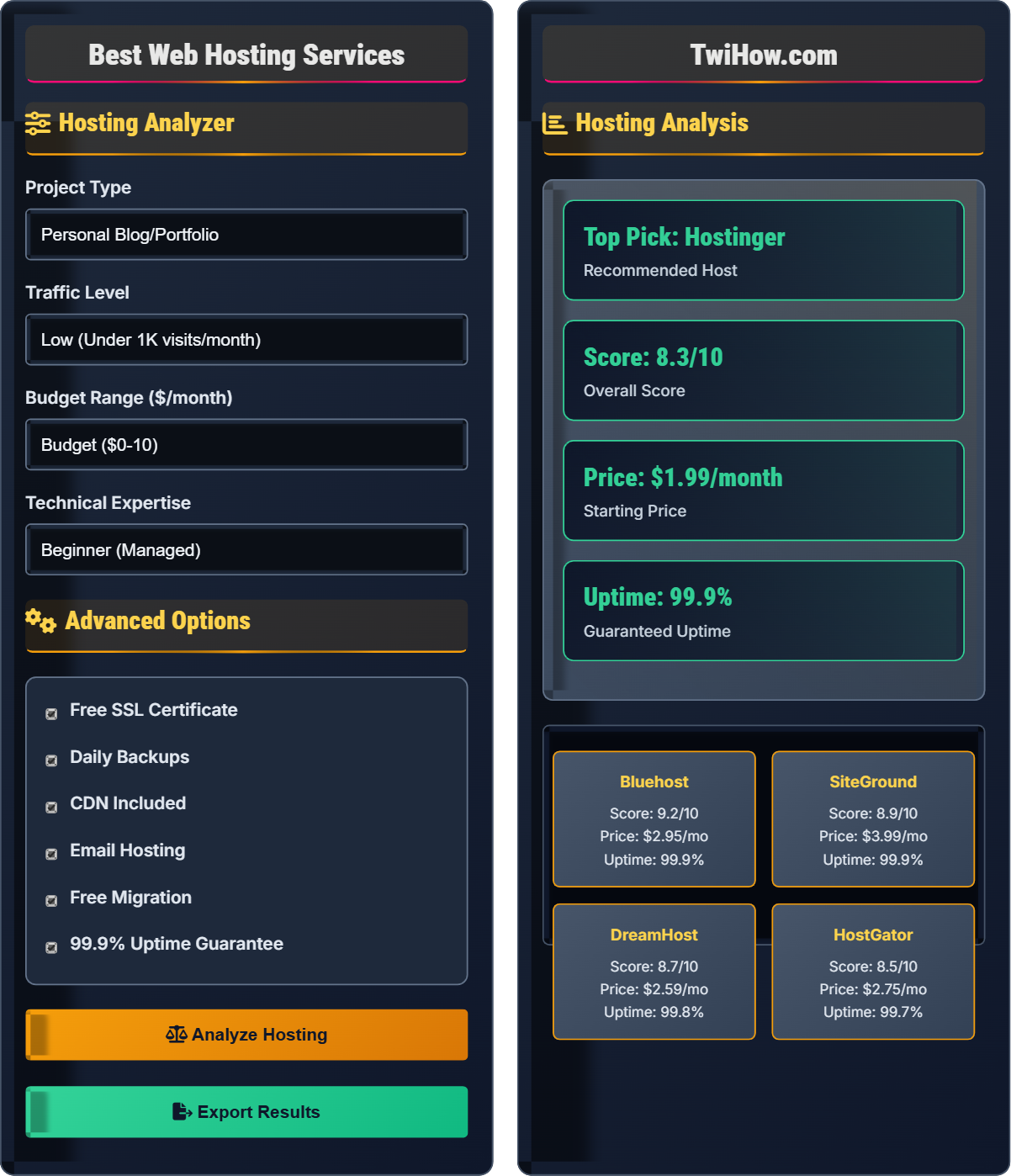
Hosting Analyzer
Advanced Options
Hosting Analysis
| Feature | Bluehost | SiteGround | DreamHost | HostGator |
|---|---|---|---|---|
| Storage | Unlimited | 10GB-40GB | Unlimited | Unlimited |
| Bandwidth | Unlimited | Unlimited | Unlimited | Unlimited |
| Email Accounts | Unlimited | Unlimited | Unlimited | Unlimited |
| SSL Certificate | Free | Free | Free | Free |
| Free Domain | 1 Year | No | 1 Year | 1 Year |
Hosting Comparison Matrix
| Aspect | Bluehost | SiteGround | DreamHost | HostGator |
|---|---|---|---|---|
| Best For | Beginners | Performance | Developers | Reliability |
| Control Panel | cPanel | Custom | cPanel | cPanel |
| Support | 24/7 | 24/7 | 24/7 | 24/7 |
| Money Back | 30 Days | 30 Days | 97 Days | 45 Days |
Web Hosting Explained
Web hosting is a service that allows individuals and organizations to make their websites accessible via the internet. When you sign up for hosting, you're renting space on a physical server where your website files are stored. This server connects to the internet, making your website available to users worldwide.
Web hosting follows a client-server model:
Where:
- Website Files: HTML, CSS, JavaScript, images, and other assets
- Server: Physical machine storing and serving files
- Internet: Network connecting server to users
- Users: People accessing the website
Essential features to consider when choosing a hosting service:
- Uptime Guarantee: Percentage of time website stays online (aim for 99.9%+)
- Speed & Performance: Server response times, loading speeds, and CDN availability
- Security: SSL certificates, firewalls, malware scanning, and backups
- Storage & Bandwidth: Amount of disk space and data transfer allowed
- Support: 24/7 availability, response times, and expertise level
- Control Panel: Ease of use, features, and customization options
- Green Hosting: Environmentally friendly data centers using renewable energy
- Edge Computing: Hosting content closer to users for faster loading
- AI-Powered Security: Machine learning for threat detection and prevention
- Serverless Architecture: Pay-per-execution hosting models
- Container Hosting: Docker and Kubernetes for application deployment
- Quantum-Ready Security: Preparing for future quantum computing threats
Hosting Fundamentals
Uptime, Bandwidth, Storage, SSL, DNS, cPanel, FTP, Databases.
Best Host = (Performance + Reliability + Support) × Features / Cost
Where Best Host = optimal hosting choice, Performance = server speed.
- Never sacrifice security for cost
- Consider growth potential
- Test customer support quality
- Read terms and conditions carefully
Best Practices
Regular backups, security updates, performance monitoring, and choosing reputable providers.
- Start with shared hosting for small sites
- Choose providers with good reviews
- Enable automatic backups
- Monitor website performance regularly
- Geographic location impact
- Migration complexity
- Contract terms
- Scalability options
Hosting Selection Quiz
Which hosting type provides dedicated resources but shares the physical server with other users?
VPS (Virtual Private Server) hosting provides dedicated resources within a shared physical server environment. It uses virtualization technology to partition a physical server into multiple isolated virtual servers, each with guaranteed resources.
Unlike shared hosting where resources are shared dynamically, VPS hosting allocates specific amounts of CPU, RAM, and storage to each virtual server, providing better performance and security.
The answer is B) VPS Hosting.
Understanding hosting types is crucial for making informed decisions. VPS hosting sits between shared and dedicated hosting, offering a balance of cost, performance, and control. The virtualization layer ensures that other VPS instances on the same physical server don't impact your allocated resources.
VPS: Virtual Private Server with dedicated resources
Virtualization: Technology for creating virtual server instances
Resource Allocation: Guaranteed CPU, RAM, and storage
• VPS offers better performance than shared hosting
• Requires more technical knowledge than shared
• More expensive than shared but cheaper than dedicated
• Good for growing websites needing more resources
• Consider managed VPS if you lack technical expertise
• Monitor resource usage to avoid overspending
• Confusing VPS with shared hosting
• Not understanding resource allocation
• Choosing VPS without technical knowledge
Explain what uptime guarantees mean in web hosting and why they're important for business websites.
Uptime Definition: Uptime guarantee is the percentage of time a hosting provider commits to keeping your website accessible. Common guarantees are 99%, 99.9%, and 99.99%.
Calculation: 99.9% uptime means the server can be down for approximately 43 minutes per month. 99.99% allows only about 4 minutes per month.
Importance: Downtime directly impacts revenue, customer satisfaction, and search engine rankings. For e-commerce sites, even minutes of downtime can result in significant financial losses.
Compensation: Many providers offer service credits if they fail to meet uptime guarantees. However, compensation rarely covers actual business losses.
Reality: Actual uptime often exceeds guarantees, but it's important to monitor and verify performance.
Process: Research → Compare Guarantees → Monitor Performance → Verify Claims.
Uptime guarantees are marketing commitments from hosting providers. The difference between 99% and 99.9% uptime may seem small, but it translates to significantly different amounts of downtime. For business-critical applications, even small amounts of downtime can be costly. Understanding uptime statistics helps make informed hosting decisions.
Uptime: Time when website is accessible
Downtime: Time when website is inaccessible
Service Credit: Compensation for missed uptime guarantees
• Aim for 99.9% or higher uptime
• Monitor actual performance, not just guarantees
• Consider business impact of downtime
• Use third-party monitoring tools
• Check historical uptime data
• Consider redundancy for critical sites
• Not monitoring actual uptime
• Accepting low uptime guarantees
• Not understanding compensation terms
Your e-commerce company processes 10,000 orders per day with an average order value of $150. You need to choose hosting that ensures maximum uptime while providing security and performance. Which hosting type would you recommend and why?
Recommendation: Managed VPS or Cloud hosting with premium features.
Rationale: With $1.5 million in daily sales, downtime costs approximately $62,500 per hour. Shared hosting cannot provide the reliability and performance needed. Dedicated hosting offers maximum performance but requires significant technical expertise.
Cloud Solution: Provides scalability, redundancy, and managed security features. Premium cloud providers offer 99.99%+ uptime guarantees and enterprise-grade security.
Requirements: SSD storage, CDN integration, automated backups, SSL certificates, DDoS protection, and 24/7 premium support.
Alternative: High-end dedicated server with managed services if you prefer single-tenant environment.
Implementation: Load balancing across multiple servers for maximum reliability.
For high-revenue e-commerce sites, hosting decisions have direct financial impact. The cost of premium hosting is justified by the potential losses from downtime. Security is equally important as financial data must be protected. The hosting choice should scale with business growth and provide robust disaster recovery options.
Managed Hosting: Provider handles server maintenance and security
Load Balancing: Distributing traffic across multiple servers
DDoS Protection: Defense against denial-of-service attacks
• Calculate cost of downtime before selecting hosting
• Prioritize security for financial transactions
• Ensure scalability for business growth
• Negotiate uptime guarantees for enterprise accounts
• Implement redundant systems for critical sites
• Regular performance testing and monitoring
• Choosing hosting based on price alone
• Not considering peak traffic loads
• Ignoring security requirements
You're managing a content-heavy website that's experiencing slow loading times. Identify three hosting-related optimizations that could improve performance and explain the technical reasons behind each.
1. CDN Implementation: Content Delivery Network caches static content (images, CSS, JS) on servers worldwide, reducing latency by serving content from locations closer to users.
Technical Reason: Reduces round-trip time by minimizing distance between users and content servers.
2. SSD Storage: Solid State Drives provide faster read/write speeds compared to traditional HDDs, improving database queries and file access times.
Technical Reason: SSDs have no moving parts and access data in microseconds rather than milliseconds.
3. Caching Solutions: Server-side caching (Redis, Memcached) stores frequently accessed data in memory, reducing database load.
Technical Reason: Memory access is thousands of times faster than disk access.
Additional: Enable GZIP compression, optimize images, and use HTTP/2 protocol for better performance.
Website performance depends on multiple factors including server hardware, network infrastructure, and software optimization. CDN addresses network latency, SSDs improve storage performance, and caching reduces computational overhead. These optimizations work together to create faster user experiences.
CDN: Content Delivery Network for distributed content
SSD: Solid State Drive with faster storage
Caching: Storing data in memory for quick access
• Always implement CDN for global audiences
• Use SSD storage for database servers
• Implement multi-layer caching strategy
• Monitor Core Web Vitals for performance metrics
• Use browser caching headers effectively
• Optimize database queries regularly
• Not implementing proper caching strategies
• Using HDD storage for high-traffic sites
• Ignoring image optimization
Which hosting security feature helps protect against distributed denial-of-service attacks?
DDoS (Distributed Denial of Service) protection specifically mitigates DDoS attacks by filtering malicious traffic before it reaches your server. This protection analyzes incoming traffic patterns and blocks suspicious requests.
While firewalls provide security, they're not specifically designed for DDoS attacks. SSL certificates encrypt data but don't prevent DDoS. Backup systems help recover from attacks but don't prevent them.
The answer is B) DDoS Protection.
DDoS attacks aim to overwhelm servers with traffic, making websites unavailable. Specialized DDoS protection services use techniques like traffic filtering, rate limiting, and distributed mitigation to absorb and deflect attack traffic. This is different from traditional security measures that focus on preventing unauthorized access.
DDoS: Distributed Denial of Service attack
Traffic Filtering: Analyzing and blocking malicious requests
Rate Limiting: Restricting request frequency
• DDoS protection should be automatic
• Look for providers with global mitigation network
• Verify protection works at network and application layers
• Choose providers with 24/7 DDoS monitoring
• Consider CDN-based DDoS protection
• Test protection during low-traffic periods
• Not understanding different types of DDoS attacks
• Assuming all hosting includes adequate protection
• Not monitoring for smaller-scale attacks
FAQ
Q: What's the difference between managed and unmanaged hosting?
A: The main differences:
Managed Hosting: Provider handles server maintenance, security updates, backups, and monitoring. You focus on your website/applications.
Unmanaged Hosting: You're responsible for all server administration, security, updates, and maintenance. Requires technical expertise.
Current Practice: Managed hosting is preferred for businesses lacking technical resources. Unmanaged hosting offers maximum control but requires significant expertise.
Q: Do I need to buy a domain separately from hosting?
A: You can buy domain and hosting from the same provider, but they're separate services:
Domain: Your website's address (e.g., example.com). Registered with domain registrars.
Hosting: Where your website files are stored. Provided by hosting companies.
Linking: You connect them by updating DNS settings to point your domain to your hosting server.
Many providers offer both services together, but you can use different companies for each.