How to Deploy Website?
Complete web deployment guide • Step-by-step explanations
Website Deployment Fundamentals:
Show Deployment SimulatorWebsite deployment is the process of publishing your website files to a web server so that visitors can access them online. It involves transferring your local files (HTML, CSS, JavaScript, images) to a hosting provider's servers, configuring domain settings, and ensuring everything works properly in a live environment.
At its core, deployment involves several key steps: preparing your code, choosing a hosting platform, uploading files, configuring DNS settings, and optimizing performance. Modern deployment often includes automated processes, version control integration, and continuous deployment pipelines.
Key deployment concepts:
- Hosting Providers: Services that store your website files (shared, VPS, cloud)
- Domain Configuration: Pointing your domain to the hosting server
- File Transfer: Methods to upload content (FTP, Git, CI/CD)
- SSL Certificates: Securing your website with HTTPS
- Performance Optimization: Caching, compression, CDN setup
Modern deployment platforms offer various solutions from simple shared hosting to complex cloud infrastructure with automated deployment pipelines that can deploy your code every time you push changes to your repository.
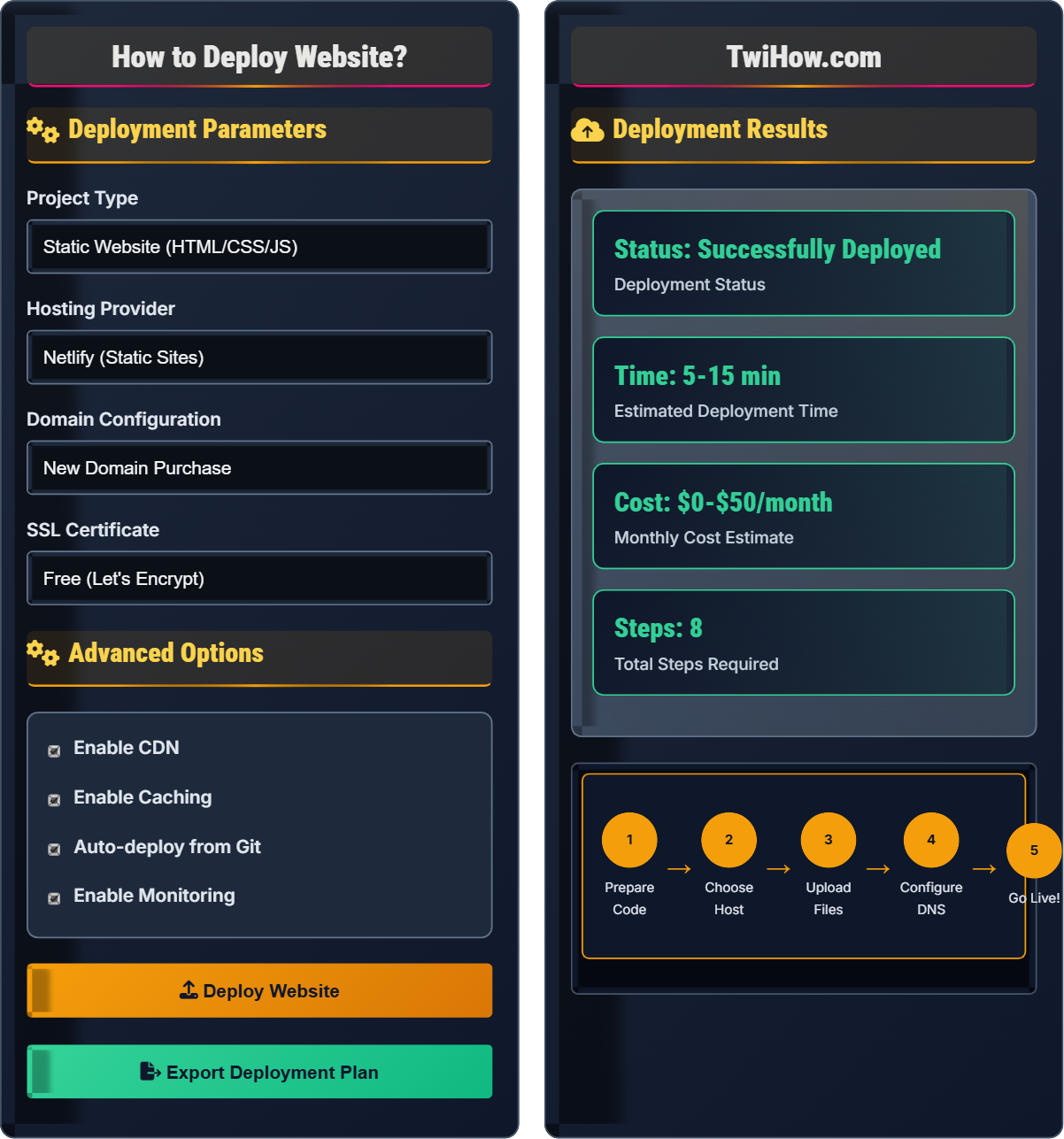
Deployment Parameters
Advanced Options
Deployment Results
| Step | Action | Difficulty | Time |
|---|---|---|---|
| 1 | Code Preparation | Easy | 5-10 min |
| 2 | Choose Hosting | Medium | 10-15 min |
| 3 | File Upload | Easy | 5-20 min |
| 4 | DNS Setup | Medium | 15-30 min |
| 5 | SSL Installation | Medium | 5-10 min |
Requirements Checklist
- ✓ Valid domain name
- ✓ Hosting account
- ✓ FTP/SFTP credentials
- ✓ SSL certificate (if needed)
- ✓ Backup of current site
How Website Deployment Works
Website deployment is the process of transferring your locally developed website files to a web server so that they can be accessed by users on the internet. This involves moving all your HTML, CSS, JavaScript, images, and other assets from your development environment to a production environment where they can be served to visitors.
The website deployment process typically follows these stages:
Where:
- Development: Creating and coding your website locally
- Testing: Ensuring functionality works properly
- Preparation: Optimizing files and setting up environment
- Upload: Transferring files to the server
- Configuration: Setting up domains, databases, and settings
- Go Live: Making the site accessible to users
Various hosting solutions available for different needs:
- Shared Hosting: Affordable option for small sites (Bluehost, SiteGround)
- VPS Hosting: More control and resources (DigitalOcean, Linode)
- Cloud Hosting: Scalable solutions (AWS, Google Cloud, Azure)
- Static Site Hosts: For simple sites (Netlify, Vercel, GitHub Pages)
- Managed WordPress: Optimized for WordPress sites
- Custom Server: Full control over configuration
- Continuous Integration: Automated testing and deployment workflows
- Version Control: Using Git for code management and deployment
- Containerization: Docker for consistent environments
- CDN Integration: Content delivery networks for faster loading
- Monitoring: Real-time performance and error tracking
- Rollback Capability: Ability to revert to previous versions
Deployment Fundamentals
Website hosting, domain configuration, file transfer protocols, SSL certificates, DNS settings.
Deployment Success = (Proper Planning + Reliable Hosting + Correct Configuration) × Testing
Where Success = successful website launch, Planning = preparation, Hosting = server choice.
- Always backup before deployment
- Test thoroughly in staging environment
- Configure SSL for security
- Optimize for performance
Best Practices
Automated deployments, staging environments, performance optimization, security configurations.
- Create staging environment
- Implement version control
- Set up automated backups
- Monitor performance metrics
- Scalability planning
- Security hardening
- SEO impact
- Uptime monitoring
Web Deployment Learning Quiz
Which of the following is NOT a valid method for deploying a website?
While FTP, Git-based deployment, and drag-and-drop interfaces are all valid methods for deploying websites, sending files via email attachment is not a practical or scalable deployment method. Email attachments have size limits, security concerns, and don't provide the necessary server access for proper website hosting.
The answer is C) Email Attachment.
Understanding various deployment methods is crucial for web developers. FTP (File Transfer Protocol) is a traditional method that allows direct file transfer to servers. Git-based deployment integrates version control with deployment, enabling automated workflows. Modern hosting platforms often provide intuitive drag-and-drop interfaces. The key is choosing the right method based on your project's complexity, team size, and hosting requirements.
FTP: File Transfer Protocol for uploading files to servers
Git Deployment: Using version control for automated deployment
CI/CD: Continuous Integration/Continuous Deployment pipeline
• Always use secure transfer methods (SFTP, HTTPS)
• Test deployments in staging first
• Keep backups before deployment
• Use Git hooks for automated deployments
• Implement zero-downtime deployment strategies
• Monitor deployment success rates
• Deploying untested code directly to production
• Forgetting to update database configurations
• Not securing file transfer methods
Explain the process of configuring DNS settings to point your domain to a new hosting provider. What are the key records you need to set up?
DNS Configuration Process: First, obtain the nameservers or IP addresses from your new hosting provider. Then, log into your domain registrar's control panel and update the nameserver records to point to your new host's nameservers.
Key DNS Records:
A Record: Maps domain to IPv4 address of the server
AAAA Record: Maps domain to IPv6 address
CNAME Record: Creates aliases for subdomains (e.g., www)
MX Record: Handles email routing
TXT Record: Used for verification and security (SPF, DKIM)
Propagation Time: Changes can take 24-48 hours to propagate globally.
DNS (Domain Name System) acts as the internet's phonebook, translating human-readable domain names into IP addresses that computers can understand. Proper DNS configuration is crucial for website accessibility. The A record is the most important for websites, as it directly maps your domain to the server's IP address. Understanding DNS is fundamental to web development because even perfectly coded websites won't be accessible if DNS isn't configured correctly.
DNS: Domain Name System that translates domains to IP addresses
Nameserver: Server that handles DNS queries for a domain
Propagation: Time for DNS changes to spread globally
• Always backup current DNS settings before changing
• Allow for propagation time when troubleshooting
• Verify all records are correct before going live
• Use DNS lookup tools to verify changes
• Lower TTL before making changes to reduce propagation time
• Set up email forwarding if you don't need separate mail server
• Forgetting to update MX records for email
• Typing IP addresses incorrectly
• Not waiting for propagation before troubleshooting
You're tasked with deploying an e-commerce website that processes payments and handles customer data. Describe the deployment strategy you would implement, including security considerations, backup plans, and testing procedures.
Deployment Strategy: Use a blue-green deployment approach with staging environment identical to production. Deploy to staging first, conduct thorough testing, then switch traffic to the new version.
Security Considerations: Ensure SSL certificates are properly installed, validate PCI DSS compliance, implement secure payment processing, and configure proper authentication.
Backup Plans: Create full database and file backups before deployment, maintain rollback procedures, and test backup restoration process.
Testing Procedures: Conduct security scans, payment flow testing, user journey validation, and performance benchmarking.
Pipeline: Development → Staging → Security Testing → Production Deployment → Monitoring.
E-commerce deployments require extra caution due to financial transactions and sensitive customer data. Security must be prioritized throughout the deployment process. The blue-green deployment strategy minimizes downtime and provides an immediate rollback option if issues arise. PCI DSS compliance is mandatory for handling payment information, making security testing critical before going live.
PCI DSS: Payment Card Industry Data Security Standard
Blue-Green Deployment: Maintaining two identical production environments
Staging Environment: Pre-production environment for testing
• Never deploy directly to production for e-commerce
• Conduct security audits before deployment
• Maintain data encryption throughout
• Use staging environment that mirrors production exactly
• Implement gradual rollout to subset of users first
• Set up real-time monitoring immediately after deployment
• Deploying without proper security testing
• Not having a rollback plan ready
• Forgetting to update payment processor configurations
After deploying your website, you notice slow loading times. Identify three technical solutions to optimize performance and explain how each would improve the user experience.
1. Content Delivery Network (CDN): Distributes content across multiple geographic locations, reducing latency by serving files from the closest server to users. This dramatically improves load times for global audiences.
2. Image Optimization: Compress images using modern formats (WebP, AVIF), implement lazy loading, and use responsive images. Images often constitute 60-80% of page weight.
3. Caching Strategy: Implement browser caching, server-side caching, and potentially full-page caching. This reduces server load and serves cached content faster.
Each solution addresses different bottlenecks in the loading process, resulting in faster perceived and actual loading times, improved user engagement, and better search engine rankings.
Performance optimization is critical for user retention and SEO. Studies show that even 1-second delays in page load time can significantly impact conversion rates. CDNs solve the geographic distance problem, image optimization tackles the bandwidth bottleneck, and caching reduces server processing time. These optimizations work together to create a seamless user experience.
CDN: Content Delivery Network for distributed content serving
Lazy Loading: Loading images only when they come into view
Cache: Temporary storage of frequently accessed data
• Aim for under 3-second page loads
• Optimize above-the-fold content first
• Test performance across different devices and networks
• Use tools like Lighthouse for performance auditing
• Implement progressive web app features
• Minimize third-party scripts and plugins
• Overlooking mobile performance optimization
• Not optimizing for Core Web Vitals
• Adding too many third-party tracking scripts
Which SSL certificate type provides the highest level of trust and authentication?
Extended Validation (EV) certificates provide the highest level of trust and authentication. They require the most rigorous verification process, including confirming the organization's legal existence, operational presence, and authorization to request the certificate. EV certificates display the organization's name in the browser's address bar, providing maximum user confidence.
Domain Validated certificates only verify domain ownership, Organization Validated verifies domain ownership plus organizational details, while Self-Signed certificates provide no third-party validation.
The answer is C) Extended Validation (EV).
SSL certificates establish trust between websites and visitors by encrypting data transmission and verifying identity. The validation level corresponds to the amount of verification performed by the Certificate Authority. For e-commerce sites and other applications handling sensitive information, EV certificates provide the strongest assurance to users that they're connecting to the legitimate website.
DV Certificate: Domain Validated - minimal verification
OV Certificate: Organization Validated - includes organizational verification
EV Certificate: Extended Validation - highest level of verification
• All websites should use HTTPS with SSL certificates
• EV certificates require more time to issue
• Let's Encrypt provides free DV certificates
• Use Let's Encrypt for development and simple sites
• Consider paid OV/EV certificates for business sites
• Automate certificate renewal processes
• Using self-signed certificates in production
• Forgetting to renew certificates
• Not configuring SSL correctly
FAQ
Q: What's the difference between deployment and publishing a website?
A: While often used interchangeably, deployment and publishing have subtle differences:
Deployment: The technical process of transferring files to a server, configuring environments, setting up databases, and making the application accessible. This includes all the backend operations.
Publishing: The broader action of making content available to users, which includes deployment but also encompasses marketing, SEO, and announcing the release.
In practice, deployment is the technical execution phase, while publishing is the strategic act of releasing to the public. For developers, deployment is the focus; for businesses, publishing encompasses the entire release strategy.
Q: Do I need to buy hosting before I can deploy my website?
A: Yes, you need hosting to deploy a website that's accessible to the public. However, there are several options:
Paid Hosting: Traditional hosting providers (Bluehost, SiteGround, AWS) offer reliable, customizable options.
Free Hosting: Platforms like GitHub Pages, Netlify, or Heroku offer free tiers for simple projects.
Local Testing: You can test locally using tools like XAMPP or local development servers, but this isn't accessible to others.
For learning purposes, free hosting is excellent. For production sites with traffic expectations, paid hosting offers better performance, support, and reliability. The hosting provider gives you the server space and internet connectivity needed for public access.