How to Secure Website?
Complete web security guide • Step-by-step explanations
Website Security Fundamentals:
Security AnalyzerWebsite security is the practice of protecting websites from cyber threats, vulnerabilities, and attacks. It involves implementing various measures to safeguard data, ensure user privacy, and maintain the integrity of web applications. Modern web security encompasses multiple layers of protection including authentication, encryption, input validation, and secure coding practices.
At its core, website security follows the CIA triad: Confidentiality (protecting sensitive data), Integrity (ensuring data accuracy), and Availability (maintaining system accessibility). Effective security requires a comprehensive approach combining technical measures, regular updates, and security awareness.
Key security concepts:
- Authentication: Verifying user identity through passwords, tokens, or biometrics
- Authorization: Controlling access to resources based on user permissions
- Encryption: Protecting data in transit and at rest using cryptographic methods
- Input Validation: Sanitizing user inputs to prevent injection attacks
- Secure Headers: Implementing HTTP headers to prevent common attacks
- Session Management: Safeguarding user sessions and cookies
Modern website security requires staying updated with emerging threats, implementing defense-in-depth strategies, and conducting regular security assessments to identify and remediate vulnerabilities before they can be exploited.
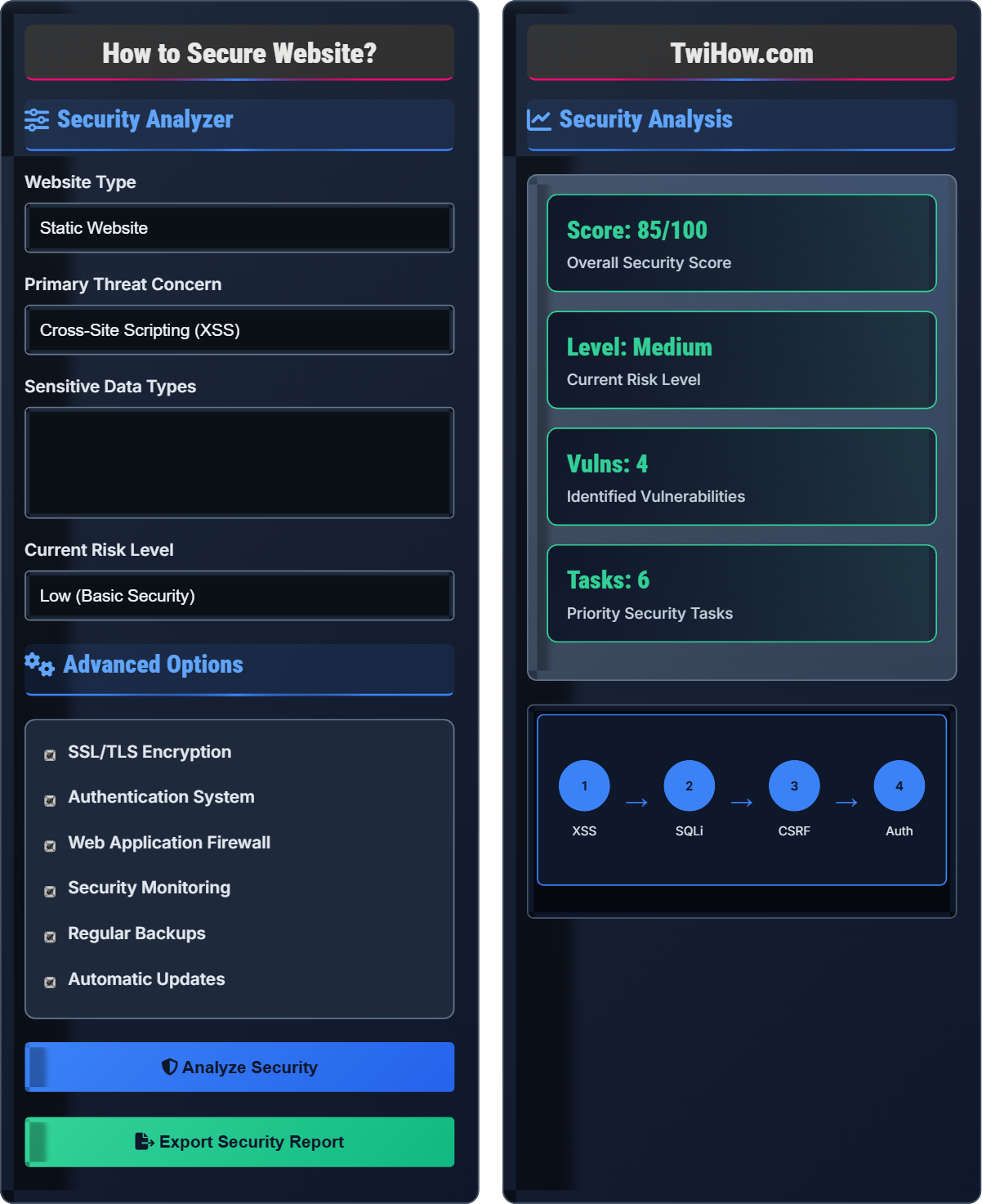
Security Analyzer
Advanced Options
Security Analysis
| Security Measure | Status | Priority | Impact |
|---|---|---|---|
| SSL/TLS Encryption | ✅ Active | High | 90% |
| Input Validation | ⚠️ Partial | High | 75% |
| Authentication | ✅ Active | High | 85% |
| WAF Protection | ❌ Missing | Medium | 60% |
| Session Management | ⚠️ Weak | High | 70% |
Identified Vulnerabilities
- • Cross-site scripting (XSS) in user input fields
- • SQL injection in search functionality
- • Missing security headers
- • Weak password policies
- • Outdated dependencies
- • Insufficient session timeout
Website Security Explained
Website security is the practice of protecting websites from cyber threats, vulnerabilities, and attacks. It involves implementing various measures to safeguard data, ensure user privacy, and maintain the integrity of web applications. Modern web security encompasses multiple layers of protection including authentication, encryption, input validation, and secure coding practices.
Website security follows the CIA triad framework:
Where:
- Confidentiality: Protecting sensitive data from unauthorized access
- Integrity: Ensuring data accuracy and preventing unauthorized modification
- Availability: Maintaining system accessibility and preventing service disruptions
Major security threats to websites:
- Cross-Site Scripting (XSS): Injecting malicious scripts into web pages
- SQL Injection: Inserting malicious SQL queries to access databases
- Cross-Site Request Forgery (CSRF): Forcing users to execute unwanted actions
- Man-in-the-Middle: Intercepting communications between parties
- Denial of Service: Overwhelming servers to disrupt services
- Session Hijacking: Stealing user session tokens
- Zero Trust Architecture: Verify everything, trust nothing approach
- Defense in Depth: Multiple layers of security controls
- Security by Design: Building security into the development process
- Regular Penetration Testing: Proactive vulnerability identification
- Security Automation: Automated scanning and monitoring
- Incident Response: Preparedness for security breaches
Security Fundamentals
Authentication, Authorization, Encryption, Validation, Session Management, Security Headers.
Security = (Prevention × Detection × Response) / Attack Surface
Where Security = overall security effectiveness, Prevention = protective measures.
- Never trust user input
- Implement defense in depth
- Keep software updated
- Use secure defaults
Best Practices
Regular audits, security testing, continuous monitoring, secure coding practices.
- Implement HTTPS everywhere
- Use strong authentication
- Sanitize all inputs
- Regular security updates
- Security vs usability balance
- Compliance requirements
- Performance impact
- Cost considerations
Website Security Quiz
What is the primary method for preventing Cross-Site Scripting (XSS) attacks?
Input validation and output encoding is the primary method for preventing XSS attacks. This involves sanitizing user input to remove malicious scripts and encoding output to prevent script execution.
XSS occurs when user input containing malicious scripts is displayed on a webpage without proper validation and encoding. The scripts execute in other users' browsers, potentially stealing data or performing actions on their behalf.
The answer is B) Input Validation and Output Encoding.
XSS is one of the most common web security vulnerabilities. It exploits the trust users have in a website by injecting malicious scripts that execute in their browsers. Proper input validation and output encoding prevent these scripts from being executed by converting dangerous characters to safe equivalents.
XSS: Cross-Site Scripting - injection attack
Input Validation: Checking and sanitizing user input
Output Encoding: Converting characters to safe equivalents
• Never trust user input without validation
• Encode output based on context
• Use Content Security Policy headers
• Use frameworks that automatically encode output
• Implement strict input validation
• Regular security testing for XSS
• Not validating user input
• Incomplete output encoding
• Trusting user-generated content
Explain what SQL injection is and describe the best practices for preventing it in web applications.
SQL Injection Definition: SQL injection is a code injection technique where malicious SQL statements are inserted into an entry field for execution. This allows attackers to view, modify, or delete database contents.
Attack Method: Attackers exploit vulnerable input fields to insert SQL commands that alter the original query intended by the application.
Prevention Best Practices:
1. Prepared Statements: Use parameterized queries with placeholders instead of string concatenation.
2. Input Validation: Validate and sanitize all user inputs, rejecting suspicious characters.
3. Principle of Least Privilege: Use database accounts with minimal necessary permissions.
4. Stored Procedures: Use stored procedures instead of dynamic SQL construction.
5. Regular Updates: Keep database software and applications updated.
Implementation: Use ORM frameworks that provide built-in protection against SQL injection.
SQL injection remains one of the most dangerous web application vulnerabilities. It occurs when user input is directly incorporated into SQL queries without proper sanitization. The consequences can be devastating, including data breaches, financial losses, and reputation damage. Prevention requires a multi-layered approach focusing on secure coding practices.
SQL Injection: Code injection technique targeting databases
Prepared Statement: Precompiled SQL query with parameters
ORM: Object-Relational Mapping framework
• Never concatenate user input into SQL queries
• Always use prepared statements
• Limit database permissions
• Use database firewalls for additional protection
• Implement regular security audits
• Use automated tools for SQL injection testing
• Concatenating user input into queries
• Not validating input formats
• Using admin-level database accounts
Your e-commerce website processes credit card payments and stores customer data. You've discovered that the site is vulnerable to both XSS and SQL injection attacks. Outline a comprehensive security strategy to address these vulnerabilities while maintaining user experience.
Comprehensive Security Strategy:
1. Input Sanitization: Implement strict input validation for all user inputs, including forms, URLs, and headers.
2. Prepared Statements: Replace all dynamic SQL queries with prepared statements and parameterized queries.
3. Output Encoding: Encode all data output to prevent XSS, especially in user-generated content.
4. PCI Compliance: Ensure adherence to Payment Card Industry Data Security Standards.
5. Web Application Firewall: Deploy WAF to filter malicious traffic and common attack patterns.
6. Security Headers: Implement Content Security Policy, X-XSS-Protection, and other security headers.
7. Regular Testing: Conduct penetration testing and vulnerability scans monthly.
Implementation Timeline: Critical fixes within 24-48 hours, comprehensive implementation within 2-4 weeks.
E-commerce sites face unique security challenges due to the sensitive nature of financial and personal data. The combination of XSS and SQL injection vulnerabilities creates a severe risk profile. The security strategy must address both immediate threats and long-term protection while maintaining seamless user experience for customers.
PCI DSS: Payment Card Industry Data Security Standard
WAF: Web Application Firewall
Penetration Testing: Authorized simulated cyber attack
• Never store credit card data directly
• Use tokenization for sensitive data
• Implement end-to-end encryption
• Use trusted payment processors
• Implement 3D Secure for payments
• Regular security training for staff
• Storing unencrypted credit card data
• Not validating payment gateway inputs
• Ignoring security patches
You're designing a web application that requires user authentication. Describe the security measures you would implement to protect user credentials and sessions, including password storage, session management, and multi-factor authentication.
Authentication Security Measures:
1. Password Storage: Use bcrypt or Argon2 for hashing passwords with salt. Never store plain text passwords.
2. Password Policies: Enforce strong password requirements and implement password strength meters.
3. Session Management: Generate cryptographically secure session IDs, implement proper session timeout, and regenerate session IDs after login.
4. Multi-Factor Authentication: Implement TOTP (Time-based One-Time Password) or SMS-based MFA options.
5. Rate Limiting: Implement account lockout mechanisms and rate limiting for login attempts.
6. Secure Cookies: Use HttpOnly, Secure, and SameSite attributes for session cookies.
7. Account Recovery: Implement secure password reset mechanisms with time-limited tokens.
Additional Measures: Implement CAPTCHA for suspicious login attempts and monitor for brute force attacks.
Authentication security is critical as it serves as the first line of defense for user accounts. Weak authentication mechanisms can lead to account compromises, data breaches, and unauthorized access. A comprehensive approach addresses password storage, session management, and multi-layered verification to ensure robust security.
bCrypt: Password hashing function
OTP: One-Time Password
HttpOnly: Cookie attribute preventing XSS access
• Never store passwords in plain text
Which HTTP security header helps prevent clickjacking attacks?
X-Frame-Options HTTP header helps prevent clickjacking attacks by controlling whether a page can be loaded in an iframe. This prevents attackers from embedding your page in malicious sites to trick users into clicking elements.
Clickjacking involves overlaying invisible elements on top of legitimate buttons or links, causing users to unknowingly perform actions. The X-Frame-Options header can be set to DENY, SAMEORIGIN, or ALLOW-FROM.
The answer is B) X-Frame-Options.
Clickjacking is a client-side attack that tricks users into clicking on something different from what they perceive. The X-Frame-Options header is specifically designed to prevent this by controlling frame embedding. Modern applications should also consider using Content Security Policy (CSP) frame-ancestors directive as a more flexible alternative.
Clickjacking: UI redressing attack tricking users
X-Frame-Options: Header controlling frame embedding
CSP: Content Security Policy
• Always implement X-Frame-Options header
• Consider CSP frame-ancestors as alternative
• Test frame embedding restrictions
• Use DENY for pages that should never be framed
• Use SAMEORIGIN for same-domain framing
• Implement CSP as modern alternative
• Not implementing frame restriction headers
• Using ALLOW-FROM without proper validation
• Not testing clickjacking protections
FAQ
Q: What's the difference between authentication and authorization?
A: The main differences:
Authentication: Verifying who a user is (login, password, MFA). It answers the question "Who are you?"
Authorization: Determining what authenticated users can do (permissions, roles). It answers the question "What can you do?"
Process: Authentication happens first, followed by authorization. You must authenticate before authorization can occur.
Current Practice: Both are essential security components that work together to protect resources and data.
Q: How often should I update my website's security measures?
A: Website security updates should follow this schedule:
Critical Patches: Apply immediately upon release (within 24-48 hours)
Regular Updates: Monthly for frameworks, libraries, and CMS
Security Audits: Quarterly comprehensive security reviews
Vulnerability Scanning: Weekly automated scans
Penetration Testing: Annually or after major changes
Recommendation: Implement automated security updates for critical components and maintain a regular review schedule for security policies.