What is Email Marketing?
Complete email marketing guide • Strategy • Implementation
Email Marketing Overview:
Plan CampaignEmail marketing is a digital marketing strategy that involves sending commercial messages to a group of people via email. It's one of the most effective marketing channels, offering high ROI and direct access to your audience. Email marketing builds relationships, drives sales, and keeps customers engaged.
Key email marketing components:
- List Building: Growing and maintaining your email subscriber list
- Content Creation: Crafting valuable, engaging email content
- Segmentation: Dividing your list into targeted groups
- Automation: Sending emails based on triggers and schedules
- Analytics: Measuring performance and optimizing campaigns
- Deliverability: Ensuring emails reach subscribers' inboxes
Effective email marketing combines permission-based communication with valuable content to build lasting customer relationships.
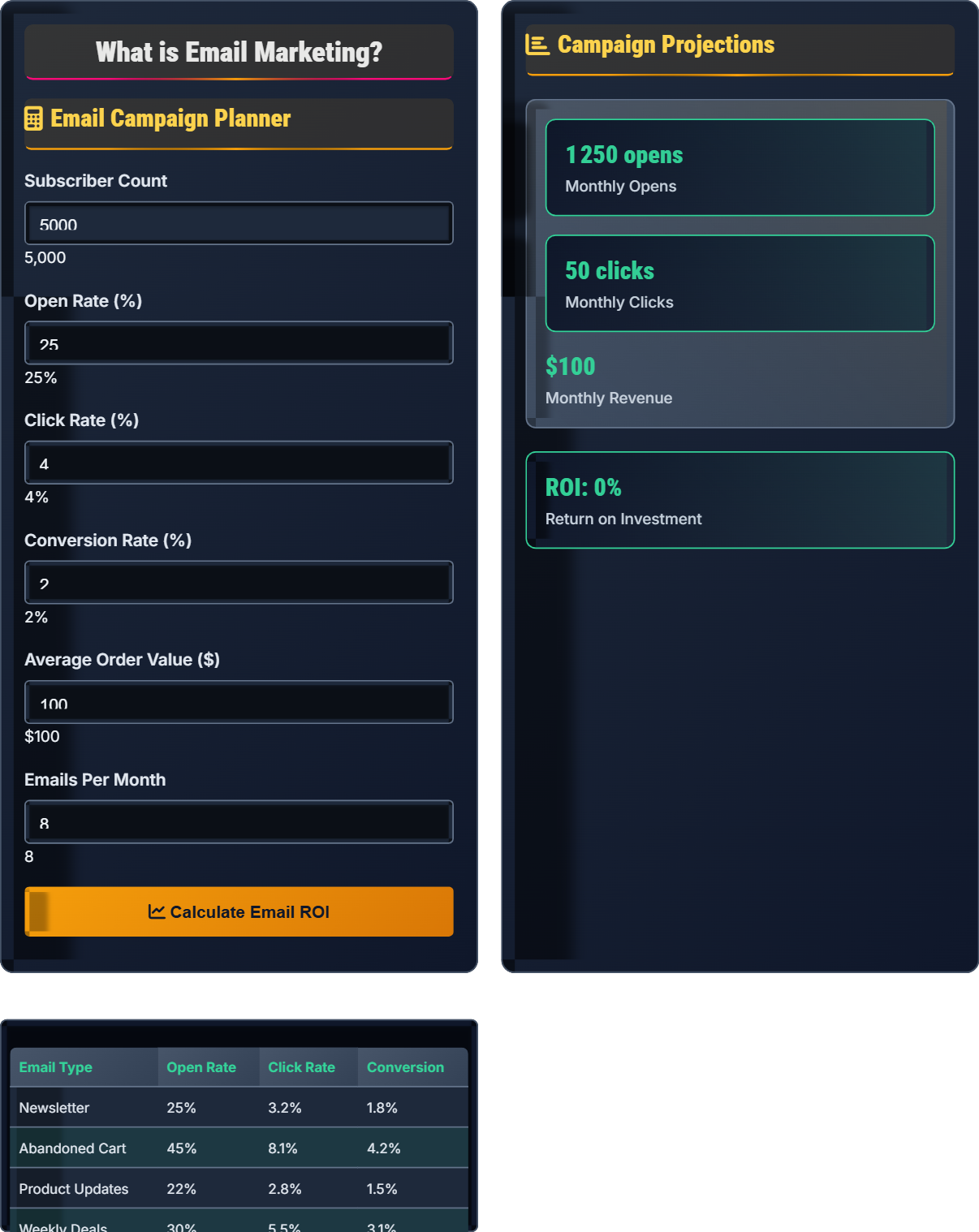
Email Campaign Planner
Campaign Projections
| Email Type | Open Rate | Click Rate | Conversion |
|---|---|---|---|
| Newsletter | 25% | 3.2% | 1.8% |
| Abandoned Cart | 45% | 8.1% | 4.2% |
| Product Updates | 22% | 2.8% | 1.5% |
| Weekly Deals | 30% | 5.5% | 3.1% |
| Welcome Series | 55% | 12.3% | 8.7% |
Email Marketing Explained
Email marketing is a digital marketing strategy that involves sending commercial messages to a group of people via email. It's one of the most cost-effective marketing channels, offering an average ROI of $42 for every $1 spent. Email marketing allows businesses to communicate directly with their audience, build relationships, and drive sales.
Key areas where email marketing provides value:
- Lead Nurturing: Guide prospects through the sales funnel
- Customer Retention: Keep existing customers engaged
- Product Announcements: Notify subscribers of new offerings
- Abandoned Cart Recovery: Remind shoppers to complete purchases
- Newsletters: Share valuable content and updates
- Promotional Campaigns: Drive sales and conversions
- Transactional Emails: Order confirmations, receipts, password resets
- Newsletter: Regular updates with news and content
- Promotional: Sales, discounts, and special offers
- Automated Sequences: Welcome series, onboarding emails
- Abandoned Cart: Reminders to complete purchases
- Re-engagement: Win back inactive subscribers
Email Marketing Strategies
Building a quality email list is the foundation of successful email marketing. Focus on organic growth through valuable lead magnets and clear opt-in processes.
- Create valuable lead magnets (ebooks, guides, free trials)
- Place opt-in forms strategically on your website
- Use double opt-in to ensure quality subscribers
- Offer exclusive content or deals for subscribers
- Track growth metrics and optimize conversion
- Keep your list clean and remove inactive subscribers
Segment your email list to send more targeted, relevant content. Segmented emails typically have 14.32% higher open rates and 100.95% higher click-through rates.
- Collect relevant data about your subscribers
- Create segments based on shared characteristics
- Personalize content for each segment
- Test different approaches for each segment
- Continuously refine segments based on performance
- Monitor engagement across different segments
Email automation allows you to send targeted messages based on triggers and schedules, saving time and increasing effectiveness.
- Identify key customer journey touchpoints
- Create automated email sequences
- Set up triggers based on user actions
- Personalize content within automation
- Test and optimize automated sequences
- Monitor automation performance regularly
Email Type Performance
Email Marketing Funnel
Funnel Optimization:
- Subscribers: Improve lead magnet and opt-in process
- Opened: Optimize subject lines and send times
- Clicked: Enhance email content and call-to-actions
- Converted: Optimize landing pages and offers
Email Template Types
Template Best Practices:
- Use mobile-responsive templates
- Include clear call-to-action buttons
- Maintain consistent brand identity
- Optimize for email client compatibility
- Test templates across different devices
- Include unsubscribe links for compliance
Email Marketing Quiz
What is the average open rate for email marketing campaigns?
The average email marketing open rate across all industries is approximately 21.5%. This can vary significantly by industry, with sectors like non-profits and finance achieving higher rates, while retail and travel may see lower rates.
The answer is C) 20-25%.
Email open rates depend on several factors including industry, subject line quality, sender reputation, and timing. A 20-25% open rate is considered average across most industries. Above-average performance typically ranges from 25-30%, while exceptional campaigns can achieve 30%+ open rates.
Open Rate: Percentage of emails opened by recipients
Industry Benchmark: Average performance by sector
Sender Reputation: Email provider's trust in sender
• Subject lines significantly impact open rates
• Timing affects when people check emails
• List quality influences deliverability
• Personalize subject lines
• Test send times
• Keep subject lines under 50 characters
• Using spammy subject lines
• Sending too frequently
• Not testing different approaches
Explain the importance of email segmentation and provide examples of effective segmentation criteria.
Importance of Segmentation: Email segmentation involves dividing your email list into smaller, targeted groups based on shared characteristics. This allows for more personalized and relevant content, leading to higher engagement rates, better conversion rates, and reduced unsubscribe rates.
Benefits: Segmented emails typically have 14.32% higher open rates and 100.95% higher click-through rates compared to non-segmented emails.
Effective Segmentation Criteria:
Demographics: Age, gender, location, job title, income level
Behavior: Purchase history, website activity, email engagement, product preferences
Psychographics: Interests, values, lifestyle, personality traits
Stage in Journey: New subscribers, regular customers, lapsed customers, VIP members
Communication Preferences: Preferred frequency, email types, time of day
Segmentation transforms generic email blasts into personalized communications. When recipients receive content relevant to their interests and needs, they're more likely to engage with your emails. This creates a positive feedback loop where engagement leads to more data, enabling even better segmentation and personalization.
Segmentation: Dividing email list into targeted groups
Personalization: Tailoring content to individual recipients
Engagement Rate: Percentage of recipients interacting with emails
• Start with broad segments and refine over time
• Collect data ethically and transparently
• Test segment performance regularly
• Use progressive profiling to gather data
• Combine multiple segmentation criteria
• Create lookalike segments from best customers
• Creating too many small segments
• Not updating segment criteria regularly
• Failing to test segmented campaigns
A company with 10,000 email subscribers has a $5,000 monthly marketing budget. They want to improve email performance through list cleaning, segmentation tools, automation, and email design. How should they allocate their budget for maximum ROI, and what results can they expect?
Recommended Allocation:
Email Service Provider: $100/month - Reliable platform for sending
Segmentation/Automation Tools: $200/month - Advanced features for personalization
Email Design/Development: $500/month - Professional templates and content
List Cleaning Services: $100/month - Maintain healthy deliverability
Remaining for Testing: $4,100/month - A/B testing and optimization
Expected Results: With proper segmentation and automation, they could see 25-40% improvement in open rates, 50-70% improvement in click rates, and 30-50% increase in conversions. This could translate to $15,000-$25,000 additional monthly revenue from email marketing alone.
Investing in email marketing infrastructure provides compounding returns. The initial investment in tools and services pays dividends through improved engagement and conversions. The key is focusing on foundational elements (list quality, segmentation) before advanced features.
Deliverability: Percentage of emails reaching inbox
List Hygiene: Maintaining clean, valid email list
Compounding Returns: Benefits that grow over time
• Invest in fundamentals first
• Track ROI on email investments
• Continuously optimize based on data
• Start with free tools and upgrade as needed
• Test one element at a time
• Focus on engagement before conversion
• Neglecting list hygiene
• Not testing email elements
• Focusing only on acquisition
A SaaS company wants to create an email automation sequence for new trial users. They want to reduce churn and increase conversion to paid plans. Design a 7-email welcome sequence with timing and content that addresses user concerns and drives conversion.
Day 0: Welcome Email
Thank user for signing up, provide login details, include quick start guide
Day 1: Getting Started
Walkthrough of key features, video tutorial, support contact
Day 2: Value Demonstration
Showcase key benefits, customer success story, use case examples
Day 3: Onboarding Help
Address common challenges, troubleshooting tips, live demo offer
Day 5: Feature Deep Dive
Highlight advanced features, integration capabilities, productivity tips
Day 7: Trial Reminder
Remind of trial expiration, emphasize value received, limited-time offer
Day 8: Final Offer
Last chance for trial, special discount, social proof, easy upgrade path
Expected Results: This sequence typically increases conversion rates by 25-40% compared to no automation.
Effective email automation sequences address user concerns at each stage of the onboarding process. The key is providing value while gradually building urgency. Each email should have a clear purpose and next step, moving users closer to conversion while addressing their evolving needs.
Automation Sequence: Series of timed emails
Churn Reduction: Preventing user cancellation
Onboarding: Helping users get started
• Address pain points at each stage
• Provide value in every email
• Include clear calls-to-action
• Personalize based on user behavior
• Test different timing intervals
• Include social proof and testimonials
• Too many emails too quickly
• Not personalizing content
• Focusing only on conversion
Which law governs email marketing practices in the United States?
The CAN-SPAM Act (Controlling the Assault of Non-Solicited Pornography and Marketing Act) is the primary federal law governing commercial email in the United States. It sets requirements for commercial messages, gives recipients the right to opt-out, and specifies penalties for violations.
The answer is B) CAN-SPAM Act.
Compliance with email marketing regulations is crucial for avoiding penalties and maintaining deliverability. The CAN-SPAM Act requires businesses to include accurate header information, provide clear identification of advertising, include physical address, offer clear opt-out mechanisms, and honor opt-out requests promptly.
CAN-SPAM Act: US email marketing law
GDPR: EU data protection regulation
Opt-out Mechanism: Way for recipients to unsubscribe
• Always include unsubscribe links
• Honor opt-out requests promptly
• Include physical mailing address
• Make unsubscribe process simple
• Keep records of consent
• Regularly clean your email list
• Not including required information
• Ignoring unsubscribe requests
• Sending to purchased lists
Email Marketing FAQ
Q: How often should I send emails to my subscribers?
A: Email frequency should be based on your audience's preferences and your industry:
Newsletters: Weekly or bi-weekly is common
Transactional Emails: As needed based on user actions
Promotional Emails: 1-2 times per week maximum
Automated Sequences: Based on user behavior triggers
Always ask for communication preferences during signup and monitor engagement metrics. The key is providing value in every email regardless of frequency. If you're sending valuable content, your audience will appreciate regular communication. If not, even infrequent emails will lead to unsubscribes.
Q: What's the difference between email marketing and spam?
A: The key differences between email marketing and spam:
Email Marketing: Permission-based, valuable content, clear unsubscribe option, compliant with regulations
Spam: Unsolicited, deceptive content, no clear opt-out, violates anti-spam laws
Legitimate email marketing requires explicit consent from recipients, provides valuable content, includes accurate sender information, and offers easy unsubscribe options. Spam typically involves purchased lists, misleading subject lines, and attempts to hide sender identity.
To avoid spam classification, always use confirmed opt-ins, provide value in every email, maintain good sender reputation, and follow CAN-SPAM Act guidelines.