Best SEO Tools for 2024
Complete SEO guide • Tool comparisons • Interactive selector
SEO Tool Overview:
Find Best ToolSearch Engine Optimization (SEO) tools help businesses analyze their website's performance, track rankings, discover keywords, and monitor competitors. These tools are essential for digital marketing success in 2024.
Key SEO tool categories:
- Keyword Research: Discover what your audience searches for
- Ranking Tracking: Monitor your search engine positions
- Backlink Analysis: Track and analyze your link profile
- Site Audits: Identify technical SEO issues
- Competitor Analysis: Monitor competitor strategies
Modern SEO tools use AI and machine learning to provide predictive insights and automate routine tasks, making them invaluable for both beginners and experts.
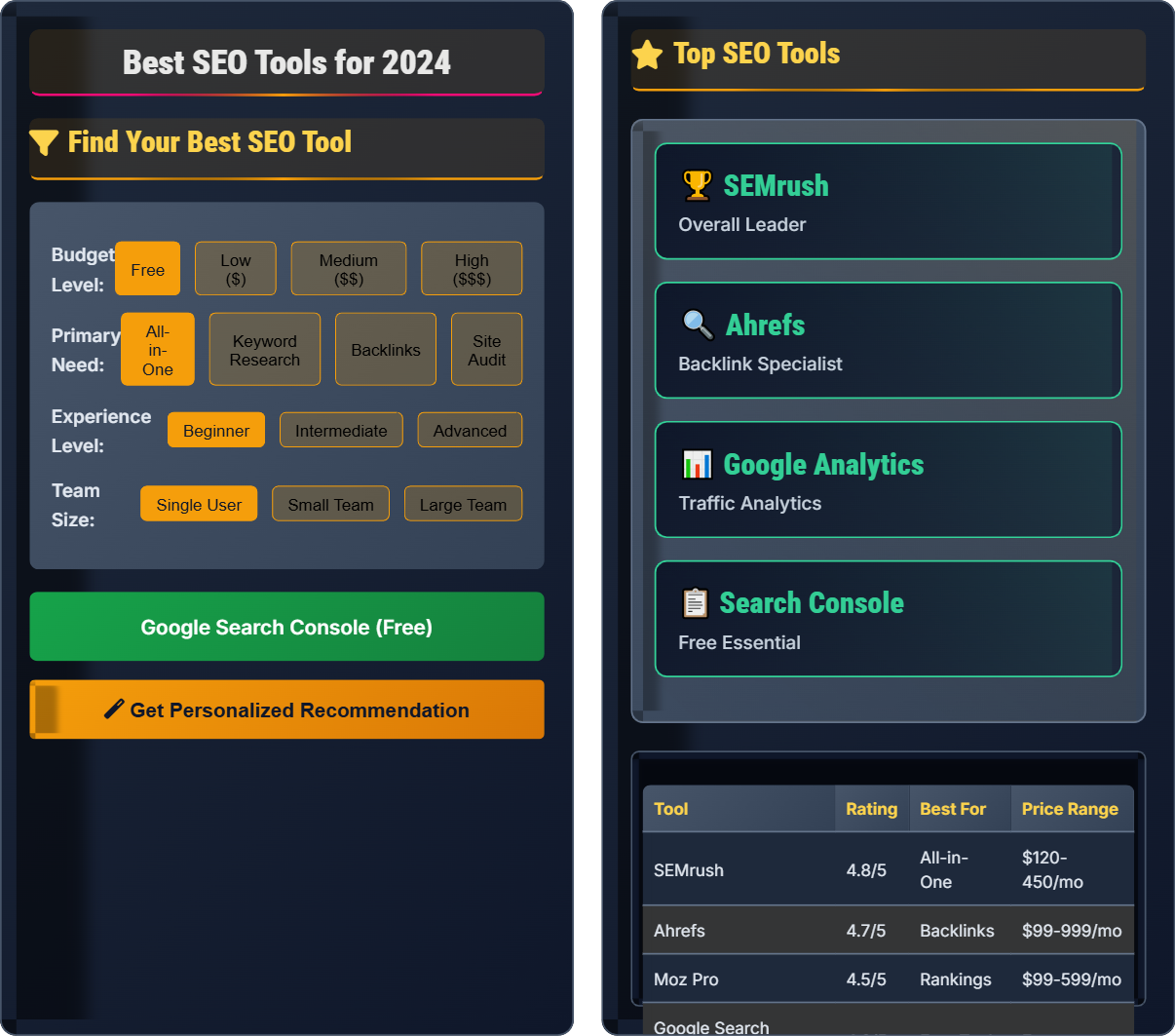
Find Your Best SEO Tool
Top SEO Tools
| Tool | Rating | Best For | Price Range |
|---|---|---|---|
| SEMrush | 4.8/5 | All-in-One | $120-450/mo |
| Ahrefs | 4.7/5 | Backlinks | $99-999/mo |
| Moz Pro | 4.5/5 | Rankings | $99-599/mo |
| Google Search Console | 4.9/5 | Free Tool | Free |
SEO Tools Explained
SEO (Search Engine Optimization) tools are software platforms that help website owners and marketers analyze, optimize, and improve their website's visibility in search engines. These tools provide insights into keyword performance, site health, competitor analysis, and much more.
Key areas where SEO tools provide value:
- Content Strategy: Identify trending topics and content gaps
- Technical SEO: Fix crawlability and indexing issues
- Link Building: Find opportunities and monitor link quality
- Local SEO: Optimize for local search queries
- E-commerce: Optimize product pages and categories
- Competitive Analysis: Monitor competitor strategies
- Free Tools: Google Search Console, Google Analytics, Ubersuggest
- Premium All-in-One: SEMrush, Ahrefs, Moz Pro
- Specialized Tools: Screaming Frog, Hotjar, BuzzSumo
- Browser Extensions: SEOquake, MozBar, Keywords Everywhere
- Analytics Platforms: Google Analytics 4, Adobe Analytics
Top SEO Tools Reviews
SEMrush is an all-in-one marketing toolkit for digital marketing professionals. It offers comprehensive SEO, content marketing, competitor research, PPC, and social media tools.
Best For: Comprehensive SEO management
Pros: Extensive features, excellent reporting, frequent updates
Cons: Expensive for small businesses, steep learning curve
Ahrefs is primarily known for its powerful backlink analysis capabilities. It has the largest index of live backlinks and provides detailed competitor analysis.
Best For: Backlink analysis and competitor research
Pros: Excellent backlink database, competitive analysis tools
Cons: Limited content marketing features, expensive plans
Google Search Console is a free tool that helps you monitor and maintain your site's presence in Google Search results. It's essential for every website owner.
Best For: Essential SEO monitoring
Pros: Completely free, direct from Google, essential features
Cons: Limited compared to premium tools, basic interface
Tool Comparison Matrix
| Feature | SEMrush | Ahrefs | Moz Pro | Google Search Console |
|---|---|---|---|---|
| Keyword Research | ★★★★★ | ★★★★☆ | ★★★☆☆ | ★★☆☆☆ |
| Backlink Analysis | ★★★★☆ | ★★★★★ | ★★★☆☆ | ★☆☆☆☆ |
| Site Audit | ★★★★★ | ★★★★☆ | ★★★★☆ | ★★★☆☆ |
| Ranking Tracking | ★★★★★ | ★★★★☆ | ★★★★☆ | ★★☆☆☆ |
| Competitor Analysis | ★★★★★ | ★★★★★ | ★★★☆☆ | ★☆☆☆☆ |
| Price | $$$ | $$$ | $$ | Free |
Personalized Recommendations
If you're running a small business with a limited budget, we recommend starting with Google Search Console (free) combined with a cost-effective tool like Ubersuggest or Moz Lite.
Digital marketing agencies need comprehensive tools with team collaboration features. SEMrush or Ahrefs with agency plans offer the best value.
E-commerce sites need tools that handle large catalogs and product-specific SEO challenges. Focus on tools with strong site audit and keyword research capabilities.
SEO Tools Quiz
Which SEO tool is best suited for analyzing backlink profiles and competitor link strategies?
Ahrefs is renowned for having the most comprehensive backlink database in the industry. While SEMrush and Moz also offer backlink analysis, Ahrefs provides the most detailed and accurate data for backlink profiling and competitor analysis.
The answer is B) Ahrefs.
Backlink analysis is crucial for SEO because search engines use incoming links as one of the primary ranking factors. Ahrefs' extensive index allows you to see not just your own backlinks, but also those of your competitors, helping you identify link-building opportunities and assess link quality.
Backlink: A link from another website to your website
Referring Domain: A unique website that links to yours
Anchor Text: The clickable text of a hyperlink
• Quality matters more than quantity in backlinks
• Diverse anchor text is better than exact match
• Relevance of linking site affects value
• Monitor lost backlinks regularly
• Focus on earning links from authoritative sites
• Disavow toxic links that could harm rankings
• Buying low-quality backlinks
• Ignoring competitor backlink analysis
• Not monitoring link profile regularly
Explain the step-by-step process of implementing Google Search Console for a new website, including verification methods and initial setup.
Step 1: Access Search Console: Go to search.google.com/search-console and sign in with your Google account.
Step 2: Add Property: Enter your website URL and click "Continue".
Step 3: Verify Ownership: Choose from available methods: HTML tag, HTML file upload, Google Analytics, Google Tag Manager, or domain name provider.
Step 4: Complete Verification: Follow instructions for your chosen method.
Step 5: Submit Sitemap: Go to Sitemaps section and submit your XML sitemap.
Step 6: Configure Settings: Set preferred domain, geographic target, and crawl rate.
Step 7: Monitor Data: Review Performance reports after a few days of data collection.
Google Search Console serves as the communication channel between Google and website owners. It provides valuable insights into how Google sees your site, including indexing issues, search queries, and mobile usability problems. The verification process ensures that only legitimate site owners can access the data.
Sitemap: File listing URLs on your website for search engines
Crawl: Process of Google's bots examining your websiteIndexing: Process of adding web pages to Google's search index
• Verify both www and non-www versions if needed
• Submit sitemap within first week
• Check for errors regularly
• Use URL inspection tool for specific pages
• Monitor mobile usability reports
• Check Performance report weekly
• Not verifying both URL versions
• Forgetting to submit sitemap
• Ignoring mobile usability issues
A small e-commerce business with a $300 monthly marketing budget needs to choose between SEMrush ($120/month) and Ahrefs ($99/month). They primarily need keyword research and backlink analysis. Which tool should they choose and why? Include a cost-benefit analysis.
Recommendation: Ahrefs ($99/month)
Cost-Benefit Analysis:
Ahrefs Advantages: Superior backlink analysis, more affordable, adequate keyword research capabilities
SEMrush Advantages: Better keyword research tools, more comprehensive features
Decision Factors: The business needs both keyword research and backlink analysis, but Ahrefs excels at backlink analysis while still providing good keyword research. At $21 less per month, they save $252 annually.
Strategy: Start with Ahrefs for backlink focus, then supplement with free keyword tools if needed.
Budget allocation in SEO tool selection requires balancing feature needs with financial constraints. For e-commerce sites, backlink analysis is often more critical than advanced keyword features, as link building drives authority and rankings. The saved money can be reinvested in other marketing activities.
ROI: Return on investment for marketing spend
Authority: Trustworthiness score based on backlinks
Link Building: Process of acquiring quality backlinks
• Prioritize tools based on biggest pain points
• Consider total cost of ownership
• Evaluate ROI of tool investments
• Start with essential tools and add gradually
• Take advantage of free trials
• Combine paid and free tools strategically
• Choosing tools based on brand alone
• Underestimating training time needed
• Not considering team size requirements
An SEO agency managing 20 client websites needs to create an efficient multi-tool strategy. They want to use Google Search Console for all clients but need additional tools for keyword research, site audits, and competitor analysis. Propose a combination of tools that maximizes efficiency while minimizing costs.
Recommended Multi-Tool Strategy:
Foundation: Google Search Console (free) for all 20 clients
Keyword Research: SEMrush Professional ($120/mo) - shared across clients
Backlink Analysis: Ahrefs Lite ($99/mo) - shared across clients
Site Audits: Screaming Frog (one-time purchase $149) + UptimeRobot (free)
Total Monthly Cost: $219/month for 20 clients = $10.95/client/month
Efficiency Benefits: Centralized reporting, bulk operations, team collaboration features.
Agencies benefit from tool consolidation and shared licenses because the per-client cost decreases significantly. By selecting tools with multi-site capabilities and team features, agencies can streamline workflows and maintain consistent reporting standards across all clients.
Multi-Site License: Permission to use tool across multiple domains
White Label Reporting: Custom branded reports for clients
API Integration: Automated data exchange between tools
• Consolidate tools to reduce complexity
• Ensure all tools have agency-friendly licensing
• Prioritize tools with automation features
• Use tool comparison spreadsheets
• Negotiate annual discounts
• Automate regular reporting
• Using different tools for each client
• Not considering data integration
• Overcomplicating the tech stack
For a content-heavy blog site, which feature set should be prioritized when selecting an SEO tool?
Content-heavy blog sites primarily rely on creating valuable content that ranks well in search engines. The most important features for blogs are keyword research to identify topics people search for, and content analysis to optimize existing content for search visibility.
While technical SEO and backlinks are important, content optimization should be the primary focus for blogs.
The answer is B) Keyword research and content analysis.
Blog sites succeed through content creation and distribution. Effective keyword research helps identify content opportunities, while content analysis tools ensure that published content is optimized for search engines. This approach maximizes organic traffic potential for content-focused sites.
Content Clustering: Organizing related content around topics
Topic Authority: Establishing expertise in specific subject areas
Content Gap Analysis: Identifying missing content opportunities
• Match tool features to business model
• Prioritize based on traffic sources
• Consider content strategy first for blogs
• Use content analysis for keyword optimization
• Monitor content performance metrics
• Plan content around search demand
• Overemphasizing technical SEO for content sites
• Not researching keyword opportunities
• Ignoring content performance metrics
SEO Tools FAQ
Q: Do I really need to pay for SEO tools, or can I manage with free options?
A: You can absolutely start with free tools and many small businesses successfully do so. Google Search Console and Google Analytics are essential free tools that provide valuable data. Ubersuggest and Google Keyword Planner also offer free tiers.
However, paid tools become necessary when you need more comprehensive data, faster processing, or advanced features like competitor analysis, rank tracking across multiple locations, or detailed backlink analysis. The decision should be based on your specific needs, growth stage, and the value you expect to gain from the insights.
As a general rule: start with free tools, measure their effectiveness, then upgrade when you hit data limits or need more sophisticated features.
Q: How often should I update my SEO tool stack as new tools emerge?
A: It's important to regularly evaluate your SEO tool stack, but major changes shouldn't be made frequently. Here's a recommended schedule:
Monthly: Review performance of current tools and explore new features
Quarterly: Assess whether tools are meeting your goals and ROI
Annually: Conduct a comprehensive review and consider alternatives
New tools emerge regularly, but established tools tend to be more reliable and have better support. Only switch tools if there's a clear benefit that outweighs the cost of migration and retraining. Focus on tools that integrate well with your existing workflow rather than chasing every new tool that appears.