How do I create a strong password that I can remember?
Complete password security guide • Step-by-step explanations
Password Security:
Show Password GeneratorCreating strong, memorable passwords is crucial for online security. The key is balancing complexity with memorability. Strong passwords should be unique, long, and unpredictable. Modern approaches include using passphrases, password managers, and multi-factor authentication to enhance security while maintaining usability.
Effective password creation involves understanding password entropy, avoiding common patterns, and implementing best practices for different account types. The goal is to create passwords that are virtually impossible to crack but easy for you to remember.
Key concepts:
- Password Entropy: Measure of password unpredictability
- Passphrases: Multi-word passwords for better memorability
- Password Managers: Tools for storing and generating secure passwords
- Multi-Factor Authentication: Additional security layer beyond passwords
Modern password security combines strong password creation with management tools and additional authentication methods to maximize protection.
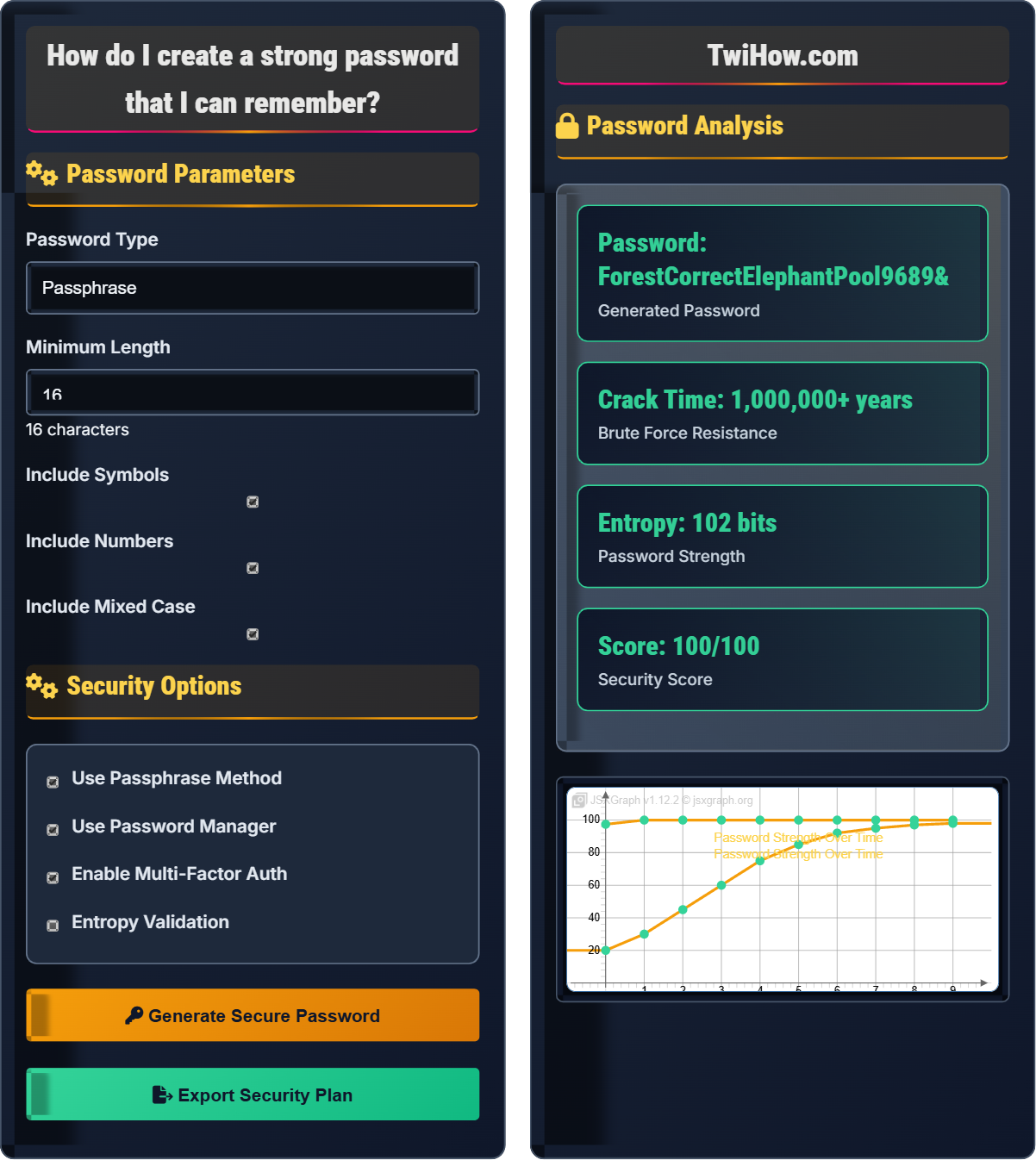
Password Parameters
Security Options
Password Analysis
| Criteria | Requirement | Met | Score |
|---|---|---|---|
| Length | ≥16 chars | ✓ Yes | 20/20 |
| Complexity | Mixed case | ✓ Yes | 15/15 |
| Numbers | Include digits | ✓ Yes | 15/15 |
| Symbols | Include symbols | ✓ Yes | 15/15 |
Password Security Explained
Creating strong, memorable passwords is crucial for online security. The key is balancing complexity with memorability. Strong passwords should be unique, long, and unpredictable. Modern approaches include using passphrases, password managers, and multi-factor authentication to enhance security while maintaining usability.
Key concepts in password security:
Core concepts include:
- Password Entropy: Measure of password unpredictability
- Passphrases: Multi-word passwords for better memorability
- Password Managers: Tools for storing and generating secure passwords
- Multi-Factor Authentication: Additional security layer beyond passwords
- Brute Force Resistance: Time required to crack through guessing
Major password security tools and practices:
- Password Managers: LastPass, 1Password, Bitwarden
- Two-Factor Authentication: Google Authenticator, Authy
- Password Strength Checkers: Online tools for validation
- Browser Password Managers: Built-in storage (Chrome, Firefox)
- Hardware Security Keys: YubiKey for MFA
- Biometric Authentication: Fingerprint, face recognition
- Use Unique Passwords: Never reuse passwords across accounts
- Implement Passphrases: Use multiple unrelated words
- Enable Password Managers: Store and generate secure passwords
- Activate MFA: Add extra security layer
- Avoid Personal Info: Don't use names, birthdays, etc.
- Regular Updates: Change passwords periodically for critical accounts
Password Fundamentals
Password entropy, passphrases, password managers, multi-factor authentication.
Password_Strength = Entropy × Unpredictability × Length_Factor
Where Password_Strength = security level, Entropy = randomness measure.
- Use unique passwords
- Combine multiple methods
- Enable MFA when possible
Creation Methods
Passphrases, random characters, pattern-based, memorable patterns.
- Passphrase method
- Random generation
- Pattern-based creation
- Personalized approach
- Memorability vs. security
- Account sensitivity
- Management complexity
- Recovery options
Password Security Learning Quiz
According to current security recommendations, what is the minimum length for a strong password?
According to current security recommendations, the minimum length for a strong password is 12 characters, though 16 or more is preferred for high-security accounts. Longer passwords exponentially increase the time required for brute force attacks, making them significantly more secure than shorter passwords.
The answer is C) 12 characters.
Password length is the most critical factor in password strength. Each additional character exponentially increases the possible combinations, making brute force attacks exponentially more difficult. Modern security guidelines have evolved from 8 to 12 characters as computing power has increased.
Brute Force Attack: Systematic attempt to guess password by trying all possibilities
Password Entropy: Measure of password unpredictability
Character Space: Set of possible characters in a password
• Length is more important than complexity
• 12+ characters recommended
• 16+ for high-security accounts
• Use passphrases for better memorability
• Focus on length over complexity
• Use password managers for generation
• Using only 8-character passwords
• Prioritizing complexity over length
• Not updating old password standards
Explain the passphrase method for creating strong, memorable passwords. What are the advantages and disadvantages of this approach?
Passphrase Method:
The passphrase method involves creating passwords using multiple unrelated words combined together. For example: "CorrectHorseBatteryStaple" or "PurpleElephant$SwimmingPool#2026".
Advantages:
• Memorable: Easier to remember than random character strings
• Long: Naturally achieves high character length
• Strong: High entropy when words are unrelated
• Fast to Type: Familiar words are quicker to enter
Disadvantages:
• Dictionary Attacks: Vulnerable if words are common phrases
• Length Limitations: Some systems restrict password length
• Complexity: Still needs special characters for some requirements
Best Practices:
• Use 4+ unrelated words
• Add numbers and symbols between words
• Avoid common phrases or song lyrics
• Use a mix of capitalization
The passphrase method provides an excellent balance between security and memorability.
The passphrase method leverages human memory strengths while maintaining security. Our brains are better at remembering meaningful sequences than random strings. By combining unrelated words, we create both length and unpredictability that makes passwords both secure and memorable.
Passphrase: Multi-word password for better security
Dictionary Attack: Attack using word lists to guess passwords
Entropy: Measure of password randomness
• Use unrelated words
• Create memorable sentences
• Use acronym approach
• Substitute characters strategically
• Using common phrases
• Not adding complexity
• Using predictable substitutions
You have 50 online accounts and want to use unique, strong passwords for each. Explain how to implement a password manager strategy, including master password selection, backup methods, and security considerations.
Password Manager Strategy:
1. Master Password Selection:
• Use a strong passphrase (e.g., "PurpleElephant$SwimmingPool#2026!")
• Ensure it's at least 16 characters long
• Include mixed case, numbers, and symbols
• Never reuse this password elsewhere
2. Backup Methods:
• Enable cloud sync with encryption
• Export encrypted backup periodically
• Store backup in secure location (safe deposit box)
• Share recovery information with trusted family member
3. Security Considerations:
• Enable two-factor authentication for the password manager
• Use biometric unlock where available
• Monitor for data breaches
• Regularly update the master password
4. Implementation:
• Start with critical accounts (banking, email)
• Gradually migrate other accounts
• Generate unique, complex passwords for each account
• Enable auto-fill and auto-change features
This strategy provides the highest security while maintaining usability.
Password managers solve the fundamental problem of password security: remembering many unique, complex passwords. The master password becomes the single point of security, so it must be exceptionally strong. The strategy balances convenience with security by centralizing management while distributing unique passwords.
Master Password: Primary password for accessing password manager
Password Manager: Tool for storing and generating passwords
Encryption: Converting data to unreadable format
• Master password must be extremely strong
• Always backup encrypted data
• Enable MFA for the manager
• Use biometric unlock
• Enable breach monitoring
• Sync across devices
• Weak master password
• Not backing up data
• Not enabling MFA
You've discovered you're using the same password for multiple accounts. Create a comprehensive plan to audit and secure your online accounts, including prioritization, replacement strategy, and ongoing maintenance.
Comprehensive Password Security Audit:
Phase 1: Assessment (Week 1):
• List all online accounts
• Identify reused passwords
• Categorize accounts by sensitivity
• Check for data breach exposure
Phase 2: Prioritization:
• Critical: Banking, email, social media
• High: Shopping, subscription services
• Medium: Forums, entertainment
Phase 3: Replacement Strategy:
• Start with critical accounts
• Use password manager to generate unique passwords
• Enable two-factor authentication
• Update security questions
Phase 4: Ongoing Maintenance:
• Monthly password rotation for critical accounts
• Quarterly security review
• Monitor for breach notifications
• Regular backup of password manager
Tools Needed:
• Password manager
• Breach monitoring service (HaveIBeenPwned)
• Two-factor authentication apps
• Secure backup storage
Security audits require systematic approaches to address vulnerabilities. The key is prioritizing critical accounts first and implementing solutions that scale. This approach ensures that the most important accounts are secured first while establishing systems for ongoing security maintenance.
Security Audit: Systematic review of security measures
Account Prioritization: Ranking accounts by importance
Security Maintenance: Ongoing security practices
• Start with critical accounts
• Implement gradually
• Maintain consistent practices
• Use breach monitoring tools
• Create account inventory
• Set calendar reminders
• Trying to fix everything at once
• Not prioritizing critical accounts
• Not implementing ongoing maintenance
Which of the following provides the strongest second factor for multi-factor authentication?
A hardware security key provides the strongest second factor for multi-factor authentication. Unlike SMS, email, or phone calls which can be intercepted or redirected, hardware keys use cryptographic protocols that are nearly impossible to compromise remotely. They provide physical possession-based authentication that is highly resistant to phishing and man-in-the-middle attacks.
The answer is C) Hardware security key.
MFA factors are categorized as something you know (password), something you have (device), and something you are (biometrics). Hardware keys represent the "something you have" factor at its most secure level, using cryptographic protocols that prevent interception or duplication.
Multi-Factor Authentication: Security requiring multiple verification methods
Hardware Security Key: Physical device for authentication
Phishing Attack: Attempt to steal credentials through deception
• Hardware keys are most secure
• Avoid SMS when possible
• Use multiple factors
• Use hardware keys for critical accounts
• Consider backup options
• Enable multiple factors
• Using SMS as primary factor
• Not enabling MFA
• Only using one factor
FAQ
Q: Is it safe to use a password manager?
A: Yes, password managers are safer than not using one:
Security Benefits:
• Generate truly random, complex passwords
• Eliminate password reuse across sites
• Encrypt passwords with military-grade encryption
• Auto-update passwords when sites are breached
Security Measures:
• Use a strong master password
• Enable two-factor authentication
• Choose reputable providers with security audits
• Regular encrypted backups
Risks vs. Alternatives:
• Single point of failure (but better than reuse)
• Cloud provider breach possibility
• However, risk is much lower than weak/reused passwords
Major security organizations recommend password managers as best practice.
Q: How often should I change my passwords?
A: Modern security guidance has changed:
General Accounts:
• Only when there's a known breach
• When required by the service
• No routine rotation needed if passwords are strong
Critical Accounts:
• Financial accounts: Every 3-6 months
• Email accounts: Every 6-12 months
• Administrative accounts: Every 90 days
Trigger Events:
• Any suspected compromise
• Data breach notification
• Suspicious activity detected
Focus: Creating strong, unique passwords is more important than frequent changes.
Q: How do I teach my children about password security?
A: Age-appropriate password education:
Young Children (Ages 6-10):
• Explain why passwords are secret
• Use simple analogies (house key concept)
• Practice typing strong passwords
Teens (Ages 11-17):
• Explain password cracking methods
• Demonstrate password managers
• Show real examples of breaches
Practical Steps:
• Help create their first strong passwords
• Set up a family password manager
• Explain social engineering dangers
• Discuss sharing and privacy
Key Messages:
• Never share passwords
• Use different passwords everywhere
• Question unusual login requests
Start early with simple concepts and build complexity over time.