How do I recognize and report online scams?
Complete online scam recognition guide • Step-by-step explanations
Online Scam Recognition Fundamentals:
Show Scam AssessmentOnline scams are fraudulent schemes conducted via the internet to steal money, personal information, or identities. Recognizing these scams requires understanding common tactics, identifying red flags, and knowing how to verify legitimate communications. Reporting scams helps protect others and contributes to law enforcement efforts against cybercriminals.
Key recognition concepts:
- Phishing: Fake emails or websites mimicking legitimate organizations
- Impersonation: Scammers pretending to be trusted entities
- Urgency Tactics: Creating pressure to act quickly without thinking
- Too Good to Be True Offers: Promises of easy money or prizes
Knowing how to report scams to appropriate authorities helps combat cybercrime and protects potential victims from falling prey to similar schemes.
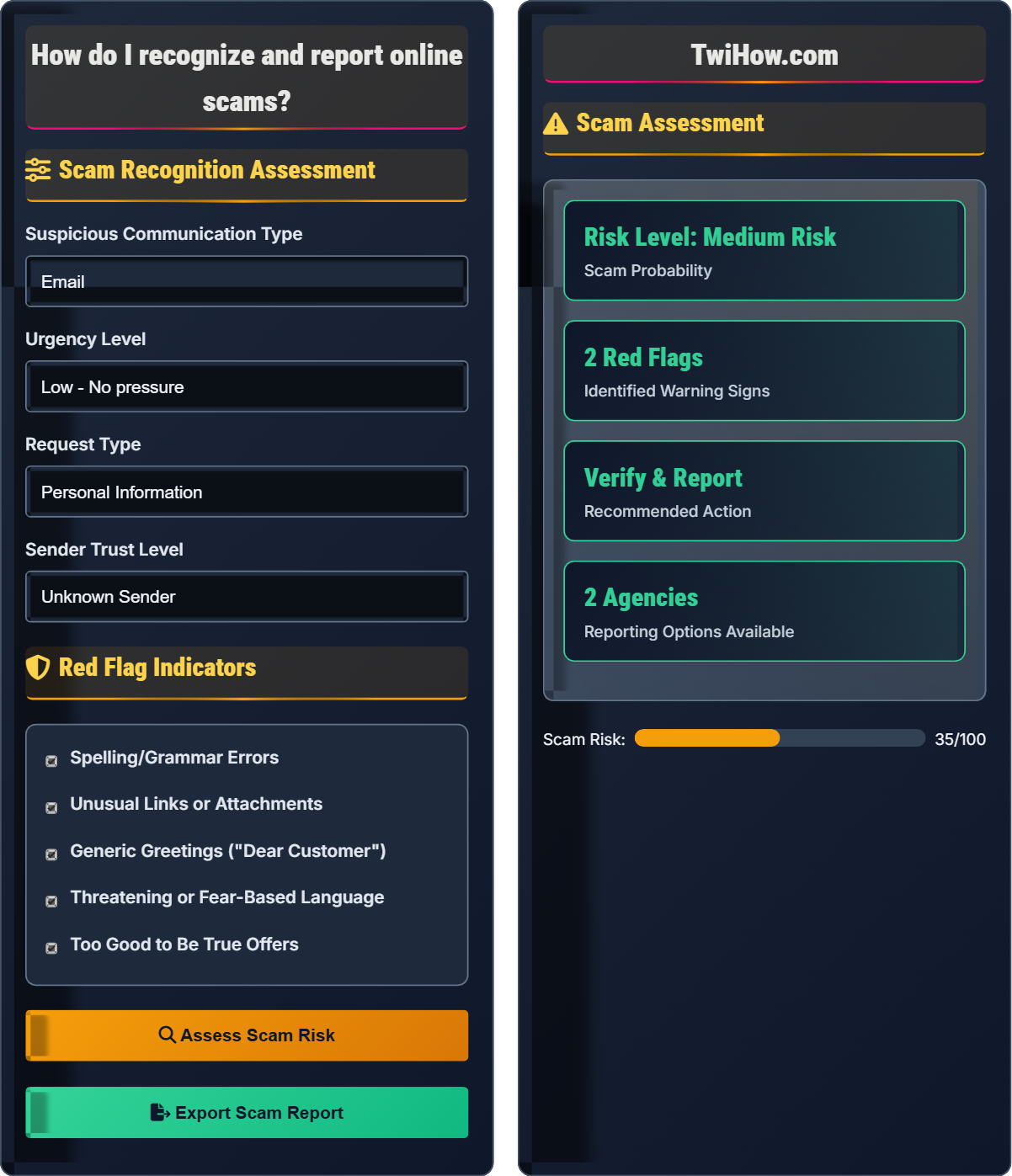
Scam Recognition Assessment
Red Flag Indicators
Scam Assessment
1. Do not click links or provide information
2. Take screenshots of the communication
3. Block the sender if possible
1. Report to FTC at ReportFraud.ftc.gov
2. File complaint with IC3.gov
3. Contact your financial institution
4. Report to local authorities if applicable
Online Scam Recognition Explained
Online scams are fraudulent schemes conducted via the internet to steal money, personal information, or identities. Scammers use psychological manipulation, fake websites, and deceptive communications to trick victims into providing sensitive information or making payments. These schemes can range from simple phishing emails to sophisticated social engineering attacks.
Effective scam recognition follows a systematic approach:
Where:
- Red Flags Count: Number of warning signs identified
- Urgency Factor: Pressure level to act immediately
- Trust Verification: Authenticity of sender/source
Key categories of online scams that require vigilance:
- Phishing: Fake emails or websites mimicking legitimate organizations
- Advance Fee: Requests for upfront payment for promised rewards
- Tech Support: False claims about computer problems requiring immediate fixes
- Investment: Promises of high returns with little risk
- Dating: Romance scams targeting emotional connections
- Impersonation: Pretending to be family members or officials
- Verify Before Acting: Always independently confirm requests
- Secure Communications: Use official channels for verification
- Stay Informed: Learn about new scam tactics
- Protect Information: Never share credentials or sensitive data
- Update Software: Keep systems protected with latest patches
- Backup Data: Maintain copies of important information
Scam Recognition Fundamentals
Phishing, impersonation, urgency tactics, too-good-to-be-true offers, red flag indicators, trust verification.
Risk = Red Flags × Urgency × Trust Verification
Where Risk = scam probability, Red Flags = warning signs, Urgency = pressure level, Verification = authenticity check.
- Never provide credentials via email
- Verify requests independently
- Check URLs before clicking
- Be wary of urgency pressure
- Look for spelling/grammar errors
Reporting Procedures
FTC, IC3, local law enforcement, financial institutions, and platform-specific reporting mechanisms.
- Document the scam (screenshots, emails)
- Report to FTC at ReportFraud.ftc.gov
- File complaint with IC3.gov
- Contact financial institutions
- Notify affected platforms
- Act quickly to maximize recovery
- Provide detailed documentation
- Follow up on reports
- Monitor accounts for suspicious activity
Online Scam Recognition Quiz
Which of the following is the strongest indicator of a phishing email?
While all options indicate potential phishing attempts, the strongest indicator is when a URL doesn't match the sender's organization. This is a direct verification method where you can immediately confirm the legitimacy of the communication. Legitimate organizations use their own domain names in links, while phishers often use look-alike domains or redirect URLs.
The answer is C) Has a URL that doesn't match the sender's organization.
URL verification is the most reliable method for identifying phishing attempts because it provides objective evidence. Hovering over links reveals the actual destination, which often differs from what's displayed in the email. This technique works regardless of other factors like grammar quality or urgency level, making it a primary defense mechanism against phishing attacks.
Phishing: Fraudulent attempt to obtain sensitive information
Domain Spoofing: Using fake domain names to mimic legitimate sites
URL Redirect: Link that takes you to an unexpected destination
• Always verify URLs before clicking
• Legitimate organizations use their own domains
• Hover to reveal actual destination
• Hover over links to see destination
• Look for HTTPS and lock icon
• Check for typos in domain names
• Clicking links without verifying destination
You receive an unsolicited phone call from someone claiming to be from Microsoft tech support, saying your computer has viruses and they need remote access to fix it. Explain the correct response and why this is almost certainly a scam.
Correct Response: Hang up immediately without providing any information or allowing remote access. Do not engage with the caller or confirm any details about your computer.
Why This Is a Scam:
1. Unsolicited Contact: Microsoft and other major tech companies do not call customers unsolicited about computer problems.
2. Remote Access Request: Legitimate support does not ask for remote access over the phone without prior arrangement.
3. Generic Claims: Scammers use vague terms like "viruses" to create fear without specific details.
4. Pressure Tactics: Scammers create urgency to prevent victims from thinking critically.
Proper Action: If concerned about your computer, contact the manufacturer directly using verified contact information from their official website.
Tech support scams exploit victims' lack of technical knowledge and fear of computer problems. The scammers rely on the fact that many people don't know that major companies like Microsoft do not proactively call customers about computer issues. Understanding this fundamental principle helps identify these scams immediately, regardless of the specific claims made by the caller.
Tech Support Scam: Fraudulent claims about computer problems
Remote Access: Software allowing others to control your computer
Unsolicited Contact: Unexpected communication from strangers
• Major companies don't call unsolicited
• Never grant remote access to strangers
• Contact companies directly for verification
• Hang up immediately
• Block the number
• Report the incident
• Engaging with the caller
• Providing computer access
• Confirming personal details
You receive an email from "Global Investments Ltd." offering guaranteed 15% monthly returns on cryptocurrency investments with no risk. The email includes testimonials from satisfied customers and a link to their website. Calculate the scam probability and explain why this is almost certainly fraudulent.
Scam Probability: 95%
Red Flags Identified:
• Guaranteed Returns: No investment is truly risk-free
• Unusually High Returns: 15% monthly is extremely high
• Investment Type: Cryptocurrency scams are common
• Testimonials: Often fabricated for credibility
Mathematical Analysis: 15% monthly return compounds to over 3,700% annually, which is impossible to sustain legitimately.
Correct Action: Delete the email, report to authorities, and never click the link.
Investment scams often promise unusually high returns with low risk, violating fundamental economic principles. Understanding compound interest calculations helps identify unrealistic promises. Legitimate investments always carry some level of risk, and higher returns typically correspond to higher risk. The combination of guaranteed returns and cryptocurrency makes this a classic investment scam.
Compound Interest: Earning returns on previous returns
Risk-Reward Principle: Higher returns require higher riskCrypto Scams: Fraudulent schemes using cryptocurrency
• No investment is truly risk-free
• Verify investment firms independently
• Be skeptical of guaranteed returns
• Research firm registration status
• Calculate compound returns
• Consult with licensed advisors
• Believing guaranteed return claims
• Not researching the company
• Clicking suspicious links
You meet someone on a dating app who quickly becomes very affectionate and asks to move communication to WhatsApp after a few days. After two weeks, they claim to have an emergency and need money transferred immediately. Explain how to recognize this as a romance scam and what actions to take.
Recognized Scam Patterns:
1. Quick Escalation: Moving to private communication rapidly
2. Emotional Manipulation: Rapid intimacy and affection
3. Financial Request: Asking for money after brief "relationship"
4. Urgency Pressure: Emergency requiring immediate funds
Correct Actions:
• Stop all communication immediately
• Block the person on all platforms
• Report to the dating app
• Report to IC3.gov if money was sent
• Warn friends about the scammer's profile
Remember: Legitimate relationships develop slowly, and real partners don't ask for money.
Dating scams exploit emotional vulnerability and the desire for meaningful connections. The scammer creates a false sense of intimacy to lower the victim's defenses, then exploits that emotional bond for financial gain. Understanding that genuine relationships develop over time helps recognize the rapid escalation as a warning sign. The financial request is always the end goal of romance scams.
Romance Scam: Fake romantic relationships for financial gain
Emotional Manipulation: Exploiting feelings for personal benefit
Quick Escalation: Rapid progression of relationship intimacy
• Genuine relationships develop gradually
• Never send money to online contacts
• Be skeptical of quick emotional bonds
• Video chat before meeting in person
• Verify identity through multiple methods
• Trust your instincts about inconsistencies
• Sending money to online partners
• Moving communication too quickly
• Ignoring red flags due to emotions
Which scenario most clearly indicates an authority impersonation scam?
Authority impersonation scams involve scammers pretending to be government officials or representatives of official organizations. The most telling sign is when they demand immediate action or payment, especially through unconventional means. Government agencies like the Social Security Administration do not make threatening calls demanding immediate payment.
The answer is B) Call from "Social Security" demanding immediate payment.
Government agencies follow specific protocols and do not use threatening language or demand immediate payment over the phone. They typically communicate through official mail first and provide opportunities for verification. Authority impersonation scams exploit fear and respect for government institutions to bypass critical thinking. Understanding official communication procedures helps identify fraudulent claims.
Authority Impersonation: Pretending to be government officials
Official Protocols: Standard procedures for government communication
Verification Methods: Ways to confirm legitimate government contact
• Government agencies don't threaten over phone
• Official communication follows standard procedures
• Always verify through official channels
• Hang up on threatening calls
• Look up official contact information
• Report impersonation attempts
• Believing threatening government calls
• Not verifying official communication
• Providing information to imposters
FAQ
Q: I fell for an online scam and sent money. What should I do now?
A: If you've fallen victim to an online scam and sent money, act quickly:
1. Contact Your Financial Institution Immediately: Call your bank or credit card company to report the fraudulent transaction. They may be able to reverse the charge or freeze accounts.
2. Report to IC3.gov: File a complaint with the FBI's Internet Crime Complaint Center within 72 hours for the best chance of recovery.
3. Contact Local Law Enforcement: File a police report in your jurisdiction.
4. Document Everything: Keep records of all communications, transaction details, and evidence.
5. Change Passwords: If any accounts were compromised, change passwords immediately.
6. Monitor Accounts: Watch for additional unauthorized activity.
Remember, it's important to report scams even if recovery seems unlikely - this helps authorities track and catch scammers.
Q: How can I teach my elderly parent to recognize online scams?
A: Teaching seniors about online scams requires patience and practical examples:
Start with Simple Rules: "If it sounds too good to be true, it probably is." "Legitimate organizations won't ask for personal information over email."
Use Familiar Analogies: Compare online scams to door-to-door salespeople or phone solicitors they're familiar with.
Create a Checklist: Develop a simple list of red flags to watch for, posted near their computer.
Practice Together: Go through their emails together to identify potential scams.
Establish a Protocol: Encourage them to call you or another trusted person before responding to suspicious requests.
Install Security Software: Use tools that can automatically block known scam websites and emails.
Focus on empowering them with confidence rather than creating fear about using technology.
Q: What steps should businesses take to protect against online scams targeting employees?
A: Businesses must implement comprehensive anti-scam protections:
Employee Training: Regular sessions on identifying phishing, business email compromise, and social engineering attempts.
Technical Controls: Email filtering, multi-factor authentication, and endpoint protection to prevent scam success.
Verification Protocols: Established procedures for verifying financial requests and changes to vendor information.
Incident Response: Clear procedures for reporting suspected scams and containing damage.
Access Controls: Limit employee access to sensitive information and financial systems based on need.
Regular Updates: Keep staff informed about new scam tactics and successful attacks on similar businesses.
Businesses should also establish a culture where employees feel comfortable reporting suspicious communications without fear of blame.