How Do I Securely Dispose of Old Hardware?
Complete security guide • Step-by-step explanations
Secure Hardware Disposal:
Show Disposal CalculatorSecurely disposing of old hardware involves properly destroying data stored on devices to prevent unauthorized access. This includes data wiping, physical destruction, and proper recycling of electronic components. Improper disposal can lead to data breaches and environmental hazards.
Following proper disposal procedures protects sensitive information and ensures environmental responsibility.
Key methods:
- Data Wiping: Software-based data removal
- Physical Destruction: Degaussing, shredding, drilling
- Professional Services: Certified data destruction
- Recycling: Environmentally responsible disposal
Successfully securing hardware disposal requires understanding different storage technologies and selecting appropriate destruction methods based on security requirements and device type.
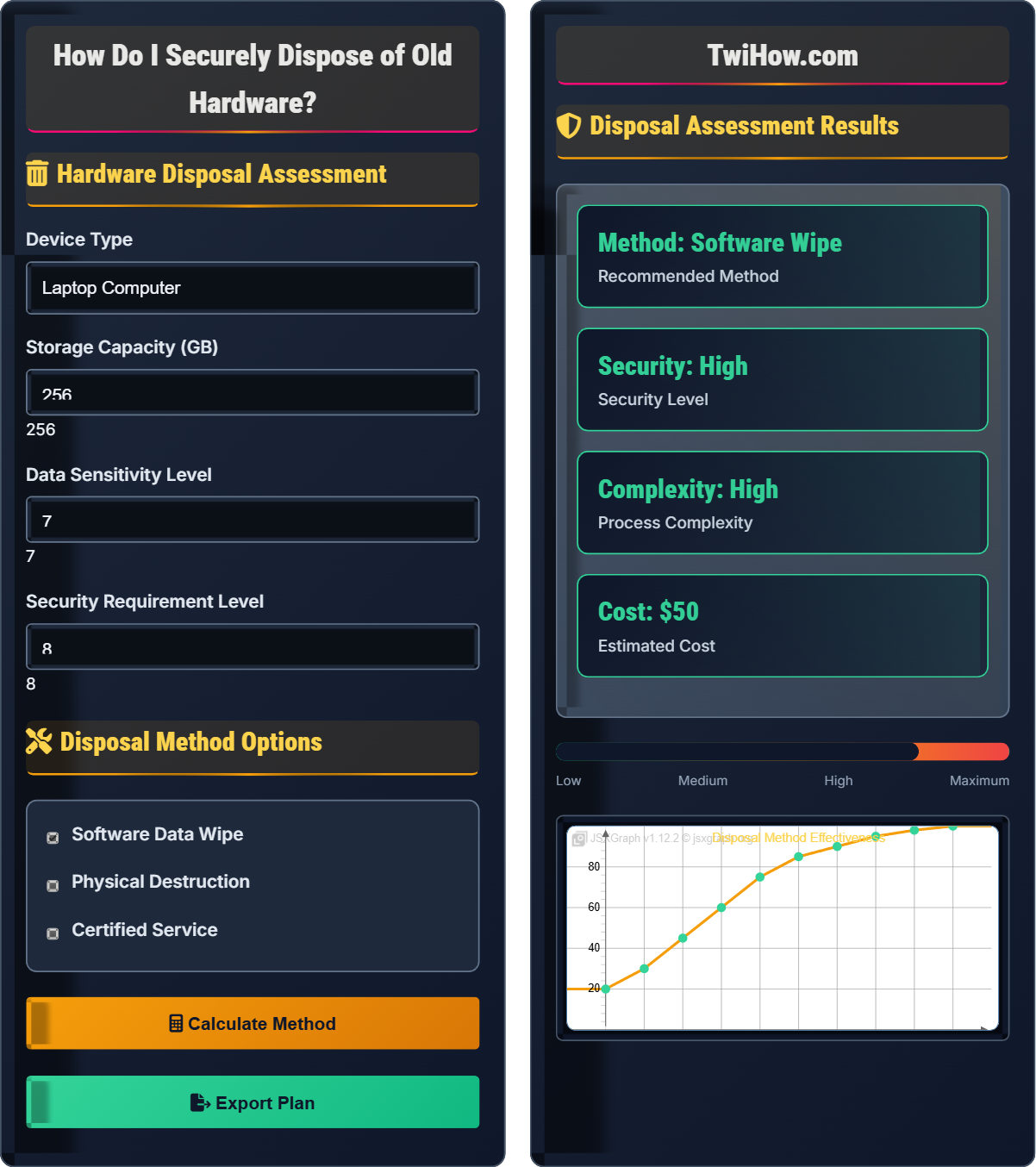
Hardware Disposal Assessment
Disposal Method Options
Disposal Assessment Results
| Method | Security | Cost | Time |
|---|---|---|---|
| Software Wipe | High | $50 | 2-4 hours |
| Physical Destruction | Maximum | $100 | 30 minutes |
| Certified Service | Maximum | $150 | 1 week |
| Factory Reset | Low | $0 | 1 hour |
Secure Hardware Disposal Explained
Secure hardware disposal is the process of permanently destroying data stored on electronic devices to prevent unauthorized recovery. This involves multiple steps to ensure that sensitive information cannot be accessed even by skilled forensic experts.
Security Level = Σ(Method Effectiveness_i × Implementation Quality_i × Verification Success_i)
Where:
- Security Level: Overall effectiveness of disposal method
- Method Effectiveness: Probability of successful data destruction
- Implementation Quality: Proper execution of disposal method
- Verification Success: Confirmation of successful destruction
Various methods for secure hardware disposal:
- Software Wiping: Overwrite data with random patterns using certified tools
- Degaussing: Demagnetize magnetic storage devices
- Physical Destruction: Shredding, drilling, or disintegration of storage media
- Certified Services: Professional data destruction with certificates
- Cryptographic Erasure: Destroy encryption keys for encrypted drives
- Factory Reset: Basic reset (not sufficient for sensitive data)
- Preparation: 1-2 days (inventory, backup, planning)
- Execution: 2-4 hours (wiping) or 30 minutes (physical destruction)
- Verification: 1-2 hours (checking and documentation)
- Certification: 1 day (for professional services)
- Recycling: 1-3 days (proper e-waste disposal)
Disposal Methods
Software wiping, physical destruction, degaussing, certified services, cryptographic erasure.
Security Level = Σ(Method Effectiveness × Implementation Quality × Verification Success)
Where Security Level = overall disposal effectiveness, Effectiveness = method success rate, Quality = implementation.
- Match method to data sensitivity
- Verify destruction success
- Document the process
Device-Specific Procedures
Laptops, smartphones, servers, SSDs, HDDs, memory cards, USB drives.
- Identify storage technology
- Assess data sensitivity
- Select appropriate method
- Execute procedure
- Verify success
- Document completion
- Research device-specific requirements
- Use certified tools
- Follow industry standards
- Consider environmental impact
Disposal Method Comparison
| Method | Security | Cost | Time | Reusability |
|---|---|---|---|---|
| Software Wipe | High | Low | Medium | Yes |
| Degaussing | Maximum | Medium | Fast | No |
| Physical Destruction | Maximum | Low | Fast | No |
| Certified Service | Maximum | High | Slow | No |
Device Type Selection
1. Back up important data
2. Use software like DBAN to wipe the drive
3. Perform multiple overwrites for sensitive data
4. Physically destroy the drive if required
5. Recycle through certified e-waste facility
Destruction Process Steps
Create an inventory of all devices to be disposed of. Identify the type of storage media, capacity, and sensitivity level of data contained. Back up any data that needs to be retained.
Based on data sensitivity and device type, select the appropriate destruction method. For highly sensitive data, physical destruction or degaussing is recommended. For less sensitive data, software wiping may be sufficient.
Carry out the selected destruction method. For software wiping, use certified tools and follow manufacturer guidelines. For physical destruction, ensure complete destruction of storage media. For degaussing, use appropriate equipment.
Verify that data destruction was successful. This may involve testing tools for software wipes or visual inspection for physical destruction. Document the verification process.
Create detailed records of the disposal process, including methods used and verification results. Properly recycle the hardware through certified e-waste facilities to ensure environmental compliance.
Industry Standards
Hardware Disposal Knowledge Quiz
Which of the following disposal methods provides the HIGHEST level of security for sensitive data?
Physical destruction provides the highest level of security because it completely destroys the storage media, making data recovery impossible. While factory resets, single-pass wipes, and cryptographic erasure can be effective, they all carry some risk of data recovery by skilled forensic experts. Physical destruction eliminates this risk entirely.
The answer is C) Physical destruction.
Understanding the security effectiveness of different disposal methods is crucial for protecting sensitive information. Physical destruction is the gold standard because it removes all traces of data storage media. Other methods rely on overwriting or encryption, which can potentially be reversed by determined attackers with sufficient resources and expertise.
Physical Destruction: Complete destruction of storage media to prevent data recovery
Software Wipe: Overwriting data with random patterns
Forensic Recovery: Advanced techniques to recover deleted data
• Match method to data sensitivity
• Physical destruction is most secure
• Verify destruction success
• Use certified tools for software wiping
• Drill multiple holes through SSDs
• Document the destruction process
• Assuming factory reset is sufficient
• Not verifying destruction success
• Improper physical destruction techniques
Explain the differences between securely disposing of SSDs versus traditional HDDs. Why do different approaches apply to each storage technology?
HDD Disposal:
• Magnetic storage technology allows for traditional wiping methods
• Multiple overwrites can effectively scramble data patterns
• Degaussing is effective for magnetic media
• Physical destruction requires drilling through platters
SSD Disposal:
• Flash storage uses wear leveling and over-provisioning
• Traditional wiping may not reach all data areas
• Degaussing is ineffective on flash memory
• Physical destruction requires crushing or shredding entire drive
TRIM Command: Modern SSDs support TRIM, which can help sanitize data, but this requires proper implementation.
Secure Erase: SSDs have built-in secure erase commands that are more effective than software wiping.
The fundamental difference lies in storage technology: magnetic vs. flash memory, requiring different approaches for complete data destruction.
The storage technology underlying different devices requires tailored disposal approaches. HDDs use magnetic storage where data is stored in predictable patterns that can be overwritten. SSDs use flash memory with wear leveling that moves data around the drive, making software wiping less reliable. Understanding these technological differences is essential for selecting appropriate disposal methods and achieving complete data destruction.
Wear Leveling: SSD technology that distributes writes evenly across memory cells
Over-provisioning: Extra storage space reserved for SSD maintenance
TRIM Command: SSD command that marks blocks for deletion
• Use device-specific methods
• SSDs require different techniques than HDDs
• TRIM and Secure Erase are SSD-specific
• Use manufacturer's secure erase tool for SSDs
• Drill multiple holes through SSD circuit boards
• For HDDs, ensure platters are damaged
• Using HDD methods on SSDs
• Not accounting for over-provisioning
• Assuming software wipe works on all SSDs
A company needs to dispose of 50 laptops containing confidential client data. The laptops have 500GB SSDs and the company has strict security requirements. Develop a comprehensive disposal plan considering security, cost, and compliance requirements.
Assessment Phase:
• Inventory all 50 laptops and document specifications
• Classify data sensitivity level (confidential client data)
• Review compliance requirements (SOX, HIPAA, etc.)
Method Selection:
• For SSDs with confidential data: Physical destruction recommended
• Alternative: Secure erase + physical destruction
• Consider certified professional service for compliance
Execution Plan:
• Engage NAID AAA certified destruction service
• Secure transport of devices to facility
• Witness destruction process if required
• Obtain destruction certificates
Verification and Documentation:
• Receive certificates of destruction
• Update asset inventory
• File certificates for compliance audits
Cost Estimate: $100-150 per device = $5,000-7,500 total
Corporate hardware disposal requires balancing security, cost, and compliance. The sensitivity of data (confidential client information) necessitates physical destruction. The volume (50 devices) makes professional services cost-effective. Compliance requirements demand proper documentation. This example demonstrates how multiple factors influence disposal decisions in enterprise environments.
NAID AAA: National Association for Information Destruction certification
Compliance Requirements: Legal and regulatory obligations
Asset Inventory: List of company-owned devices
• Match security to data sensitivity
• Document the process
• Consider professional services for volume
• Use certified vendors for compliance
• Witness destruction for high-value data
• Maintain detailed records
• Underestimating security requirements
• Not considering compliance obligations
• Poor documentation practices
You need to dispose of an old smartphone that contained banking apps, photos, and personal communications. Compare the effectiveness of different disposal methods for mobile devices and recommend the best approach for this scenario.
Mobile Device Disposal Methods:
Factory Reset:
• Pros: Easy, preserves device value
• Cons: Not sufficient for sensitive data, may leave traces
• Effectiveness: Low for sensitive data
Encryption + Factory Reset:
• Pros: More secure, relatively easy
• Cons: Still relies on OS implementation
• Effectiveness: Medium
Physical Destruction:
• Pros: Maximum security, complete destruction
• Cons: Destroys device, requires special tools
• Effectiveness: Maximum
Professional Service:
• Pros: Certified, compliant, documented
• Cons: Cost, logistics
• Effectiveness: Maximum
Recommendation for Scenario: For a smartphone with banking apps, photos, and personal communications, physical destruction is recommended. The sensitive nature of the data warrants maximum security. If professional service is unavailable, physically destroy the device by removing the battery and damaging the internal storage chips beyond repair.
Mobile devices present unique challenges for secure disposal. Their compact design, multiple storage areas (internal memory, SIM card, cloud sync), and proprietary systems make thorough data destruction complex. The variety of sensitive data (financial, personal, communications) increases the security requirements. This analysis demonstrates how to evaluate different methods based on security effectiveness, practicality, and the specific sensitivity of stored data.
Factory Reset: Built-in device restoration function
Cloud Sync: Automatic data synchronization to remote servers
Internal Storage: Device's primary storage memory
• Mobile devices require special consideration
• Cloud data must be cleared separately
• Physical destruction is most secure
• Sign out of all accounts first
• Remove SIM and SD cards
• Use encryption before resetting
• Assuming factory reset is sufficient
• Not considering cloud backups
• Forgetting removable storage
Which industry standard is most commonly referenced for data sanitization in corporate environments?
NIST SP 800-88 ("Guidelines for Media Sanitization") is the most widely recognized and implemented standard for data sanitization in corporate environments. It provides comprehensive guidance on purging, sanitizing, and disposing of various types of storage media. While ISO 27001 includes data disposal requirements, NIST SP 800-88 is specifically focused on media sanitization techniques and procedures.
The answer is B) NIST SP 800-88.
Industry standards provide authoritative guidance for implementing secure practices. NIST SP 800-88 specifically addresses media sanitization with detailed procedures for different storage technologies and security levels. Understanding these standards helps organizations implement defensible security practices that meet regulatory expectations and industry best practices. The standard provides a framework for making informed decisions about disposal methods based on data sensitivity and security requirements.
NIST SP 800-88: National Institute of Standards and Technology guideline for media sanitization
Media Sanitization: Process of removing data from storage media
Defensible Security: Practices that can be justified to auditors/regulators
• Follow recognized standards
• Document compliance efforts
• Regularly update procedures
• Reference NIST standards for guidance
• Maintain compliance documentation
• Train staff on procedures
• Not following established standards
• Poor documentation practices
• Inadequate staff training
FAQ
Q: Is it safe to donate or sell my old computer after doing a factory reset?
A: A factory reset alone is NOT sufficient for safely donating or selling a computer that contained sensitive data. Factory resets simply remove file references but often leave recoverable data on the drive.
For Safe Donation/Sale:
1. Back up important files before starting
2. Use disk wiping software like DBAN or manufacturer tools
3. Perform multiple overwrites for sensitive data
4. Physically inspect the drive after wiping
5. Remove all personal accounts and credentials
For maximum security, consider physical destruction of the drive and replacing it with a new one.
Q: What are the legal requirements for disposing of business hardware?
A: Legal requirements vary by jurisdiction and data type, but common requirements include:
Federal Requirements:
• GLBA (Gramm-Leach-Bliley Act): Financial institutions must protect customer records
• HIPAA: Healthcare organizations must safeguard protected health information
• Sarbanes-Oxley: Public companies must retain financial records appropriately
State Requirements:
• Electronic waste laws: Proper recycling of electronic components
• Data breach notification: Requirements if disposal leads to exposure
Best Practices:
• Document disposal procedures
• Use certified destruction services
• Obtain certificates of destruction
• Retain records for required periods
Consult with legal counsel to ensure compliance with all applicable regulations in your jurisdiction.
Q: Can data really be recovered from a "wiped" hard drive?
A: Yes, data can sometimes be recovered from a "wiped" hard drive, depending on the wiping method used:
Simple Deletion: Data is easily recoverable since only file references are removed
Single-Pass Wipe: Data may be recoverable with advanced techniques
Multi-Pass Wipe: Makes recovery extremely difficult but not impossible
Physical Destruction: Makes recovery impossible
Factors Affecting Recovery:
• Wiping Method: Number of overwrite passes
• Storage Technology: HDD vs SSD behave differently
• Equipment Used: Professional tools can recover from more difficult cases
• Time Elapsed: Freshly wiped drives are more recoverable
For truly secure disposal, physical destruction or certified professional services are recommended for sensitive data.