How Do I Verify the Integrity of Downloaded Software?
Complete security guide • Step-by-step explanations
Software Integrity Verification:
Show Verification ToolVerifying software integrity ensures that downloaded files have not been tampered with or corrupted during transmission. This process involves comparing digital fingerprints (checksums) or verifying digital signatures to confirm that the software matches the original publisher's version. Integrity verification is crucial for preventing malware infections and ensuring software authenticity.
Proper verification protects against supply chain attacks and man-in-the-middle tampering.
Key methods:
- Checksum Verification: Comparing file hashes (MD5, SHA-256, SHA-512)
- Digital Signatures: Cryptographic verification of publisher authenticity
- Certificate Checking: Validating code signing certificates
- Hash Comparison: Matching computed hashes with published values
- Signature Validation: Verifying cryptographic signatures
- Reputation Checking: Using security vendor databases
Successfully verifying software integrity requires understanding different verification methods and implementing appropriate techniques based on software type and security requirements.
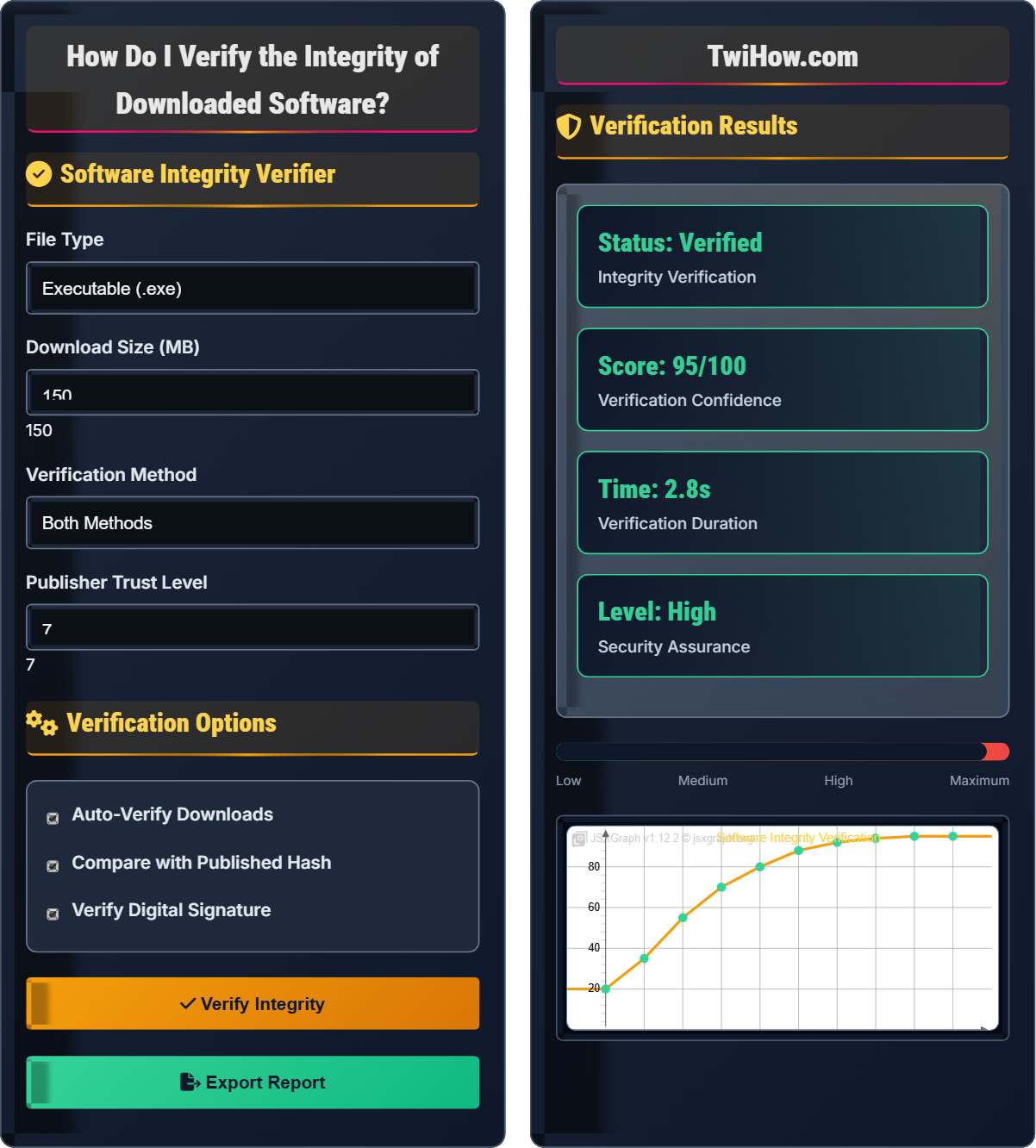
Software Integrity Verifier
Verification Options
Verification Results
| Method | Result | Confidence | Time |
|---|---|---|---|
| Checksum | ✓ Match | High | 0.8s |
| Signature | ✓ Valid | High | 1.2s |
| Certificate | ✓ Trusted | Medium | 0.4s |
| Reputation | ✓ Clean | High | 0.0s |
Software Integrity Verification Explained
Software integrity verification is the process of ensuring that downloaded software has not been modified, corrupted, or tampered with since its publication. This involves using cryptographic methods to confirm that the file received matches exactly the file published by the legitimate source. Integrity verification is essential for preventing malware infections and ensuring software authenticity.
Where:
- Valid Methods: Number of verification methods that pass
- Total Methods: Total number of verification methods attempted
- Integrity Score: Overall confidence in file integrity
Key methods for software integrity verification:
- Checksum Verification: Hash comparison using MD5, SHA-256, or SHA-512
- Digital Signatures: Cryptographic verification of publisher authenticity
- Certificate Validation: Checking code signing certificate trustworthiness
- Reputation Checking: Consulting security vendor databases
- Hash Comparison: Matching computed hashes with published values
- Signature Validation: Verifying cryptographic signatures
- File Analysis: Scanning for malware and threats
- Source Verification: Confirming download source authenticity
- Before Download: Verify source and check reputation
- During Download: Monitor download process
- After Download: Perform integrity verification
- Before Installation: Final verification and scan
- Ongoing: Regular verification of critical software
Verification Methods
Checksum verification, digital signatures, certificate validation, reputation checking.
Integrity Score = (Valid Methods / Total Methods) × 100
Where Integrity Score = overall confidence, Valid Methods = passed verification methods, Total Methods = all attempted methods.
- Always verify before installation
- Use multiple verification methods
- Trust official sources only
Verification Process
Executables, installers, archives, packages, mobile apps, scripts.
- Download software from official source
- Obtain official checksum/signature
- Calculate local hash
- Compare hashes
- Verify digital signature
- Validate certificate
- Scan for malware
- Install if verified
- Verify source authenticity
- Use secure connections
- Store checksums securely
- Regular verification updates
Software Integrity Verification Process
| Method | Algorithm | Security Level | Speed | Complexity |
|---|---|---|---|---|
| MD5 | MD5 Hash | Low | Fast | Simple |
| SHA-1 | SHA-1 Hash | Low | Fast | Simple |
| SHA-256 | SHA-256 Hash | High | Medium | Simple |
| SHA-512 | SHA-512 Hash | Very High | Medium | Simple |
| Digital Signature | Asymmetric Crypto | Very High | Slow | Complex |
| Certificate | PKI Verification | High | Medium | Complex |
Verification Method Selection
1. Hash Calculation: Compute hash of downloaded file
2. Official Hash: Obtain published hash from source
3. Comparison: Verify hashes match exactly
4. Algorithms: MD5, SHA-256, SHA-512, SHA-3
5. Tools: Command-line utilities, GUI tools
6. Limitations: Doesn't verify publisher authenticity
Verification Tools and Structure
• Windows: certUtil, PowerShell Get-FileHash
• Linux/macOS: md5sum, sha256sum, openssl
• Multi-platform: 7-Zip, HashTab
• Automation: Batch scripts, shell scripts
• Integration: CI/CD pipeline verification
• HashTab: Explorer integration for hash calculation
• QuickSFV: Checksum verification utility
• Everything: File search with hash verification
• Antivirus: Real-time scanning and verification
• Security Suites: Integrated verification features
• VirusTotal: Multi-engine malware scanning
• HashCheck: Online hash verification
• Security Databases: Reputation checking
• CDN Verification: Download integrity
• Code Repositories: Built-in verification
• Windows: Authenticode, SmartScreen
• macOS: Gatekeeper, Notarization
• Linux: Package manager verification
• Mobile: App store verification
• Browser: Download protection
• Platform Compatibility: Ensure tools work on your OS
• Algorithm Support: Verify required hash algorithms
• Automation Capability: Batch processing support
• Integration: Workflow integration options
• Security: Tool integrity and trustworthiness
Verification Process Steps
Confirm you're downloading from the official source. Check the URL, verify the publisher, and ensure you're using HTTPS. Look for official download pages and avoid third-party mirrors when possible.
Monitor the download for any interruptions or corruption. Use reliable download managers and ensure stable internet connection. Verify the file size matches expectations.
Compute the hash of the downloaded file using the appropriate algorithm (usually SHA-256 for modern software). Use trusted tools and verify the calculation process.
Compare the calculated hash with the official hash published by the software vendor. Ensure the official hash comes from a trusted source.
Check the digital signature of the software to verify publisher authenticity. Ensure the signing certificate is valid and trusted.
Perform any additional checks such as antivirus scanning and reputation verification before installation.
Software Integrity Verification Timeline
Hash Examples and Verification
a1b2c3d4e5f6789012345678901234567890abcdef1234567890abcdef123456
abcdef1234567890abcdef1234567890
• Calculated hash matches published hash
• File integrity confirmed
• No tampering detected
• Safe to proceed with installation
• Calculated hash does not match
• File may be corrupted or tampered
• Do not install this file
• Download from official source again
Software Integrity Verification Quiz
Which hash algorithm provides the highest security for software integrity verification?
SHA-256 provides the highest security among the options for software integrity verification. MD5 and SHA-1 have known collision vulnerabilities that make them unsuitable for security purposes. CRC32 is not a cryptographic hash and is not secure against intentional modification. SHA-256 is currently the recommended standard for software integrity verification.
The answer is C) SHA-256.
Hash algorithms are ranked by their resistance to collision attacks (where two different files produce the same hash). MD5 and SHA-1 are considered broken for security purposes due to discovered collision vulnerabilities. SHA-256 belongs to the SHA-2 family, which remains secure against known attacks. The length of the hash (256 bits) provides sufficient security against brute-force attacks.
Hash Algorithm: Function that produces fixed-length output from input
Collision: Two different inputs producing same hash output
Security Verification: Confirming file hasn't been tampered
• Use SHA-256 or higher
• Avoid MD5 and SHA-1
• Verify hash source
• Use official hash sources
• Verify through multiple channels
• Use command-line tools for automation
• Using outdated hash algorithms
• Not verifying hash source
• Accepting mismatched hashes
Explain how digital signatures work in software verification and why they're more secure than checksums alone.
How Digital Signatures Work:
• Key Generation: Publisher generates public-private key pair
• Signing Process: Publisher hashes software and encrypts hash with private key
• Signature Creation: Creates digital signature attached to software
• Verification: Recipient uses publisher's public key to decrypt signature
• Hash Comparison: Decrypts signature and compares with computed hash
Why More Secure Than Checksums:
• Authenticity: Confirms software came from legitimate publisher
• Non-Repudiation: Publisher cannot deny signing the software
• Integrity: Detects any modification to signed software
• Certificate Validation: Verifies publisher's identity through PKI
Process Details:
1. Code Signing: Publisher signs executable with private key
2. Timestamping: Adds time stamp to signature
3. Certificate Chain: Validates through trusted CA hierarchy
4. Revocation Check: Verifies certificate hasn't been revoked
Limitations:
• Compromised Keys: If private key stolen, signatures can be forged
• Expired Certificates: Old signatures may be rejected
• Chain Trust: Depends on trust in certificate authorities
Best Practices:
• Combine Methods: Use both signatures and checksums
• Verify Certificate: Check signing certificate validity
• Check Revocation: Verify certificate hasn't been revoked
• Multi-Vendor: Use multiple verification sources
Digital signatures provide both integrity and authenticity verification, making them superior to checksums alone.
Digital signatures solve the authenticity problem that checksums alone cannot address. While checksums verify that a file hasn't changed, they don't verify who created the file. Digital signatures use asymmetric cryptography to bind the publisher's identity to the software, ensuring both integrity and authenticity. This is crucial for preventing supply chain attacks where malicious actors substitute legitimate software with compromised versions.
Digital Signature: Cryptographic verification of authenticity
Public-Private Key: Asymmetric encryption key pair
PKI: Public Key Infrastructure for certificate management
• Verify certificate validity
• Check revocation status
• Use multiple verification methods
• Check certificate details
• Verify timestamp
• Use OS verification tools
• Accepting unsigned software
• Not checking certificate validity
• Ignoring revocation status
You've downloaded a software installer and received a checksum from the official website. The calculated hash doesn't match. What should you do and why?
Immediate Actions:
• DO NOT INSTALL: Stop any installation process immediately
• Delete File: Remove the downloaded file from your system
• Re-download: Download the software again from the official source
• Verify Source: Confirm you're on the official website
Investigation Steps:
• Double-Check: Recalculate the hash to ensure no calculation error
• Compare Sources: Verify checksum from multiple official sources
• Check Website: Look for security notices or updates
• Security Scan: Scan the mismatched file if kept for analysis
Reasons for Mismatch:
• Man-in-the-Middle Attack: Attacker modified file during download
• Website Compromise: Official site was hacked
• Download Corruption: File was corrupted during transfer
• Version Difference: Different version than expected
• Hash Publication Error: Wrong hash published by vendor
Re-download Process:
1. Secure Connection: Ensure HTTPS connection to official site
2. Official Source: Verify URL matches official domain
3. Correct Version: Confirm you're downloading the right version
4. Hash Verification: Calculate and compare hash immediately
5. Signature Check: Verify digital signature if available
Additional Security Measures:
• Antivirus Scan: Scan downloaded file before installation
• Reputation Check: Use VirusTotal or similar service
• Network Security: Use trusted network for downloads
• Backup: Maintain system backups before installation
When to Contact Vendor:
• Repeated Failures: Multiple mismatches with same software
• Website Issues: Suspicious content on official site
• Security Concerns: Signs of compromise or attack
Never Ignore Hash Mismatches: A hash mismatch indicates the file has been altered and should never be installed. This could be due to corruption or malicious modification.
Hash mismatches are a critical security indicator that should never be ignored. The mismatch could indicate various issues from simple download corruption to sophisticated supply chain attacks. The immediate response should always be to not install and investigate. This scenario demonstrates why integrity verification is crucial - it catches problems that might otherwise lead to system compromise.
Hash Mismatch: Calculated hash differs from expected hash
Supply Chain Attack: Attack on software distribution process
Man-in-the-Middle: Interception of communication between parties
• Never install mismatched files
• Always verify before installing
• Re-download from official source
• Keep original checksum for reference
• Use secure download connections
• Verify source authenticity
• Installing mismatched files anyway
• Not investigating the cause
• Ignoring security warnings
Compare the software verification processes for Windows, macOS, and Linux. What are the platform-specific tools and methods?
Windows Verification:
• Authenticode: Built-in signature verification system
• SmartScreen: Reputation-based download filtering
• certUtil: Command-line hash calculation tool
• PowerShell: Get-FileHash cmdlet for hash verification
• Properties Dialog: Signature tab shows verification details
• Security Center: Integrated malware and reputation checking
macOS Verification:
• Gatekeeper: Automatic verification of downloaded apps
• Notarization: Apple's security checking service
• codesign: Command-line tool for signature verification
• spctl: Command-line tool for assessment verification
• Finder: Displays verification status for apps
• System Integrity: Built-in protection mechanisms
Linux Verification:
• Package Managers: apt, yum, pacman with built-in verification
• GPG: GNU Privacy Guard for signature verification
• Hash Tools: md5sum, sha256sum, sha512sum for checksums
• AppImage: Self-contained applications with verification
• Snap/Flatpak: Sandboxed packages with built-in verification
• Repositories: Signed package repositories
Common Verification Steps:
• Download: From official, trusted sources
• Hash Verification: Compare calculated with published hash
• Signature Check: Verify digital signature validity
• Certificate Validation: Confirm signing certificate trust
• Reputation Scan: Check with security vendors
• Installation: Verify before running software
Platform-Specific Advantages:
• Windows: Integrated tools and wide software support
• macOS: Automatic verification and Apple's notarization
• Linux: Strong package management and open verification
Platform-Specific Challenges:
• Windows: Large attack surface, many legacy tools
• macOS: Closed ecosystem, limited customization
• Linux: Fragmented ecosystem, varying security levels
Best Practices Across Platforms:
• Use Official Sources: Download from vendor's official website
• Verify Multiple Ways: Combine hash, signature, and reputation checks
• Stay Updated: Keep verification tools and OS updated
• Trust but Verify: Don't rely solely on platform protections
Each platform provides built-in verification capabilities, but users should understand and utilize multiple verification methods for maximum security.
Different operating systems implement verification differently based on their architecture and security models. Windows emphasizes code signing and reputation systems, macOS focuses on sandboxing and notarization, and Linux relies on package management and open-source verification. Understanding platform-specific tools helps users implement appropriate verification strategies for their environment.
Authenticode: Windows code signing technology
Gatekeeper: macOS application verification system
Package Manager: Software installation and verification tool
• Use platform-specific tools
• Verify through multiple methods
• Keep tools updated
• Learn OS-specific commands
• Use built-in security features
• Combine multiple verification methods
• Relying only on OS protections
• Not using platform tools
• Ignoring verification altogether
What is the most important step in software integrity verification?
Obtaining the official hash from a trusted source is the most important step in software integrity verification. If you get the wrong hash from an untrusted or compromised source, the entire verification process becomes meaningless. You could verify that the file matches the wrong hash and think it's safe when it's actually compromised. The integrity of the verification process depends entirely on the trustworthiness of the reference hash.
The answer is C) Obtaining the official hash from a trusted source.
This question highlights the critical importance of trust in the verification process. The verification chain is only as strong as its weakest link. If the reference hash itself is compromised or incorrect, all subsequent verification steps are worthless. This demonstrates why source verification is fundamental to security - you must trust the source of truth before you can trust the verification process.
Reference Hash: Official hash used for comparison
Trust Chain: Series of trusted entities in verification
Verification Process: Steps to confirm file integrity
• Verify hash source authenticity
• Use official publisher sources
• Cross-reference when possible
• Check multiple official sources
• Use HTTPS for hash retrieval
• Verify publisher identity
• Getting hash from unofficial sources
• Not verifying hash source
• Assuming hash is correct
FAQ
Q: How can I verify software integrity on my computer without command-line tools?
A: There are several GUI-based tools for verifying software integrity:
Windows GUI Tools:
• HashTab: Adds hash calculation to file properties dialog
• QuickSFV: Simple checksum verification utility
• 7-Zip: Can calculate checksums for various algorithms
• PowerShell ISE: Graphical PowerShell with verification commands
macOS GUI Tools:
• Digest Checker: Menu bar app for hash calculations
• Hashgen: Simple drag-and-drop hash calculator
• Terminal: Built-in command-line with Finder integration
• Security & Privacy: Built-in verification for downloaded apps
Multi-Platform GUI Tools:
• HashMyFiles: File hash calculator for Windows
• GtkHash: Cross-platform hash calculation tool
• PeaZip: Archive manager with built-in verification
• WinRAR: Archive tool with checksum verification
Browser Extensions:
• Download Hash Verifier: Chrome/Firefox extensions
• Secure Download: Automatic verification extensions
Antivirus Integration:
• Real-time Scanning: Automatically verifies downloaded files
• Cloud Scanning: Uses multiple engines for verification
• Reputation Services: Checks file reputation before download
Operating System Features:
• Windows SmartScreen: Warns about untrusted downloads
• macOS Gatekeeper: Verifies app signatures automatically
• Linux Package Managers: Built-in verification for packages
These tools provide user-friendly interfaces for verifying software integrity without requiring command-line knowledge.
Q: How do I sign my own software for integrity verification?
A: Here's how to sign your software for integrity verification:
Code Signing Process:
• Obtain Certificate: Purchase code signing certificate from trusted CA
• Private Key: Keep signing key secure and backed up
• Sign Executable: Use signing tools to add digital signature
• Timestamp: Add timestamp to signature for long-term validity
Platform-Specific Tools:
• Windows: signtool.exe from Windows SDK
• macOS: codesign command-line tool
• Linux: GPG for signing packages and releases
• Java: jarsigner for JAR files
Windows Code Signing:
cmd
signtool sign /f "mycert.pfx" /p "password" /t http://timestamp.digicert.com myfile.exe
macOS Code Signing:
bash
codesign --force --options runtime --sign "Developer ID Application: Name" MyApp.app
Best Practices:
• Key Security: Store private key in hardware security module
• Certificate Renewal: Renew before expiration to avoid interruption
• Timestamping: Always use timestamp server for long-term validity
• Reputation Building: Gradually build reputation with security vendors
Verification Information:
• Provide Hashes: Publish SHA-256 hashes for your software
• Verification Instructions: Provide clear instructions to users
• Checksum Files: Create .sha256 or .md5 files with hashes
• Website Verification: Display hashes on your official website
Automation:
• CI/CD Pipeline: Integrate signing into build process
• Scripting: Automate signing for multiple files
• Version Control: Track hash changes with version releases
• Security Scanning: Scan before signing to ensure cleanliness
Common CAs for Code Signing:
• DigiCert: High-end certificates with strong reputation
• GlobalSign: Trusted by major security vendors
• Sectigo: Competitive pricing with good support
• Entrust: Enterprise-focused with advanced features
Properly signed software builds trust with users and security systems, making verification easier and more reliable.
Q: What are the enterprise approaches to software verification?
A: Enterprise software verification involves multiple layers and approaches:
Centralized Policy Management:
• Group Policy: Enforce software verification policies across domain
• MDM Solutions: Mobile Device Management for verification policies
• Endpoint Protection: Centralized security management platforms
• Whitelisting: Only allow pre-approved software to run
Automated Verification Systems:
• SCCM: Microsoft System Center Configuration Manager
• WSUS: Windows Server Update Services for patch verification
• Ansible/Puppet: Infrastructure as code with verification
• Custom Scripts: Automated verification for specific needs
Enterprise Security Platforms:
• Carbon Black: Continuous endpoint monitoring and verification
• CrowdStrike: Real-time threat detection and verification
• Microsoft Defender ATP: Advanced threat protection
• VMware Workspace ONE: Unified endpoint management
Software Distribution:
• Internal Repositories: Company-controlled software sources
• Package Validation: Automated verification before deployment
• Approval Workflows: Multi-stage verification and approval
• Testing Environments: Verify in isolated environments first
Compliance and Reporting:
• SOX Compliance: Software verification for financial controls
• PCI DSS: Secure software management for payment systems
• SOAR Platforms: Security orchestration and automation
• SIEM Integration: Security event monitoring and correlation
Network-Level Verification:
• Proxy Servers: Intercept downloads for verification
• Firewall Rules: Control and monitor download sources
• Content Filtering: Block unverified software sources
• DLP Solutions: Data Loss Prevention for software downloads
Advanced Verification Techniques:
• Behavioral Analysis: Monitor software behavior after installation
• Machine Learning: AI-powered threat detection
• Blockchain Verification: Immutable verification records
• Zero Trust Architecture: Continuous verification model
Training and Awareness:
• Security Training: Regular training on verification procedures
• Phishing Simulations: Test awareness of malicious downloads
• Policy Updates: Regular updates to verification policies
• Incident Response: Procedures for verification failures
Enterprise verification requires a comprehensive approach combining technology, processes, and people to ensure security at scale.