What Are the Best Tools for Personal Cybersecurity?
Complete security guide • Step-by-step explanations
Personal Cybersecurity Tools:
Show Security PlannerPersonal cybersecurity tools are essential software and services that protect individuals from online threats. These include antivirus software, password managers, VPNs, firewalls, and other security applications that defend against malware, phishing, identity theft, and other cyber threats.
Implementing the right combination of tools creates a comprehensive security layer that protects your digital life.
Key categories:
- Antivirus/Endpoint Protection: Malware detection and removal
- Password Managers: Secure credential storage and generation
- VPNs: Secure and private internet connections
- Two-Factor Authentication: Additional account security layers
- Firewalls: Network traffic monitoring and control
- Backup Solutions: Data protection and recovery
Successfully implementing personal cybersecurity tools requires understanding threat landscapes and selecting appropriate defenses for your specific needs and risk profile.
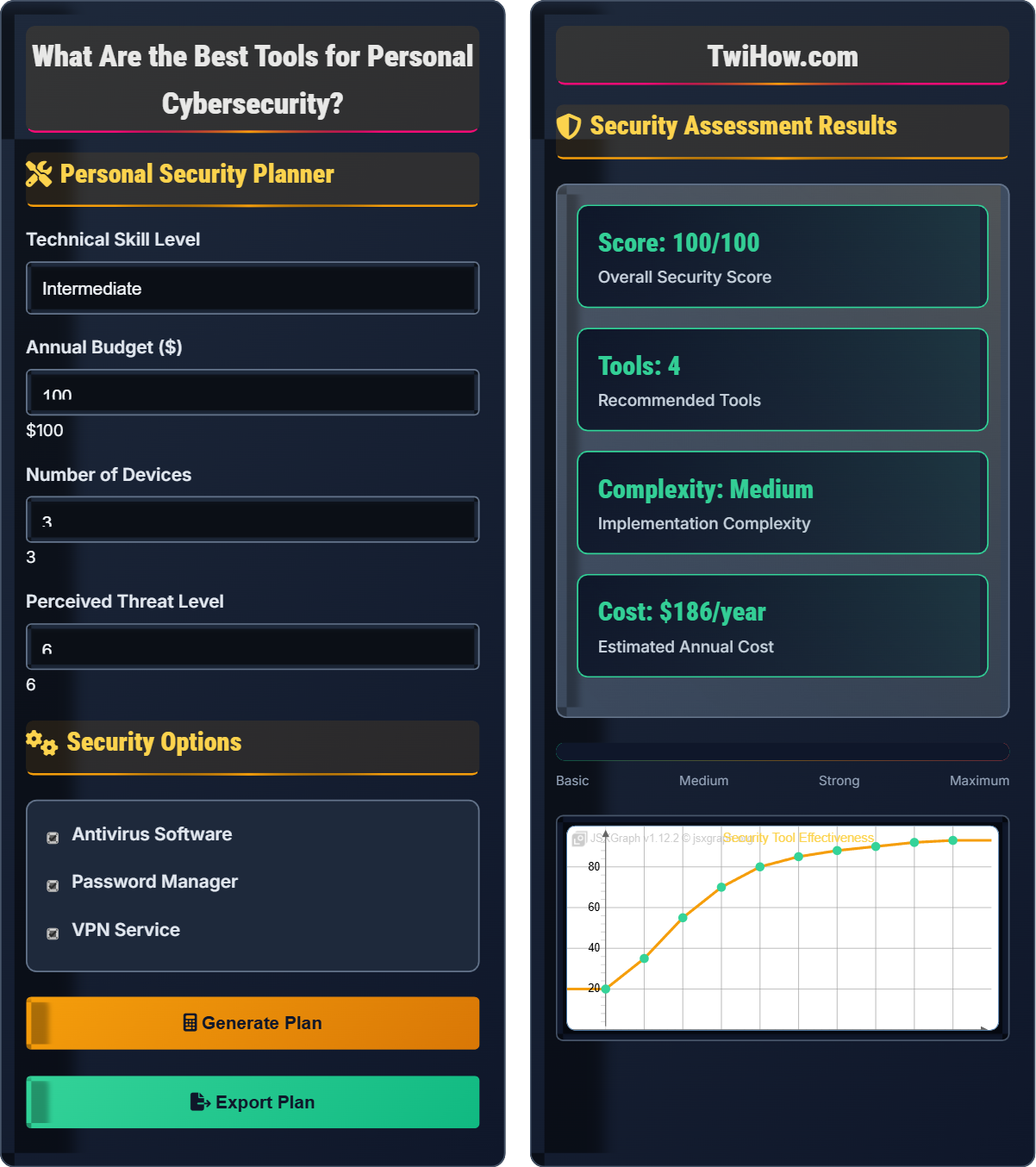
Personal Security Planner
Security Options
Security Assessment Results
| Tool | Category | Priority | Cost |
|---|---|---|---|
| Antivirus | Malware Protection | High | $50 |
| Password Manager | Authentication | High | $36 |
| VPN | Privacy | Medium | $100 |
| 2FA Authenticator | Authentication | High | Free |
Personal Cybersecurity Tools Explained
Personal cybersecurity tools are software applications, services, and practices designed to protect individuals from online threats. These tools defend against malware, phishing, identity theft, data breaches, and other cyber attacks that target personal information and devices.
Overall Security = 1 - ∏(1 - Tool_i_Effectiveness)
Where:
- Overall Security: Total protection level achieved
- Tool Effectiveness: Probability of threat prevention
- Coverage: Percentage of threat types addressed
- Reliability: Consistency of protection over time
Key categories of personal cybersecurity tools:
- Antivirus/Malware Protection: Real-time threat detection and removal
- Password Managers: Secure credential storage and generation
- VPNs: Secure and private internet connections
- Firewalls: Network traffic monitoring and control
- Two-Factor Authentication: Additional account security layers
- Backup Solutions: Data protection and recovery systems
- Privacy Tools: Ad blockers, tracker blockers, encryption
- Security Monitoring: Account monitoring and breach detection
- Week 1: Assessment and tool selection
- Week 2: Installation and basic configuration
- Week 3: Advanced configuration and testing
- Week 4: Optimization and documentation
- Ongoing: Regular updates and monitoring
Essential Security Tools
Antivirus, password managers, VPNs, firewalls, 2FA, backup solutions.
Overall Security = 1 - ∏(1 - Tool_i_Effectiveness)
Where Overall Security = total protection level, Tool Effectiveness = threat prevention probability.
- Layer multiple tools for defense in depth
- Keep tools updated
- Configure properly for maximum protection
Tool Recommendations
Beginner, intermediate, advanced, business users.
- Assess security needs
- Research available tools
- Compare features and costs
- Test free versions
- Make final selection
- Deploy and configure
- Start with essentials
- Don't over-complicate
- Regular updates and maintenance
- Monitor effectiveness
Security Tool Ecosystem
| Tool | Function | Priority | Cost | Difficulty |
|---|---|---|---|---|
| Antivirus | Malware Protection | High | $40-60/yr | Easy |
| Password Manager | Credential Security | High | $30-60/yr | Medium |
| VPN | Privacy Protection | Medium | $50-120/yr | Easy |
| 2FA | Account Security | High | Free | Easy |
| Firewall | Network Security | Medium | Free | Medium |
| Backup | Data Protection | High | $50-100/yr | Medium |
Security Tool Categories
Antivirus software provides real-time protection against malware, viruses, spyware, and other malicious software. It scans files, monitors system behavior, and quarantines or removes threats. Modern antivirus solutions also include web protection, email scanning, and ransomware protection.
Key Features: Real-time scanning, cloud-based threat detection, behavioral analysis, automatic updates
Popular Options: Bitdefender, Norton, McAfee, Windows Defender
Essential Tool Features
• Real-time malware scanning
• Web protection
• Email scanning
• Behavioral analysis
• Automatic updates
• Auto-fill credentials
• Password generation
• Secure sharing
• Breach monitoring
• Cross-platform sync
• Military-grade encryption
• No-logs policy
• Kill switch
• Multiple server locations
• Ad/tracker blocking
• Time-based codes
• Push notifications
• Backup codes
• Biometric options
• Universal 2nd Factor (U2F)
When selecting security tools, prioritize features based on your specific needs:
• Essential: Basic protection features (scanning, blocking)
• Important: Advanced features (behavioral analysis, encryption)
• Nice-to-have: Convenience features (auto-fill, sync)
• Optional: Premium features (cloud backup, advanced support)
Setup Process Steps
Identify your security needs based on your online activities, devices, and risk tolerance. Create a list of essential tools and set a budget for security investments.
Research available tools, read reviews, and compare features. Test free versions or trial periods to evaluate effectiveness before committing to paid subscriptions.
Install selected tools on all devices and configure them according to best practices. Enable automatic updates and set appropriate security levels.
Integrate tools with existing accounts and services. Test all features to ensure they're working properly and not conflicting with other software.
Monitor tool performance and adjust settings as needed. Regularly review security reports and update configurations based on experience.
Keep all tools updated with the latest security definitions and patches. Regularly review and renew subscriptions as needed.
Security Tool Implementation Timeline
Personal Cybersecurity Knowledge Quiz
Which of the following is considered the MOST essential cybersecurity tool for personal use?
While all listed tools are important, antivirus software is generally considered the most essential cybersecurity tool for personal use. It provides the first line of defense against malware, viruses, and other malicious software that can compromise your system. Without basic malware protection, other security measures become less effective as the underlying system may be compromised.
The answer is C) Antivirus Software.
Antivirus software serves as the foundation of personal cybersecurity by protecting the operating system and files from malicious software. It's the first barrier that prevents malware from gaining a foothold on your system. While other tools like password managers and 2FA are crucial for specific threats, antivirus protection addresses the broadest range of potential threats and provides system-level security that other tools depend on.
Antivirus Software: Program that detects and removes malware
Malware: Malicious software designed to harm systems
System-Level Security: Protection of the underlying operating system
• Start with system protection
• Layer multiple tools
• Keep tools updated
• Use real-time scanning
• Update definitions regularly
• Perform regular scans
• Not updating antivirus definitions
• Disabling real-time protection
• Ignoring scan results
Explain the benefits of using a password manager and why it's considered a critical security tool.
Benefits of Password Managers:
• Unique Passwords: Generates and stores unique, complex passwords for every account
• Convenience: Auto-fills login credentials, eliminating memory burden
• Security: Encrypted storage prevents unauthorized access to passwords
• Breach Monitoring: Alerts you when accounts are compromised
• Shared Access: Securely shares credentials with family members
Why It's Critical:
• Prevents Credential Stuffing: Unique passwords prevent attackers from using breached credentials elsewhere
• Reduces Human Error: Eliminates weak or reused passwords
• Enhances Other Security: Makes 2FA more effective by securing the password component
• Time Savings: Saves time on password management tasks
Security Mechanisms:
• Master Password: Single strong password unlocks all others
• End-to-End Encryption: Passwords encrypted locally before transmission
• Zero-Knowledge Architecture: Service provider cannot access passwords
Using a password manager is one of the most impactful security improvements an individual can make, addressing the fundamental weakness of human password management.
Password managers address a fundamental security paradox: humans are terrible at remembering complex, unique passwords, yet weak passwords are a primary attack vector. By outsourcing password management to a secure tool, users can maintain high security without the cognitive burden. This demonstrates the power of security tools to overcome human limitations and significantly improve overall security posture.
Password Manager: Software for secure credential storage and generation
Credential Stuffing: Attack using stolen credentials on other sites
End-to-End Encryption: Data encrypted before transmission
• Use a strong master password
• Enable auto-fill features
• Monitor breach alerts
• Start with important accounts
• Use biometric unlock
• Enable breach monitoring
• Using weak master password
• Not enabling auto-fill
• Ignoring breach alerts
A user has antivirus software and uses strong passwords but wants to improve their overall security. They have a budget of $50 per year. Recommend the most effective additional security tool and explain your reasoning.
Recommended Tool: Password Manager
Reasoning:
• Gap Analysis: While the user has antivirus protection, they're likely still reusing passwords or using simple variations, which is the most common security vulnerability
• Impact Assessment: A password manager would provide the highest security improvement for the lowest cost, addressing the most prevalent attack vector
• Budget Efficiency: Premium password managers typically cost $30-60/year, fitting within the budget
Security Improvement Calculation:
• Current Security: Antivirus (high effectiveness) + Weak passwords (low effectiveness) = Medium overall security
• With Password Manager: Antivirus (high) + Strong unique passwords (high) = High overall security
Alternative Analysis:
• VPN ($50-100): Good for privacy but doesn't address password weaknesses
• Backup solution ($50-100): Important but doesn't prevent account compromises
• Password manager ($30-60): Directly addresses the most critical vulnerability
Implementation Priority:
1. Implement password manager immediately
2. Generate unique passwords for all accounts
3. Enable 2FA on critical accounts
4. Consider VPN for additional privacy protection
The password manager provides the most significant security improvement within the budget constraints.
This scenario demonstrates the importance of risk assessment and resource allocation in cybersecurity. Even with some security measures in place, the weakest link often determines overall security. Password management is frequently the most vulnerable aspect of personal security, making it the highest priority improvement. This approach shows how to maximize security impact within budget constraints.
Risk Assessment: Evaluating potential security threats
Resource Allocation: Distributing security investments effectively
Security Posture: Overall security strength and preparedness
• Address the weakest link first
• Maximize security impact per dollar
• Consider threat likelihood and impact
• Start with highest-impact tools
• Use free trials before purchasing
• Consider family plans for savings
• Buying tools without assessing needs
• Not addressing the biggest vulnerabilities
• Overspending on unnecessary features
Compare the security and privacy benefits of using a VPN versus Tor for anonymous browsing. When would you recommend each solution?
VPN Benefits:
• Speed: Much faster than Tor, suitable for streaming and gaming
• Usability: Simple to set up and use, works with all applications
• Stability: Reliable connection with consistent performance
• Access: Bypasses geo-restrictions and censorship
• Privacy: Hides IP address from websites and ISPs
Tor Benefits:
• Anonymity: Stronger anonymity through multiple relay nodes
• Decentralization: No single point of control or trust
• Access: Access to .onion sites and blocked content
• Resistance: Better against traffic correlation attacks
VPN Limitations:
• Trust Model: Must trust VPN provider with your traffic
• Metadata: Provider knows your IP address and connection times
• Logging: Some providers may log user activity
Tor Limitations:
• Speed: Very slow due to multiple relays
• Usability: Complex setup, not suitable for all applications
• Blocking: Many websites block Tor traffic
• Exit Node Risk: Last relay can potentially see traffic
Recommendations:
• VPN for: General privacy, streaming, bypassing geo-blocks, public Wi-Fi protection
• Tor for: Strong anonymity, accessing blocked content, journalist/source communication
Hybrid Approach: Using Tor over VPN (or VPN over Tor) provides additional security layers but increases complexity.
This comparison illustrates the security-privacy-usability trade-offs inherent in cybersecurity. VPNs offer practical privacy improvements with good usability, while Tor provides stronger anonymity at the cost of performance and convenience. Understanding these trade-offs helps users select appropriate tools based on their specific needs and threat model.
VPN: Virtual Private Network for secure connections
Tor: Onion Router for anonymous browsing
Threat Model: Specific assumptions about potential attacks
• Match tools to specific needs
• Consider performance requirements
• Evaluate trust models
• Research VPN providers carefully
• Use Tor Browser Bundle for safety
• Consider your threat model
• Assuming VPN provides complete anonymity
• Using Tor for everyday browsing
• Not researching providers
Which method of two-factor authentication is considered the most secure?
Hardware security keys (such as YubiKey or Titan Security Key) are considered the most secure method of two-factor authentication. They use public-key cryptography and are resistant to phishing attacks, unlike SMS or email which can be intercepted. Authenticator apps are more secure than SMS/email but still vulnerable to certain attacks. Hardware keys provide the strongest authentication method available to consumers.
The answer is D) Hardware security keys.
Different 2FA methods have varying security strengths. SMS and email can be intercepted through SIM swapping or email compromise. Authenticator apps are more secure but still vulnerable to malware or phishing if the user enters codes for fake sites. Hardware keys use cryptographic signatures that prove physical possession of the device, making them nearly impossible to bypass remotely.
Two-Factor Authentication: Verification using two different factors
Hardware Security Key: Physical device for authenticationPhishing Resistance: Immunity to fake login pages
• Use strongest method available
• Enable 2FA on all important accounts
• Protect backup codes
• Start with authenticator apps
• Upgrade to hardware keys for critical accounts
• Keep backup codes secure
• Using SMS for critical accounts
• Not enabling 2FA at all
• Losing backup codes
FAQ
Q: I'm not tech-savvy. What's the minimum I need to do to stay secure?
A: For beginners, focus on these essential steps:
1. Enable Windows Defender or macOS security:
• Windows 10/11 has built-in antivirus that's quite effective
• macOS has Gatekeeper and XProtect built-in
2. Use strong, unique passwords:
• Create a long passphrase for your main account
• Use a different password for each important account
• Consider a free password manager like Bitwarden's free tier
3. Enable two-factor authentication:
• Turn on 2FA for email, banking, and social media accounts
• Use authenticator apps rather than SMS when possible
4. Keep software updated:
• Enable automatic updates for your operating system
• Update browsers and other software regularly
5. Be cautious online:
• Don't click suspicious links or download unknown attachments
• Verify sender identity before sharing information
These basic steps will significantly improve your security without requiring technical knowledge.
Q: Are free security tools safe to use, or should I pay for premium versions?
A: Many free security tools are perfectly safe and effective:
Safe Free Tools:
• Antivirus: Windows Defender (built-in), Avast Free, AVG Free
• Password Manager: Bitwarden Free, 1Password Family Plan
• Browser Security: uBlock Origin, HTTPS Everywhere
• Firewall: Windows Firewall (built-in)
When to Consider Premium:
• Advanced Features: Real-time protection, behavioral analysis
• Cross-Platform Sync: Using multiple devices
• Priority Support: Business or critical use
• Additional Features: VPN, dark web monitoring
Choosing Wisely:
• Research the company's reputation and funding model
• Read privacy policies to understand data collection
• Look for open-source options when possible
• Try free versions before purchasing
Many premium features are unnecessary for typical users, so free tools can provide excellent protection.
Q: What's the most effective combination of security tools for advanced users?
A: For advanced users, consider this comprehensive security stack:
Endpoint Protection:
• Antivirus: Bitdefender GravityZone or CrowdStrike Falcon
• EDR: SentinelOne, Carbon Black, or Microsoft Defender ATP
• Host Firewall: GlassWire or TinyWall
Authentication & Access:
• Password Manager: 1Password or Bitwarden Premium
• 2FA: YubiKey 5 series for critical accounts
• SSH Keys: Hardware-based SSH authentication
Privacy & Network:
• VPN: Mullvad, ProtonVPN, or custom WireGuard setup
• Ad Blocker: uBlock Origin with custom filters
• DNS: Cloudflare 1.1.1.1 or NextDNS with blocking
Monitoring & Analysis:
• Network Monitor: GlassWire or NetLimiter
• System Monitor: Process Monitor, Autoruns
• Threat Intelligence: AlienVault OTX, VirusTotal
Backup & Recovery:
• Backup: Duplicati with encryption to multiple destinations
• Bootable Tools: Kali Linux Live, Ubuntu Rescue
Advanced Considerations:
• Sandboxing: Sandboxie or Firejail for untrusted applications
• Encryption: VeraCrypt for sensitive data containers
• Secure Communication: Signal, Wire, or Matrix clients
Remember to regularly audit and test your security measures to ensure they're functioning properly.