What are the privacy settings I should change on social media?
Complete social media privacy guide • Step-by-step explanations
Social Media Privacy Fundamentals:
Show Privacy AssessmentSocial media privacy settings are crucial controls that determine who can see your personal information, posts, and activity. With billions of users sharing personal data daily, understanding and configuring these settings is essential for protecting your digital identity and preventing unauthorized access to your personal information.
Key privacy concepts:
- Profile Visibility: Who can see your profile and personal details
- Data Sharing: How your information is used by platforms and shared with third parties
- Location Tracking: Whether your location is shared with others
- Advertising Preferences: How your data is used for targeted ads
Proper privacy configuration helps protect against identity theft, stalking, cyberbullying, and unauthorized data harvesting by companies and malicious actors.
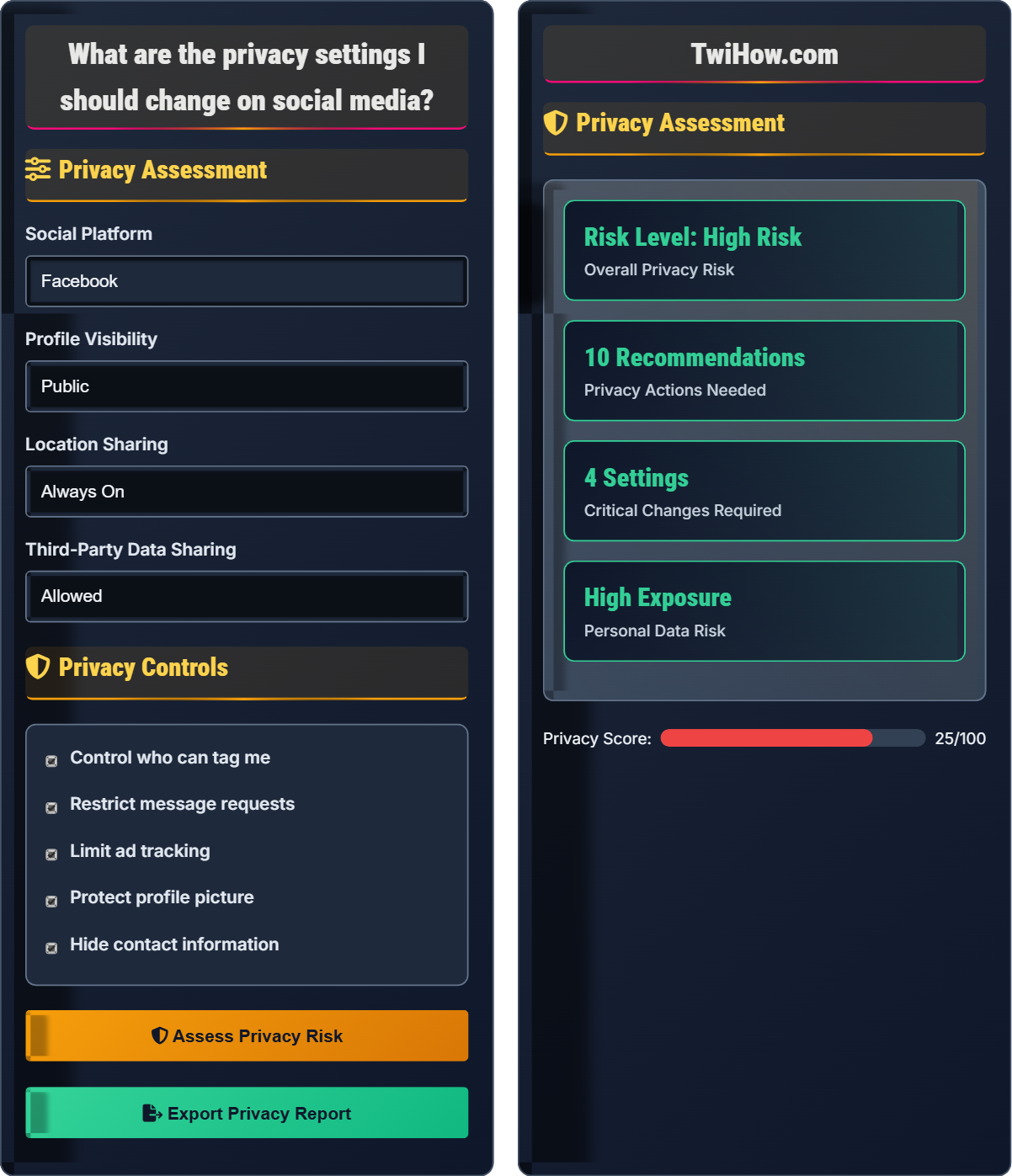
Privacy Assessment
Privacy Controls
Privacy Assessment
High risk due to public profile information and location sharing
Moderate risk from location history and public posts
High risk from third-party app permissions
1. Make profile private
2. Disable location sharing
3. Review app permissions
4. Limit data sharing
Social Media Privacy Explained
Social media privacy refers to the controls and settings that govern how your personal information, posts, and activities are shared and accessed on social networking platforms. It encompasses everything from who can see your profile to how your data is collected and used by the platform and third parties.
Effective social media privacy relies on multiple layers of control:
Where:
- Exposed Data: Personal information publicly available
- Privacy Controls: Active protective settings
- Threat Level: Potential risks in your environment
Key areas where social media privacy can be compromised:
- Data Harvesting: Platforms collecting personal information for advertising
- Identity Theft: Malicious actors using personal details for fraud
- Location Tracking: Geotagging revealing your whereabouts
- Social Engineering: Scammers using profile information for targeted attacks
- Employment Impact: Employers reviewing social media profiles
- Stalking: Unwanted individuals tracking your activities
- Regular Audits: Review privacy settings monthly
- Minimal Sharing: Share only necessary information
- Strong Authentication: Use two-factor authentication
- Careful Connections: Verify friend requests and follows
- App Permissions: Grant minimal necessary access
- Content Awareness: Think before posting
Privacy Fundamentals
Profile visibility, data sharing, location tracking, ad preferences, tagging controls, message privacy.
Risk = (Exposed Data / Privacy Controls) × Threat Level
Where Risk = privacy vulnerability, Exposed Data = accessible personal info, Controls = protective measures.
- Always make profiles private
- Disable location sharing
- Review connected apps regularly
- Limit data sharing with third parties
- Control who can tag and contact you
Platform-Specific Settings
Each social media platform has unique privacy controls and default settings that require individual attention.
- Facebook: Timeline and tagging settings
- Instagram: Story and comment restrictions
- Twitter: Tweet visibility and discovery
- LinkedIn: Profile viewing options
- TikTok: Privacy and safety settings
- Default settings are often permissive
- Platform policies change frequently
- Mobile apps may have different defaults
- Browser vs. app settings may differ
Social Media Privacy Quiz
Which of the following is the most secure profile visibility setting for protecting personal information on social media?
The most secure profile visibility setting is "Private" where only you can see your profile. This provides maximum control over who accesses your personal information and prevents strangers, employers, or potential stalkers from viewing your content.
The answer is C) Private - Only you can see your profile.
Profile visibility is the first and most fundamental privacy control on social media platforms. Setting your profile to private creates a barrier between your personal information and the public internet. While this limits some social features, it significantly reduces exposure to unwanted attention, data harvesting, and potential security threats. Even if you want to share content with friends, you can still do so while maintaining privacy controls.
Public Profile: Visible to anyone on the internet
Private Profile: Visible only to approved followers
Friends Only: Visible to established connections
• Private profiles offer maximum protection
• Public profiles expose data to harvesting
• Visibility settings apply to all content
• Start with private settings then selectively open
• Review visibility before posting sensitive content
• Check mobile app settings separately
• Leaving profiles public by default
Explain the risks associated with enabling location services on social media platforms and describe at least three specific ways this information can be misused by malicious actors.
Risks of Location Services: Enabling location services creates a detailed record of your movements, habits, and routines that can be exploited in multiple ways.
Three Ways Location Data Can Be Misused:
1. Physical Stalking: Malicious actors can track your location in real-time or review your history to predict your movements and potentially follow or confront you.
2. Burglary Planning: Criminals can see when you're away from home by tracking your location, allowing them to plan break-ins during your absence.
3. Social Engineering Attacks: Scammers can use your location data to craft convincing phishing attempts or fake emergencies targeting you or your contacts.
Additional risks include revealing sensitive locations like your workplace, children's school, or places of worship.
Location data is particularly sensitive because it reveals patterns of behavior and personal routines that cannot be changed like passwords. Once location data is collected, it can be stored indefinitely by platforms and potentially sold to third parties. The combination of location with other personal data creates detailed profiles that can be used for various malicious purposes beyond simple tracking.
Geotagging: Adding geographical identification metadata to posts
Location History: Record of places you've visited over time
Real-time Tracking: Current location visible to others
• Location data is permanent once shared
• Disable location services when not needed
• Review location history regularly
• Turn off location services in app settings
• Disable geotagging for photos
• Use airplane mode when traveling
• Automatically sharing location with every post
• Not realizing location data persists
• Sharing location of home or work
Sarah uses Facebook, Instagram, and LinkedIn regularly. Her Facebook profile is set to public, Instagram to friends-only, and LinkedIn to public. She has connected her accounts to 15 third-party apps, shares her location on most posts, and allows targeted advertising. Calculate her privacy risk level and recommend specific actions she should take to improve her privacy posture.
Privacy Risk Assessment: Sarah faces a HIGH privacy risk due to multiple vulnerabilities.
Factors Contributing to High Risk:
• Two public profiles exposing personal information to everyone
• 15 connected third-party apps with potential data access
• Extensive location sharing creating movement patterns
• Targeted advertising allowing data profiling
Recommended Actions:
1. Change both Facebook and LinkedIn to private profiles
2. Review and remove unnecessary third-party app connections
3. Disable location sharing and geotagging
4. Opt out of targeted advertising preferences
5. Conduct quarterly privacy audits
Privacy risk compounds across multiple platforms and settings. Sarah's case demonstrates how seemingly minor privacy decisions across different areas create a significant cumulative risk. Each platform's privacy settings interact with others, and third-party apps can aggregate data across platforms. A holistic approach to privacy management is essential for comprehensive protection.
Privacy Posture: Overall security stance regarding personal data
Data Aggregation: Combining information from multiple sources
Third-Party Apps: External applications connected to social media
• Consistent privacy across platforms
• Minimize third-party app access
• Regular privacy audits are essential
• Use same privacy level across platforms
• Remove unused connected apps monthly
• Check privacy settings after platform updates
• Inconsistent privacy across platforms
• Not reviewing connected apps
• Assuming privacy settings are permanent
You're a recent college graduate with a new job in a conservative industry. Your social media profiles contain party photos, controversial opinions, and location data showing frequent visits to bars and nightclubs. Explain how to remediate this situation while preserving your ability to connect with friends and maintain a positive professional image.
Remediation Strategy:
Immediate Actions:
1. Adjust privacy settings to restrict audience for past content
2. Delete or hide inappropriate photos and posts
3. Review and clean up tagged content
Ongoing Management:
4. Create different privacy zones for personal and professional content
5. Use features like "Close Friends" lists for personal content
6. Maintain professional content separately
Long-term Strategy:
7. Establish posting guidelines before sharing
8. Regular privacy audits to maintain professional image
9. Separate personal and professional social media presence if needed
Professional privacy management requires balancing personal freedom with career considerations. The key is controlling access rather than completely hiding your personality. Modern social media platforms offer sophisticated audience controls that allow you to share different content with different groups of people. This approach maintains authentic relationships while protecting your professional reputation.
Privacy Zones: Different audiences for different types of content
Professional Image: Online persona presented to employers/networks
Content Moderation: Managing what appears on your profiles
• Assume employers will review your profiles
• Control audience, not authenticity
• Separate personal and professional content
• Use "Close Friends" feature for personal content
• Create professional highlights sections
• Post in private mode initially
• Deleting entire profiles instead of managing them
• Not considering employer perspectives
• Failing to audit old content
Which of the following represents the greatest risk when connecting third-party applications to your social media accounts?
Connecting third-party applications to your social media accounts grants them access to your personal data, including profile information, friends list, posts, and sometimes private messages. This creates significant privacy and security risks, as these apps may store your data insecurely, sell it to third parties, or become targets for data breaches.
The answer is B) The app gains access to your personal data.
Third-party app permissions represent one of the most significant privacy risks on social media platforms. When you connect an app, you're often granting it broad access to your personal information and social connections. Many users don't read permission requests carefully, unknowingly giving apps access to sensitive data. These apps can harvest your data, track your behavior, and potentially compromise your account security.
Third-Party Apps: External applications connected to social media
Data Access Permissions: Rights granted to connected applications
Data Harvesting: Collecting user information by third parties
• Always review app permissions carefully
• Only connect trusted applications
• Regularly audit connected apps
• Read permission requests thoroughly
• Revoke unused app connections
• Research apps before connecting
• Connecting to unknown applications
• Not reviewing permission requests
• Forgetting to revoke unused apps
FAQ
Q: How often should I review my social media privacy settings?
A: You should review your social media privacy settings at least once every 3 months, or immediately after any platform updates. Social media companies frequently change their default settings and privacy policies, often making them more permissive. Additionally, review settings after:
1. Major platform updates: Companies often reset privacy defaults
2. Policy changes: When terms of service are updated
3. After security incidents: Following reported data breaches
4. Life changes: New job, relationship status, etc.
Set calendar reminders to ensure regular reviews, and pay special attention to settings that control who can see your posts, tag you, or send you messages.
Q: How can I help my teenager understand the importance of social media privacy?
A: Teaching teenagers about social media privacy requires a balanced approach that emphasizes practical consequences rather than fear tactics:
Practical Examples: Show them how employers, colleges, and scholarship committees review social media profiles. Demonstrate how personal information can be used for identity theft or scams.
Hands-On Learning: Sit with them and review their privacy settings together. Let them see the difference between public and private profiles.
Empowerment Approach: Frame privacy controls as tools that give them power over their digital identity, not restrictions on their freedom.
Real-World Consequences: Discuss how social media posts can affect future opportunities and relationships.
Encourage open dialogue about their online experiences and respect their desire for some privacy while establishing reasonable safety guidelines.
Q: What privacy considerations should businesses keep in mind when using social media?
A: Businesses face additional privacy and legal considerations on social media:
Compliance Requirements: GDPR, CCPA, and other privacy regulations may apply depending on your customer base and location.
Data Collection Limits: Only collect data that's necessary for business purposes and clearly communicate how it will be used.
Employee Policies: Establish clear guidelines for employee social media use representing the company.
Customer Information: Be especially careful with personally identifiable information (PII) shared by customers.
Intellectual Property: Protect proprietary information and trade secrets from inadvertent disclosure.
Consider implementing a social media policy that outlines acceptable practices, data handling procedures, and privacy protection measures for all employees.