What is zero-trust security and should my business adopt it?
Complete zero-trust security guide • Step-by-step explanations
Zero-Trust Security Fundamentals:
Show Business AssessmentZero-trust security is a cybersecurity framework that assumes no implicit trust and continuously validates every transaction. The core principle is "never trust, always verify" - meaning that no user, device, or network is automatically trusted, regardless of whether they're inside or outside the corporate perimeter. This approach is becoming essential as traditional perimeter-based security models become ineffective against modern threats.
Key concepts:
- Continuous Verification: Ongoing authentication and authorization
- Least Privilege Access: Minimal permissions required for specific tasks
- Microsegmentation: Dividing networks into smaller, isolated segments
- Multi-Factor Authentication: Requiring multiple forms of verification
Implementing zero-trust can significantly reduce your organization's attack surface and improve security posture, but requires substantial investment in technology, processes, and training.
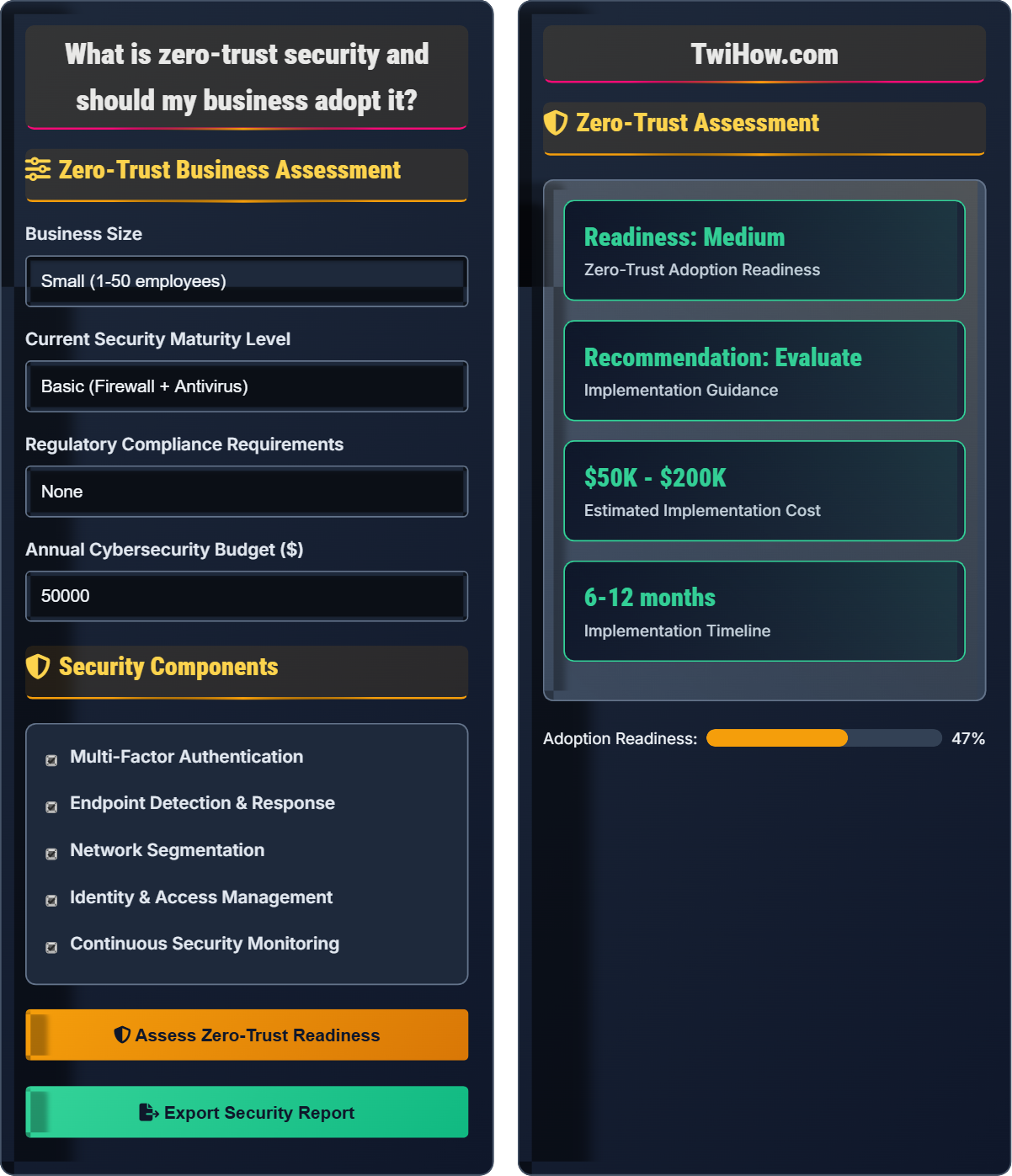
Zero-Trust Business Assessment
Security Components
Zero-Trust Assessment
Zero-Trust Security Explained
Zero-trust security is a cybersecurity framework that assumes no implicit trust and continuously validates every transaction. The core principle is "never trust, always verify" - meaning that no user, device, or network is automatically trusted, regardless of whether they're inside or outside the corporate perimeter. This approach is becoming essential as traditional perimeter-based security models become ineffective against modern threats.
Zero-trust implementation follows a comprehensive security approach:
Where:
- Verification Frequency: How often authentication occurs
- Access Controls: Granularity of permissions and restrictions
- Attack Surface: Potential entry points for threats
- Continuous Monitoring: Ongoing security assessment
Essential elements of a zero-trust architecture:
- Identity Verification: Multi-factor authentication and identity management
- Device Trust: Endpoint security and compliance verification
- Network Segmentation: Microsegmentation and secure communication
- Data Protection: Encryption and access controls
- Continuous Monitoring: Real-time threat detection and response
- Least Privilege Access: Minimal permissions for specific tasks
- Enhanced Security: Reduced attack surface and improved threat detection
- Regulatory Compliance: Better adherence to security standards
- Incident Response: Faster containment and recovery from breaches
- Cloud Migration: Secure hybrid and multi-cloud environments
- Remote Work: Secure access from any location
- Cost Reduction: Lower long-term security incident costs
Zero-Trust Fundamentals
Never trust, always verify; least privilege access; microsegmentation; continuous verification; identity management.
Posture = (Verification × Access Controls) / (Attack Surface) × Monitoring
Where Posture = security effectiveness, Verification = authentication frequency, Access Controls = permission granularity, Attack Surface = potential entry points.
- Verify identity for every access request
- Grant minimal necessary permissions
- Continuously monitor all activities
- Segment networks into isolated zones
- Encrypt data in transit and at rest
Implementation Considerations
Size, budget, regulatory requirements, current security maturity, workforce distribution, technology infrastructure.
- Assessment and planning
- Identity and access management
- Network segmentation
- Endpoint security enhancement
- Continuous monitoring deployment
- Full integration and optimization
- Implementation costs and complexity
- User experience and productivity impact
- Integration with existing systems
- Staff training and skill development
Zero-Trust Security Quiz
What is the fundamental principle of zero-trust security?
The fundamental principle of zero-trust security is "never trust, always verify." This means that no user, device, or network is automatically trusted, regardless of whether they're inside or outside the corporate perimeter. Every access request must be validated before access is granted, and this verification continues throughout the session.
The answer is B) Never trust, always verify.
The zero-trust model fundamentally shifts security thinking from a "castle and moat" approach to a "verify everything" approach. Traditional security models trusted everything inside the network perimeter, but modern threats often originate from within. Zero-trust treats every access request as potentially malicious, requiring continuous validation regardless of location or previous authentication status.
Zero-Trust: Security model requiring continuous verification
Perimeter Security: Traditional model trusting internal users
Continuous Verification: Ongoing authentication and authorization• Verify every access request
• Assume no implicit trust
• Validate continuously during sessions
• Start with identity verification
• Implement gradually in phases
• Focus on critical assets first
• Assuming internal users are trustworthy
Explain the main challenges organizations face when implementing zero-trust security and describe strategies to overcome them.
Main Implementation Challenges:
1. Legacy System Integration: Older systems may not support zero-trust requirements. Solution: Implement gateways and proxies to bridge legacy and modern systems.
2. User Experience: Increased authentication requirements can impact productivity. Solution: Use adaptive authentication that considers risk factors to minimize disruption.
3. Complexity Management: Zero-trust architectures can become complex to manage. Solution: Invest in automation tools and centralized management platforms.
4. Cost Considerations: Significant investment in technology and training. Solution: Phase implementation and demonstrate ROI through reduced security incidents.
5. Skills Gap: Need for specialized security expertise. Solution: Partner with managed security service providers and invest in training programs.
Successful Implementation Strategies: Start with pilot projects, focus on critical assets first, ensure executive buy-in, and maintain clear communication about benefits.
Zero-trust implementation is a significant organizational change that requires careful planning and management. The challenges are primarily operational and cultural rather than purely technical. Organizations must balance security improvements with business continuity and user productivity. Success depends on phased implementation, stakeholder buy-in, and continuous improvement processes.
Legacy Systems: Older technology that may not support modern security
Adaptive Authentication: Risk-based authentication that adjusts requirements
Managed Security Services: Outsourced security expertise and operations
• Plan for gradual implementation
• Maintain business continuity
• Invest in staff training
• Start with identity management
• Use cloud-based solutions for faster deployment
• Monitor user feedback and adjust accordingly
• Attempting full implementation immediately
• Not considering user experience impact
• Underestimating training requirements
A mid-sized company with 250 employees is considering zero-trust implementation. Their current annual security budget is $150,000, and they've experienced 2 security incidents in the past year costing $500,000 each. Calculate the potential cost-benefit of implementing zero-trust security, assuming it reduces incident probability by 75% and costs $300,000 to implement over 2 years.
Current Annual Security Costs:
• Current budget: $150,000
• Average annual incident cost: $500,000 × 2 = $1,000,000
• Total current cost: $1,150,000
After Zero-Trust Implementation:
• Implementation cost: $300,000 over 2 years ($150,000/year average)
• New annual budget: $150,000 + $150,000 = $300,000
• Reduced incident probability: 2 incidents × 0.25 = 0.5 incidents/year
• Expected annual incident cost: $500,000 × 0.5 = $250,000
• Total post-implementation cost: $300,000 + $250,000 = $550,000
Annual Savings: $1,150,000 - $550,000 = $600,000
ROI: ($600,000 - $150,000) ÷ $150,000 = 300% ROI in first year after implementation
Cost-benefit analysis for security investments requires considering both direct costs (implementation and maintenance) and indirect savings (reduced incident costs). Zero-trust implementations often show strong ROI when organizations have experienced significant security incidents, as the reduction in incident probability and impact can far outweigh the implementation costs.
Return on Investment (ROI): Financial benefit compared to cost
Incident Cost: Total expenses from security breaches
Probability Reduction: Decrease in likelihood of events
• Consider both direct and indirect costs
• Account for probability changes
• Factor in implementation timeline
• Include productivity impacts in calculations
• Consider regulatory compliance benefits
• Factor in insurance premium reductions
• Only considering implementation costs
• Not accounting for productivity impact
• Underestimating incident costs
Your organization has 30% of employees working remotely permanently. Traditional VPN access is causing performance issues and security concerns. Explain how zero-trust security addresses remote work challenges and what components are most critical for remote worker security.
How Zero-Trust Addresses Remote Work Challenges:
1. Eliminates Network Perimeter: Instead of extending the corporate network to remote workers, zero-trust validates each user and device individually.
2. Direct Application Access: Users connect directly to specific applications rather than the entire network, reducing attack surface.
3. Context-Aware Access: Access decisions consider device health, location, and risk factors.
4. Continuous Validation: Sessions are monitored for anomalous behavior even after initial access.
Critical Components for Remote Workers:
• Secure Access Service Edge (SASE): Cloud-based security services for remote access
• Device Compliance: Ensuring endpoints meet security requirements
• Identity Management: Robust authentication for distributed workforce
• Conditional Access: Policy-based access control considering risk factors
• Endpoint Detection and Response: Real-time threat monitoring on remote devices
This approach provides better security and performance for remote workers while reducing VPN overhead.
Traditional VPNs create a "moat" around the corporate network that extends to remote workers, making them part of the internal network. Zero-trust treats remote workers the same as internal users - requiring verification for each resource access. This model is more secure and scalable for distributed workforces.
VPN: Virtual Private Network extending corporate network
SASE: Secure Access Service Edge for cloud security
Conditional Access: Policy-based access considering context
• Secure all endpoints equally
• Validate device compliance
• Monitor remote sessions continuously
• Implement adaptive authentication
• Use cloud-based security services
• Regular security assessments
• Extending VPN to all remote workers
• Not validating device compliance
• Assuming home networks are secure
Which regulatory requirement most strongly supports zero-trust implementation?
All of these regulatory requirements strongly support zero-trust implementation. SOX requires controls over financial data access, HIPAA mandates protection of patient information, and PCI DSS demands secure handling of payment data. Zero-trust principles of least privilege access, continuous monitoring, and strong identity verification directly address the compliance requirements of all these regulations.
The answer is D) All of the above support zero-trust equally.
Zero-trust security architecture inherently supports regulatory compliance by implementing principles that align with security requirements across various regulations. The framework of continuous verification, least privilege access, and detailed logging provides evidence for compliance audits while improving overall security posture.
SOX: Sarbanes-Oxley Act for financial controls
HIPAA: Health Insurance Portability and Accountability Act
PCI DSS: Payment Card Industry Data Security Standard
• Zero-trust supports multiple regulations
• Continuous monitoring for compliance
• Detailed access logging required
• Map zero-trust components to compliance requirements
• Use automation for compliance reporting
• Regular compliance assessments
• Implementing zero-trust without compliance mapping
• Not documenting security controls
• Assuming compliance is automatic
FAQ
Q: We're a small startup with limited budget. Is zero-trust security worth it for us, and how can we implement it affordably?
A: Zero-trust security is actually more important for startups than large enterprises, as a single security incident could be catastrophic for your business. Here's how to implement it affordably:
Phased Approach:
• Start with identity management - implement multi-factor authentication on all accounts
• Use cloud-based solutions (Azure AD, AWS IAM) instead of expensive on-premise systems
• Focus on protecting your most critical assets first (customer data, intellectual property)
Affordable Solutions:
• Leverage built-in cloud security features from AWS/Azure/GCP
• Use open-source tools for network segmentation and monitoring
• Implement security-as-a-service offerings instead of hiring full-time staff
Cost-Effective Priorities:
• Multi-factor authentication ($2-5/user/month)
• Endpoint protection with EDR capabilities
• Identity and access management
• Security awareness training for employees
The investment in zero-trust principles is typically much less than the cost of a security breach, especially for small businesses.
Q: How does zero-trust security integrate with our existing security tools and infrastructure?
A: Zero-trust doesn't replace your existing security tools but rather orchestrates them into a unified security framework:
Integration Points:
• SIEM/SOAR: Use for continuous monitoring and automated response to security events
• Firewalls: Implement microsegmentation policies to create isolated security zones
• Identity Providers: Extend multi-factor authentication and single sign-on to all resources
• EDR Solutions: Verify device compliance before granting access
Orchestration Layer:
• Implement a policy engine that coordinates access decisions across all tools
• Use APIs to connect existing tools with zero-trust components
• Centralize logging and monitoring for unified visibility
Migration Strategy:
• Start with identity management integration
• Gradually extend zero-trust policies to applications and data
• Use software-defined perimeters to create virtual security zones
Most existing security tools can be integrated into a zero-trust architecture with proper planning and configuration.
Q: What are the biggest risks of not implementing zero-trust security in today's threat landscape?
A: The risks of not implementing zero-trust security are substantial in today's threat landscape:
Modern Attack Vectors:
• Lateral Movement: Traditional perimeters don't prevent attackers from moving freely once inside
• Insider Threats: Trusted internal users with excessive privileges can cause significant damage
• Cloud-Native Threats: Traditional security models don't protect cloud and hybrid environments effectively
Business Impact:
• Ransomware: Can spread rapidly through an unsegmented network
• Data Breaches: Lack of microsegmentation allows access to all data repositories
• Compliance Violations: Inadequate access controls can lead to regulatory penalties
Statistical Evidence:
• 74% of breaches involve access to privileged accounts (Verizon DBIR)
• Average cost of a data breach is $4.45 million (IBM Security)
• 95% of security incidents involve human error (Cybersecurity Insiders)
Organizations with mature zero-trust implementations report 40-60% fewer successful attacks and significantly faster incident response times.