How to Document Code and Projects Professionally?
Complete documentation guide • Step-by-step strategies
Professional Documentation:
Show Documentation AnalyzerProfessional documentation is a critical skill that bridges the gap between code and understanding. Effective documentation makes code accessible, maintainable, and collaborative. It includes inline comments, API documentation, project READMEs, and architectural explanations that help both current and future developers understand the codebase.
Professional documentation follows structured approaches, uses consistent formatting, and targets different audiences with varying levels of technical knowledge. It serves multiple purposes: onboarding new team members, facilitating code reviews, and ensuring long-term maintainability.
Key components of professional documentation:
- Inline Comments: Explain complex logic and decision-making
- API Documentation: Describe endpoints, parameters, and usage
- Project README: Overview, installation, and usage instructions
- Architecture Docs: System design and component relationships
Modern documentation tools and practices help automate generation and maintain consistency across projects.
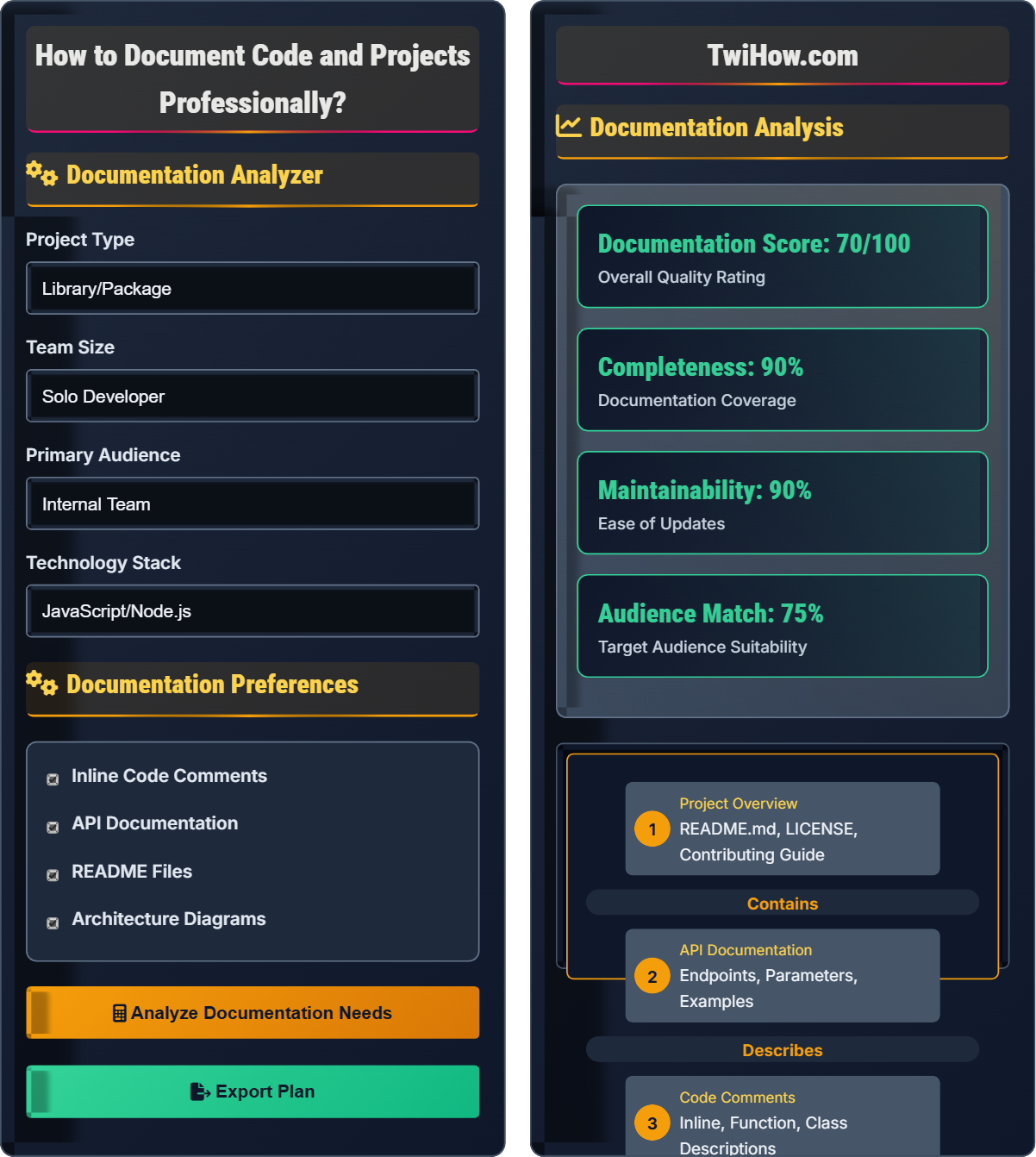
Documentation Analyzer
Documentation Preferences
Documentation Analysis
Documentation Structure
Based on your inputs, the recommended documentation structure includes:
- Project README with overview, installation, and usage
- API documentation with endpoint specifications
- Code comments following language conventions
- Architecture documentation for complex systems
- Changelog and version history
This structure ensures comprehensive coverage for your project type and audience.
| Practice | Description | Priority |
|---|---|---|
| Clear Naming | Use descriptive variable/function names | High |
| Inline Comments | Explain complex logic | High |
| README Structure | Standard sections and formatting | High |
| API Examples | Provide usage examples | Medium |
Professional Documentation Fundamentals
Professional documentation follows a hierarchical structure that serves different audiences and purposes:
Where:
- Overview: High-level project description and goals
- Usage: How to install, configure, and use the software
- Reference: Detailed technical specifications and API documentation
- Explanation: Why certain decisions were made and how components work
Professional documentation includes several distinct types:
- README Files: Project overview and quick start guide
- API Documentation: Endpoint specifications, parameters, and examples
- Code Comments: Inline explanations of complex logic
- Architecture Documents: System design and component relationships
- Changelog: History of changes and version information
- Contributing Guide: Instructions for contributing to the project
Effective documentation follows these principles:
- Clarity: Use simple, precise language avoiding jargon
- Completeness: Cover all essential information
- Consistency: Maintain uniform formatting and terminology
- Accessibility: Structure content for easy navigation
- Relevance: Focus on information users actually need
- Timeliness: Keep documentation up-to-date with changes
- Over-documenting: Creating documentation that's harder to maintain
- Under-documenting: Not providing enough information for users
- Outdated Info: Documentation that doesn't match the current code
- Wrong Audience: Writing for the wrong skill level
- Inconsistent Format: Varying styles across documents
- No Examples: Providing specifications without practical usage
Documentation Fundamentals
Documentation, specification, API documentation, README, code comments, changelog, architecture.
Quality = (Clarity × Completeness × Consistency) / (Maintenance Effort)
Where Clarity = Understandability, Completeness = Coverage, Consistency = Uniformity.
- Document code as you write it
- Write for someone less experienced than yourself
- Keep documentation synchronized with code
Implementation Strategies
Documentation tools, version control, templating systems, publishing platforms, CI/CD integration.
- Choose appropriate documentation tools for your stack
- Create standard templates and formatting guidelines
- Integrate documentation generation into your workflow
- Establish review processes for documentation quality
- Automate publishing and versioning where possible
- Train team members on documentation standards
- Time investment in documentation creation
- Maintenance overhead for keeping docs current
- Team buy-in and consistent practices
- Tool integration with existing development workflow
Documentation Quiz
What is the primary purpose of professional code documentation?
The primary purpose of professional code documentation is to help current and future developers understand and maintain code. Documentation serves as a bridge between the developer who wrote the code and those who need to read, modify, or extend it. It preserves knowledge about design decisions, explains complex logic, and provides context that isn't apparent from the code itself.
The answer is B) To help current and future developers understand and maintain code.
Professional documentation is fundamentally about knowledge transfer. Code is written once but read many times by different people. Documentation helps preserve the context, reasoning, and understanding that went into creating the code. It's not just about explaining what the code does, but why it was written that way and how it fits into the larger system.
Knowledge Transfer: Preserving information for future use
Code Comprehension: Understanding code functionality
Context Preservation: Maintaining decision rationale
• Document for future readers, not just yourself
• Explain the "why" not just the "what"
• Keep documentation close to the code
• Write documentation while coding
• Use clear, simple language
• Include practical examples
• Documenting obvious code
• Using technical jargon without explanation
• Not updating documentation when code changes
Explain the principles of effective inline code comments and provide examples of when and how to use them appropriately.
Principles of Effective Inline Comments:
1. Explain Intent, Not Mechanics: Don't repeat what the code clearly states; explain why it does what it does. Example: // Retry failed requests with exponential backoff instead of // Increase delay.
2. Clarify Complex Logic: Use comments to explain non-obvious algorithms or business rules. Example: // Calculate tax based on state residency rules before a complex tax calculation.
3. Warn About Side Effects: Alert other developers to potential consequences. Example: // This function modifies the global state - use with caution.
4. Document Assumptions: State conditions that the code relies on. Example: // Assumes input is sorted - caller must ensure this.
5. Mark Temporary Solutions: Indicate temporary workarounds. Example: // TODO: Replace with proper validation after API upgrade.
When NOT to Comment:
• When code is self-explanatory (good variable names, clear logic)
• To excuse poor code quality ("// This is messy but it works")
• To duplicate information available elsewhere
Commenting Best Practices:
• Use consistent formatting and style
• Write comments as complete sentences
• Update comments when changing code
• Use standard tags like TODO, FIXME, HACK when appropriate
Effective comments enhance code readability and maintainability without cluttering the codebase.
Good inline comments serve as signposts that guide readers through complex code. They shouldn't duplicate what the code says but should explain the reasoning behind it. The goal is to preserve the developer's mental model and decision-making process. Comments are most valuable when they capture the "why" behind the "what," especially for business logic, performance optimizations, or non-obvious solutions.
Inline Comments: Notes embedded within code
Self-Documenting Code: Code that explains itself
Side Effects: Unintended consequences of code execution
• Explain the "why" not the "what"
• Keep comments up-to-date with code
• Use consistent formatting
• Write comments before complex code
• Use standard comment tags
• Review comments during code reviews
• Commenting every line of code
• Writing misleading or outdated comments
• Using comments to excuse poor design
You're creating a README for a new open-source JavaScript library that provides utility functions for data manipulation. The library has 10 functions, supports Node.js 12+ and modern browsers, and has no external dependencies. Write a structure for the README that would be most helpful to potential users and contributors.
Recommended README Structure:
1. Title & Tagline: Library name with brief description of purpose
2. Table of Contents: Navigation for long READMEs
3. Badges: npm version, license, build status, downloads
4. Introduction: What the library does and why it exists
5. Installation: npm/yarn commands with Node/browser support info
6. Quick Start: Simple example showing basic usage
7. API Documentation: Function signatures with examples
8. Examples: Practical use cases with code
9. Browser Support: Compatible browsers and Node versions
10. Contributing: Guidelines for contributing code
11. License: Licensing information
12. Related Projects: Similar libraries or extensions
Example API Section:
## Functions
### `arrayUtils.sortBy(array, property)`
Sorts an array of objects by a specified property.
javascript
const users = [{name: 'John', age: 30}, {name: 'Jane', age: 25}];
const sorted = arrayUtils.sortBy(users, 'age');
// [{name: 'Jane', age: 25}, {name: 'John', age: 30}]
This structure provides comprehensive information while maintaining readability and easy navigation.
README structure is crucial for open-source projects because it's often the first thing potential users see. The structure should answer questions in the order users have them: what is this? how do I install it? how do I use it? can I contribute? The key is balancing comprehensiveness with scannability. Users should be able to quickly find what they need without reading the entire document.
README: Project overview document
API Documentation: Interface specificationsQuick Start: Immediate usage instructions
• Lead with the most important information
• Include working code examples
• Keep sections concise and scannable
• Use badges for quick status information
• Include a live demo when possible
• Organize API documentation by functionality
• Writing READMEs for developers instead of users
• Not including working examples
• Missing installation instructions
You're documenting a REST API endpoint that allows users to search for products with filters for category, price range, and availability. The endpoint accepts query parameters and returns paginated results. How should you structure the API documentation to be most helpful to developers integrating with your API?
API Documentation Structure:
1. Endpoint Overview: Brief description of what the endpoint does
2. HTTP Method & URL: GET /api/products/search
3. Authentication: Any required headers or tokens
4. Request Parameters: Detailed table of query parameters
5. Example Request: Actual curl or code example
6. Response Format: JSON structure with field descriptions
7. Example Response: Sample JSON response
8. Status Codes: List of possible HTTP status codes
9. Error Responses: Example error responses with explanations
10. Rate Limits: Any restrictions on usage
11. Pagination: How pagination works with this endpoint
Example Documentation:
## Search Products
Search for products with optional filters.
### Request
`GET /api/products/search`
### Query Parameters
| Parameter | Type | Required | Description |
|-----------|------|----------|-------------|
| q | string | No | Search term |
| category | string | No | Product category |
| minPrice | number | No | Minimum price |
| maxPrice | number | No | Maximum price |
| available | boolean | No | Only available items |
| page | number | No | Page number (default: 1) |
| limit | number | No | Items per page (default: 20) |
### Example Request
`GET /api/products/search?category=electronics&minPrice=100&maxPrice=500&page=1&limit=10`
### Response
json
{
"data": [...],
"pagination": {
"page": 1,
"limit": 10,
"total": 150,
"pages": 15
}
}
This structure gives developers everything they need to successfully integrate with the API.
API documentation is critical because developers must understand how to interact with your system without seeing your code. The documentation should answer: what does this endpoint do? how do I call it? what parameters does it accept? what does it return? what errors might occur? Good API documentation is like a contract that enables developers to use your API correctly without needing to contact you.
REST API: Web API following REST principles
Query Parameters: URL parameters for filtering
Pagination: Breaking results into pages
• Always provide example requests and responses
• Document all possible status codes
• Include error scenarios and responses
• Use tools like Swagger/OpenAPI for auto-generation
• Include SDK examples for popular languages
• Provide sandbox environments for testing
• Not documenting error responses
• Omitting required parameters
• Not providing working examples
Which of the following is the most effective strategy for keeping documentation up-to-date?
The most effective strategy is to integrate documentation updates into the development workflow. This means treating documentation as part of the development process rather than a separate task. When code changes, the developer who made the change updates the corresponding documentation at the same time. This ensures documentation stays current and reduces the burden of maintaining it later.
This approach can be formalized through pull request templates that require documentation updates, code review processes that include documentation, and automated checks that ensure documentation is present for new features.
The answer is B) Integrate documentation updates into the development workflow.
Documentation maintenance is a common challenge because it's often seen as a separate, lower-priority task. By integrating it into the development workflow, documentation becomes a natural part of creating software rather than an afterthought. This approach ensures that documentation is written while the developer remembers the details, and it's updated when changes occur. The key is making documentation part of the definition of "done" for any code change.
Documentation Workflow: Process for creating and maintaining docs
Definition of Done: Criteria for completed work
Integrated Process: Documentation as part of development
• Document changes when code is written
• Include documentation in code reviews
• Automate where possible
• Use pull request templates requiring docs
• Set up automated checks for missing docs
• Link documentation to code in version control
• Leaving documentation for later
• Not reviewing documentation quality
• Having no process for documentation maintenance
FAQ
Q: How do I balance writing documentation with shipping features?
A: The key is to treat documentation as part of the development process, not a separate task. Write documentation as you code, focusing on the most critical information first. Use templates to speed up documentation creation. Automate generation of API documentation from code comments. The time invested in good documentation pays dividends by reducing support requests, onboarding time, and debugging efforts. It's better to have good documentation for key features than incomplete documentation for everything.
Q: What tools do you recommend for professional documentation?
A: For API documentation: Swagger/OpenAPI, Postman. For code documentation: JSDoc (JavaScript), Sphinx (Python), Javadoc (Java). For project documentation: Markdown files in GitHub/GitLab with integrated preview. For comprehensive sites: GitBook, Docusaurus, or MkDocs. For internal documentation: Confluence, Notion, or GitLab Wiki. The choice depends on your team size, audience, and technical requirements. Consider integration with your existing development workflow when selecting tools.
Q: How detailed should code comments be?
A: Code comments should explain the "why" behind complex decisions, not the "what" that the code already shows. Comment on business logic, performance considerations, security implications, and non-obvious algorithm choices. Don't comment obvious code or use comments to excuse poor design. A good rule: if another developer would wonder why you did something, add a comment. If the code is self-explanatory, no comment is needed. Focus on explaining the reasoning and context that aren't apparent from the code itself.