How to Handle User Authentication and Authorization Securely?
Complete security guide • Step-by-step implementation
Authentication & Authorization:
Show Security AnalyzerSecure user authentication and authorization are critical components of any web application. Authentication verifies user identity, while authorization determines what authenticated users can access. Proper implementation requires multiple security layers, including password hashing, secure token management, session handling, and permission controls.
Modern security practices involve using proven authentication protocols, implementing multi-factor authentication, and following security standards like OAuth 2.0 and OpenID Connect. The goal is to protect user credentials while providing seamless access to authorized resources.
Key security principles:
- Password Hashing: Never store passwords in plain text
- Token Management: Secure JWT and session handling
- Input Validation: Prevent injection attacks
- Rate Limiting: Protect against brute force attacks
- HTTPS: Encrypt all authentication traffic
Security is an ongoing process requiring regular updates, monitoring, and adherence to best practices and compliance standards.
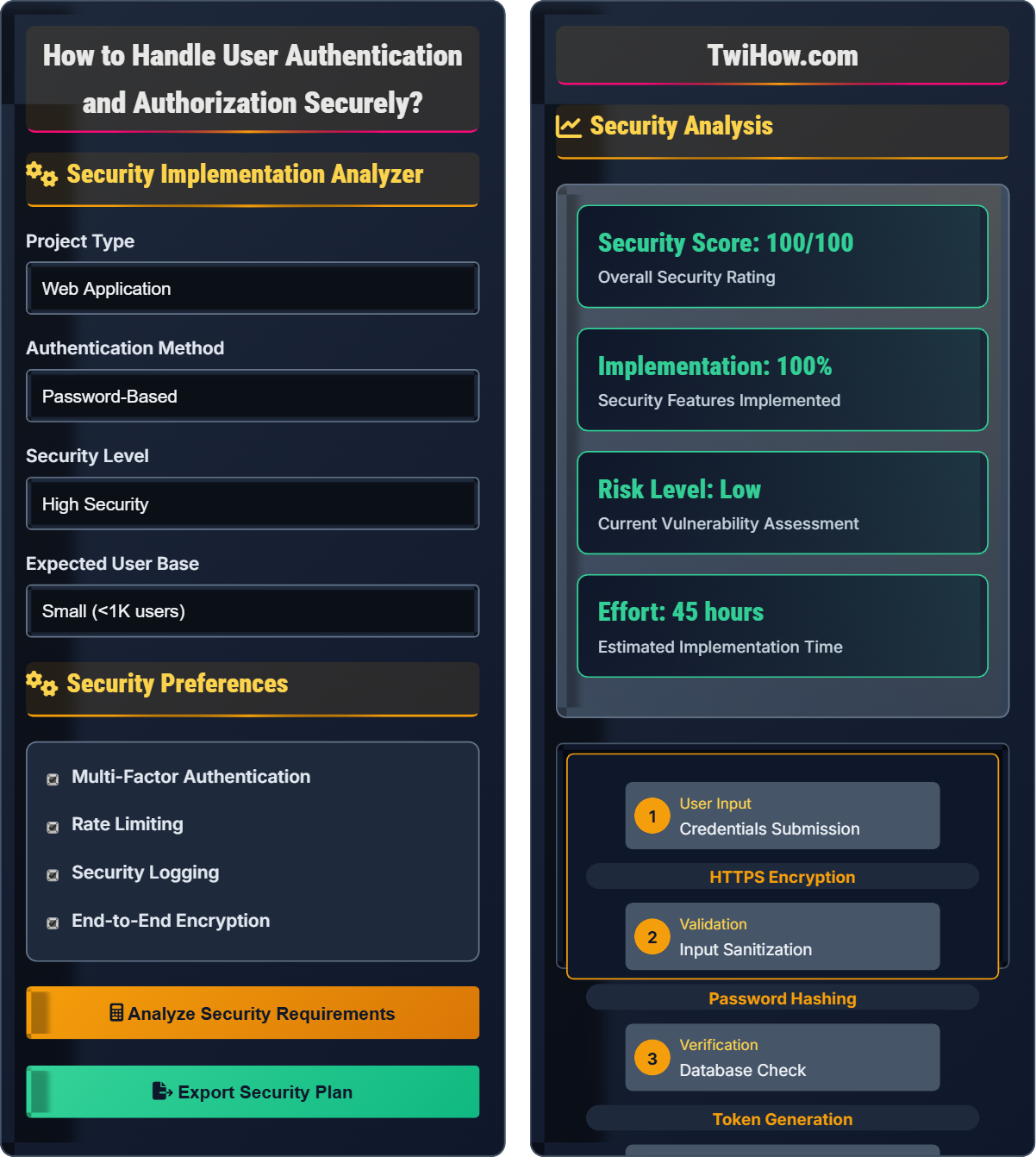
Security Implementation Analyzer
Security Preferences
Security Analysis
Security Requirements
Based on your inputs, the following security requirements apply:
- Strong password hashing (bcrypt/scrypt)
- Secure token management (JWT with refresh tokens)
- Multi-factor authentication implementation
- Rate limiting for login attempts
- Secure session management
- Input validation and sanitization
These requirements ensure compliance with modern security standards.
| Security Aspect | Implementation | Frequency |
|---|---|---|
| Login Attempts | Rate Limiting | Continuous |
| Token Validation | Server-side | Per Request |
| Session Timeout | Automatic | Configurable |
| Security Logs | Centralized | Real-time |
Authentication & Authorization Fundamentals
Authentication and authorization follow a layered security model:
Where:
- Authentication: Verifying user identity (Who are you?)
- Authorization: Determining access permissions (What can you do?)
- Validation: Ensuring data integrity and security
Essential security components for authentication and authorization:
- Password Hashing: bcrypt, scrypt, Argon2 for secure password storage
- Token Management: JWT, OAuth 2.0 for secure session handling
- Input Validation: Sanitization and validation of all user inputs
- Rate Limiting: Protection against brute force and DoS attacks
- Session Management: Secure cookie handling and session storage
- Multi-Factor Authentication: Additional security layer for sensitive operations
Major threats to authentication and authorization systems:
- SQL Injection: Exploiting database queries with malicious input
- Session Hijacking: Stealing user session tokens
- Brute Force Attacks: Systematically guessing passwords
- Cross-Site Scripting (XSS): Injecting malicious scripts
- Cross-Site Request Forgery (CSRF): Forcing unwanted actions
- Man-in-the-Middle: Intercepting network communications
- Never Store Plain Text Passwords: Always hash with salt
- Use HTTPS Everywhere: Encrypt all communications
- Implement Rate Limiting: Prevent brute force attacks
- Validate Input Serverside: Never trust client input
- Use Secure Token Storage: HttpOnly cookies or secure local storage
- Regular Security Audits: Test and update security measures
Security Fundamentals
Authentication, authorization, JWT, OAuth, password hashing, session management, security tokens.
Security Strength = (Authentication Methods × Validation Checks) / (Attack Surface × Vulnerability Risk)
Where Authentication Methods = Password + MFA + Biometrics, Validation Checks = Input + Session + Token.
- Always hash passwords before storing
- Use HTTPS for all authentication
- Implement rate limiting
Implementation Strategies
Secure libraries, encryption tools, token management, validation frameworks, security testing tools.
- Set up secure password hashing system
- Implement token-based authentication
- Configure session management
- Implement authorization checks
- Set up security monitoring
- Test security measures
- Performance impact of security measures
- Usability vs. security trade-offs
- Compliance requirements
- Regular security updates
Security Quiz
What is the most secure way to store user passwords?
The most secure way to store passwords is hashed with bcrypt or similar adaptive hashing algorithms. These algorithms are specifically designed for password storage and include salting to prevent rainbow table attacks. They are also computationally expensive, making brute force attacks more difficult.
Plain text storage is never acceptable. MD5 is cryptographically broken and unsuitable for passwords. Encryption can be decrypted, revealing passwords if keys are compromised.
The answer is C) Hashed with bcrypt or similar adaptive hashing algorithm.
Password hashing is a one-way process that transforms passwords into irreversible hashes. Adaptive algorithms like bcrypt automatically adjust computational cost to stay ahead of hardware advances. The salt ensures that identical passwords produce different hashes, preventing attackers from identifying users with the same password. This approach means that even if your database is compromised, the actual passwords remain protected.
Hashing: One-way transformation of data
Salting: Adding random data to prevent rainbow attacks
Bcrypt: Adaptive password hashing algorithm
• Never store plain text passwords
• Use adaptive hashing algorithms
• Always include salts in hashes
• Use bcrypt, scrypt, or Argon2
• Adjust cost factor based on hardware
• Implement password strength requirements
• Using weak hashing algorithms
• Not using salts
• Storing passwords in plain text
Explain the security considerations for implementing JWT (JSON Web Tokens) in a web application, including common vulnerabilities and mitigation strategies.
JWT Security Considerations:
1. Secret Key Management: Store secret keys securely and never expose them in client-side code. Use environment variables and proper access controls.
2. Algorithm Confusion: Always specify the expected algorithm and reject tokens with "none" algorithm. Validate algorithm headers.
3. Token Expiration: Implement short-lived access tokens with refresh tokens for extended sessions. Use both expiration and issued-at claims.
4. Token Storage: Store in httpOnly cookies or secure local storage. Avoid storing sensitive data in JWT payloads.
5. Signature Verification: Always verify JWT signatures server-side. Never trust unsigned tokens.
6. Audience Validation: Verify the audience claim to ensure tokens are intended for your application.
7. Replay Attack Prevention: Implement token revocation and unique identifiers (jti) for critical operations.
8. Cross-Site Request Forgery: Implement CSRF protection alongside JWT authentication.
These measures ensure JWT tokens provide secure authentication while preventing common attack vectors.
JWTs are stateless tokens that can be very secure when implemented correctly. However, they're vulnerable to several attacks if not properly configured. The key is understanding that JWTs are just a transport mechanism - security comes from proper implementation of validation, storage, and key management. The stateless nature of JWTs means the server doesn't store session data, but this also means tokens can't be revoked until expiration, making short lifetimes crucial.
JWT: JSON Web Token for stateless authentication
Claims: Data stored in JWT payload
Secret Key: Cryptographic key for signing tokens
• Never store sensitive data in JWT payloads
• Always verify JWT signatures
• Implement short token lifetimes
• Use refresh tokens for extended sessions
• Implement token blacklisting for logout
• Validate all JWT claims
• Exposing secret keys in client code
• Not validating algorithm headers
• Using overly long token lifetimes
Your web application stores session tokens in regular cookies without the secure flag. A user accesses your site over HTTP instead of HTTPS. What security vulnerability does this create, and how would you fix it?
Vulnerability: Storing session tokens in regular cookies without the secure flag over HTTP creates a Man-in-the-Middle (MitM) attack vector. When users access the site over HTTP, the session cookie containing the authentication token is transmitted in plain text, allowing attackers on the same network to intercept and steal the token.
Fix:
1. Enforce HTTPS: Redirect all HTTP traffic to HTTPS using server configuration.
2. Secure Cookie Flags: Set secure, HttpOnly, and SameSite flags on session cookies:
Set-Cookie: sessionId=abc123; Secure; HttpOnly; SameSite=Strict
3. HSTS Header: Implement Strict-Transport-Security header to force HTTPS:
Strict-Transport-Security: max-age=31536000; includeSubDomains
4. Token Rotation: Regenerate session tokens after authentication events.
5. Session Timeout: Implement automatic session expiration for inactive users.
These measures ensure that session tokens are protected and cannot be easily intercepted or misused.
Cookie security flags are crucial for protecting session tokens. The Secure flag ensures cookies are only sent over HTTPS connections. HttpOnly prevents JavaScript access, protecting against XSS attacks. SameSite helps prevent CSRF attacks. Together, these flags provide multiple layers of protection for session tokens. The HSTS header ensures that browsers always use HTTPS, preventing downgrade attacks.
HttpOnly: Cookie flag preventing JavaScript access
Secure Flag: Cookie flag for HTTPS transmission only
HSTS: HTTP Strict Transport Security
• Always use HTTPS for authentication
• Set proper cookie security flags
• Implement session timeout
• Use security headers like CSP
• Implement secure session regeneration
• Monitor for suspicious session activity
• Not setting cookie security flags
• Allowing HTTP for authentication
• Not implementing session timeouts
You're implementing a login system and need to protect against brute force attacks. Design a rate limiting strategy that balances security with user experience. Consider different scenarios like IP-based limits, account-based limits, and temporary lockouts.
Multi-Layer Rate Limiting Strategy:
1. IP-Based Limits: Allow 5 failed attempts per minute per IP. Block temporarily after 20 attempts per hour.
2. Account-Based Limits: Allow 3 failed attempts per 15 minutes per account. Implement progressive delays (1min, 5min, 15min).
3. CAPTCHA Integration: Trigger after 3 failed attempts to distinguish humans from bots.
4. Account Lockout: Temporary lock after 10 failed attempts within 24 hours. Permanent lock requires admin intervention.
5. Monitoring: Log suspicious patterns and notify administrators of potential attacks.
6. Recovery: Implement secure account recovery mechanisms for legitimate users.
Implementation Example:
const attempts = await getFailedAttempts(ip, username);
if (attempts.ip >= 5) return { blocked: true, wait: 60 };
if (attempts.account >= 3) return { captcha: true };
if (attempts.account >= 10) return { locked: true };
This strategy balances security with usability by implementing escalating responses to suspicious activity.
Rate limiting is about finding the right balance between security and usability. Too aggressive and legitimate users get blocked; too lenient and attackers can still brute force. A layered approach considers both IP and account-based limits, implementing different strategies for different scenarios. The key is to make it difficult for attackers while minimizing impact on legitimate users. Progressive delays and CAPTCHA challenges are effective middle-ground solutions.
Rate Limiting: Restricting request frequency
Brute Force: Systematic password guessing
CAPTCHA: Challenge to distinguish humans from bots
• Implement multiple layers of protection
• Use progressive response to attacks
• Monitor and log suspicious activity
• Use sliding window counting
• Implement account recovery
• Monitor for credential stuffing
• Allowing unlimited login attempts
• Not considering IP vs account limits
• No account recovery mechanism
Which of the following is the most secure approach to validating user input in authentication systems?
The most secure approach is client-side validation with server-side validation. Client-side validation provides immediate feedback to users, while server-side validation is essential for security since client-side validation can be bypassed. Server-side validation is the only true security measure as clients can be compromised or modified.
Client-side validation should never be trusted for security purposes. Always assume that all input reaching your server is potentially malicious and validate accordingly.
The answer is C) Client-side validation with server-side validation.
Client-side validation is for user experience, server-side validation is for security. Clients are untrusted environments that can be modified by attackers. Any security validation must happen on the server where you have control. Client-side validation can be bypassed by disabling JavaScript, using developer tools, or making direct API calls. The client-side validation is just a convenience for legitimate users, while server-side validation is the actual security barrier.
Client-Side: Validation in user's browser
Server-Side: Validation on your server
Input Sanitization: Cleaning malicious input
• Server-side validation is mandatory
• Never trust client-side validation
• Sanitize all user inputs
• Use parameterized queries
• Implement whitelist validation
• Validate both client and server side
• Relying on client-side validation only
• Not validating API inputs
• Using blacklist instead of whitelist
FAQ
Q: Should I use JWT or session-based authentication?
A: The choice depends on your application architecture. JWT is stateless and good for distributed systems and APIs, but harder to revoke. Session-based auth is server-managed and easier to control, but requires server-side storage. JWT is better for microservices and mobile apps. Sessions are better for traditional web apps with server-side rendering. Consider your scaling needs, revocation requirements, and architecture when deciding.
Q: How often should we rotate authentication secrets?
A: Rotate authentication secrets based on risk assessment. High-security applications should rotate secrets every 90 days. Moderate security applications every 6-12 months. Low-risk applications annually. However, rotate immediately if there's any suspicion of compromise. Consider using infrastructure that makes rotation easier, like AWS Secrets Manager or HashiCorp Vault. Regular rotation reduces the window of exposure if secrets are compromised.
Q: What are the compliance requirements for authentication?
A: Key compliance requirements include: GDPR (EU) requires user consent for data processing and right to access/erase data. HIPAA (US) mandates access controls for health information. PCI DSS requires strong authentication for cardholder data. SOX requires access controls for financial data. Many regulations require multi-factor authentication for sensitive systems. Password policies must meet minimum strength requirements. Regular security audits and user access reviews are often required. Always consult legal counsel for specific requirements.