What is the Best Way to Learn Coding for Free?
Complete coding guide • Step-by-step learning paths
Coding Fundamentals:
Show Learning Path CalculatorLearning to code for free is entirely possible with the abundance of online resources available today. The key is to find the right combination of structured learning, hands-on practice, and community support that fits your learning style and goals.
Effective coding education combines theory with practical application. Start with foundational concepts, then gradually progress to building real projects that demonstrate your skills.
Key elements of successful free coding education:
- Structured Curriculum: Organized learning paths from basics to advanced topics
- Hands-On Practice: Real coding exercises and projects
- Community Support: Forums, study groups, and mentorship
- Project Portfolio: Building a portfolio of work to showcase skills
Modern free coding resources offer comprehensive curricula that rival traditional education programs, providing interactive lessons, coding challenges, and collaborative learning opportunities.
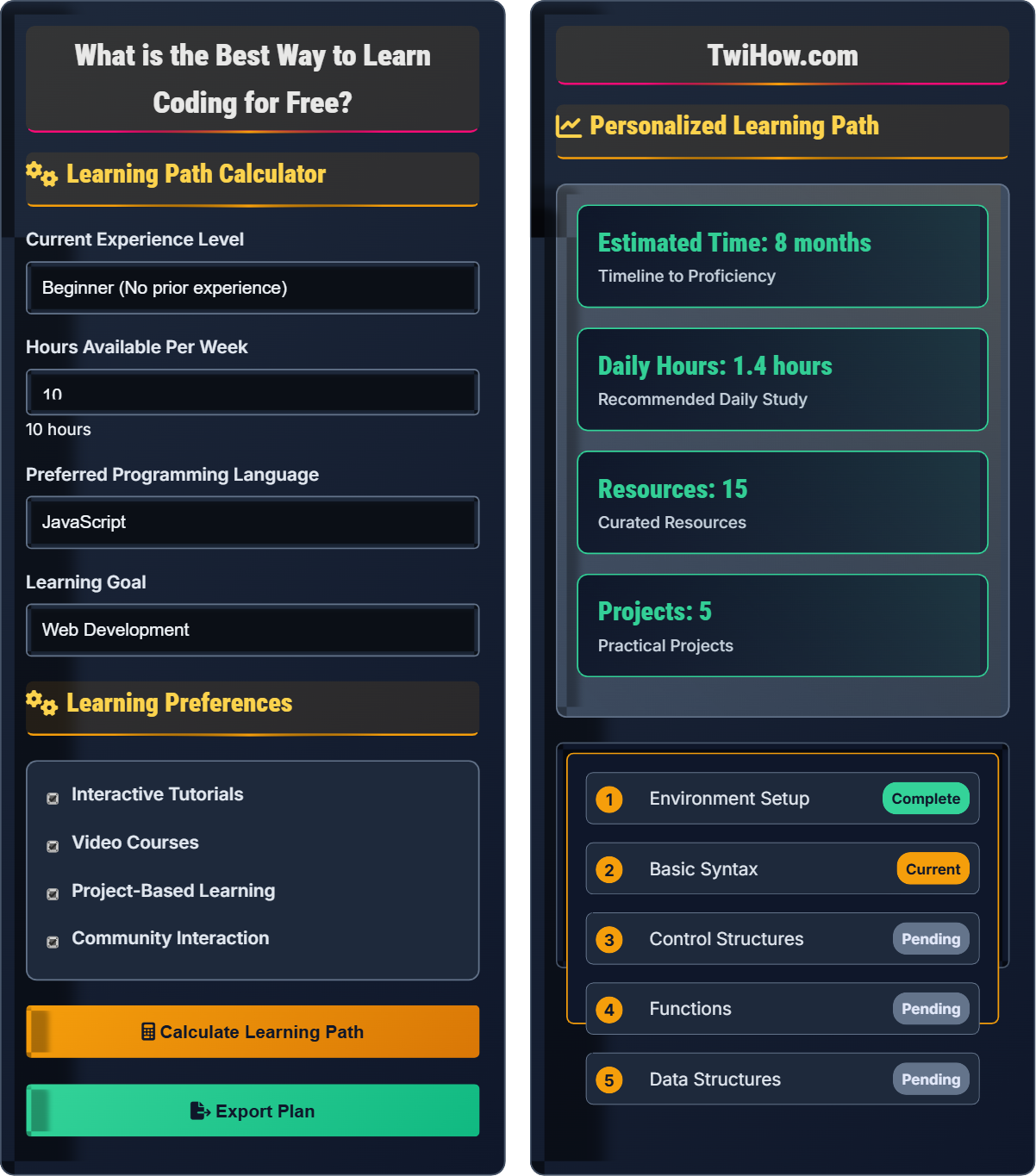
Learning Path Calculator
Learning Preferences
Personalized Learning Path
| Resource | Type | Duration | Difficulty |
|---|---|---|---|
| FreeCodeCamp | Interactive | 3 months | Beginner |
| Codecademy | Course | 2 months | Beginner |
| YouTube Tutorials | Video | 1 month | All Levels |
| GitHub Repositories | Practice | Ongoing | All Levels |
| Stack Overflow | Support | Ongoing | All Levels |
Core Skills to Master
- Version Control (Git)
- Problem Solving
- Debugging Techniques
- Testing Practices
- Documentation
Best Ways to Learn Coding for Free
There are numerous high-quality platforms offering free coding education:
- FreeCodeCamp: Comprehensive curriculum with certifications
- Codecademy: Interactive lessons with immediate feedback
- Khan Academy: Beginner-friendly approach with visual learning
- MIT OpenCourseWare: University-level computer science courses
- Harvard CS50: Free version of Harvard's famous intro course
- YouTube Channels: Traversy Media, The Net Ninja, Dev Ed
Effective coding education follows a progressive structure:
Where:
- Syntax: Basic language rules and grammar
- Control Flow: Conditionals, loops, and functions
- Data Structures: Arrays, objects, lists, trees
- Algorithms: Problem-solving patterns and efficiency
- Projects: Real-world application of knowledge
Key platforms and resources for free coding education:
- Documentation: MDN Web Docs, Python.org, Java Documentation
- Practice Platforms: LeetCode, HackerRank, Codewars
- Books: "Automate the Boring Stuff" (Python), "Eloquent JavaScript"
- Communities: Reddit (r/learnprogramming), Discord servers, Stack Overflow
- Podcasts: "The Changelog", "Syntax", "ShopTalk Show"
- Newsletters: JavaScript Weekly, Python Weekly, CSS-Tricks
- Consistency: Daily practice beats sporadic intensive sessions
- Build Projects: Portfolio projects demonstrate practical skills
- Read Code: Study code written by experienced developers
- Teach Others: Explaining concepts reinforces your understanding
- Embrace Struggle: Debugging and problem-solving are part of learning
- Stay Curious: Keep exploring new technologies and techniques
Coding Fundamentals
Variables, functions, loops, conditionals, data structures, algorithms, debugging.
Time to Proficiency = (Knowledge Base × Practice Intensity) / Distractions
Where Knowledge Base = Resources + Mentors, Practice Intensity = Hours per day × Consistency.
- Start with one language and master it
- Code every day, even if just for 30 minutes
- Build projects to demonstrate skills
Career Applications
Web development, mobile apps, data science, game development, cybersecurity, AI/ML.
- Master fundamentals
- Build portfolio projects
- Create online presence
- Network with professionals
- Apply for junior positions
- Market demand varies by location
- Continuous learning is essential
- Soft skills complement technical skills
- Networking accelerates career growth
Coding Learning Quiz
Which of the following is the most effective approach for beginners to learn coding for free?
The most effective approach combines structured learning with consistent practice. Following a curriculum provides a logical progression of concepts while hands-on practice reinforces learning. This approach ensures that each new concept builds upon previously learned material.
The answer is B) Follow a structured curriculum with hands-on practice.
Effective coding education follows the principle of scaffolding - starting with basic concepts and gradually increasing complexity. Structured curricula are designed by experts who understand the optimal sequence of learning. Hands-on practice is crucial because programming is a skill that requires active engagement, not passive consumption.
Scaffolding: Learning approach that builds knowledge incrementally
Active Learning: Learning through practice rather than passive consumption
Curriculum: Planned sequence of educational experiences
• Start with foundational concepts before advancing
• Practice regularly to reinforce learning
• Build projects to demonstrate skills
• Choose one resource and stick with it initially
• Code daily, even if just for 30 minutes
• Build small projects to apply concepts
• Switching between too many resources
• Watching without practicing
• Skipping fundamentals to tackle advanced topics
Explain the criteria you should use when selecting free coding resources, and provide examples of high-quality platforms for different learning styles.
Criteria for Resource Selection:
1. Quality of Content: Look for resources with up-to-date information, clear explanations, and good reviews.
2. Learning Style Match: Some people learn better with visual aids, others with hands-on practice, and others with reading.
3. Community Support: Active communities provide help when you get stuck.
4. Progression Path: Resources should have a logical flow from beginner to advanced.
Examples by Learning Style:
Visual Learners: YouTube channels like Traversy Media, The Net Ninja, or Khan Academy
Interactive Learners: FreeCodeCamp, Codecademy, or Scrimba
Reading Learners: MDN Web Docs, Python.org tutorials, or "Automate the Boring Stuff"
Project-Based Learners: GitHub repositories, The Odin Project, or exercism.io
Different learning styles require different approaches. Visual learners benefit from diagrams and video demonstrations. Kinesthetic learners need hands-on interaction. Reading/writing learners prefer textual explanations. Understanding your learning style helps you select resources that maximize your learning efficiency. The most effective approach often combines multiple learning modalities.
Learning Styles: Different ways individuals process information
Active Learning: Engagement with material through practice
Metacognition: Awareness of your own learning process
• Match resources to your learning style
• Verify content accuracy and currency
• Look for active community support
• Try multiple resources to find what works for you
• Combine different types of resources
• Join Discord or Reddit communities for support
• Using outdated resources
• Ignoring your learning preferences
• Not verifying resource quality
You have 15 hours per week available for learning to code, but you're struggling to make consistent progress. You spend 2 hours watching YouTube videos, 1 hour reading articles, and 3 hours trying to build projects. Calculate how much time you're spending on active coding practice versus passive learning, and suggest a better time allocation to accelerate your learning.
Current Time Allocation:
• Passive Learning: 2 hours (YouTube) + 1 hour (reading) = 3 hours
• Active Practice: 3 hours (building projects) = 3 hours
• Unaccounted: 15 - 3 - 3 = 9 hours
Recommended Allocation:
For faster learning, increase active practice time. Suggested distribution:
• Active Coding Practice: 10 hours (67%)
• Guided Learning: 3 hours (20%)
• Review/Planning: 2 hours (13%)
This allocation emphasizes hands-on practice, which is crucial for developing coding skills. More time spent actively coding leads to faster improvement and better retention of concepts.
Research in educational psychology shows that active learning is significantly more effective than passive learning for skill acquisition. In programming, this means that time spent writing code, debugging, and building projects is more valuable than watching tutorials or reading. The recommended 70-20-10 split prioritizes active practice while maintaining some guided learning and reflection time.
Active Learning: Learning through doing and practicing
Passive Learning: Learning through observation and listening
Deliberate Practice: Focused practice aimed at improving specific skills
• Prioritize active practice over passive consumption
• Maintain consistency in study schedule
• Balance learning with application
• Track your time to identify inefficiencies
• Use the Pomodoro technique for focus
• Set specific, measurable goals
• Spending too much time on tutorials
• Not tracking time effectively
• Lacking specific goals
You want to learn coding for free to eventually get a job in tech. Based on current market demand and learning resources, recommend the best programming language for a complete beginner to start with, considering they want to pursue web development. Justify your choice with specific reasons related to job prospects, learning curve, and available free resources.
Recommendation: JavaScript
Justification:
1. Job Market Demand: JavaScript dominates web development with 95%+ of websites using it. Front-end, back-end (Node.js), and full-stack opportunities are abundant.
2. Learning Curve: Relatively forgiving syntax compared to languages like C++. Allows beginners to build interactive projects quickly.
3. Free Resources: Extensive ecosystem of free resources including:
• FreeCodeCamp's JavaScript curriculum
• Mozilla Developer Network (MDN) documentation
• YouTube channels like Traversy Media and The Net Ninja
• Interactive platforms like Codecademy and Scrimba
4. Versatility: Once learned, JavaScript can be used for web, mobile (React Native), desktop (Electron), and server-side development.
Alternative: Python for beginners who prefer simpler syntax and want to explore data science or automation later.
Choosing the first programming language is crucial for beginners. The ideal choice balances market demand, learning curve, and available resources. JavaScript excels in all three areas for web development. It allows beginners to see immediate results (making web pages interactive) which maintains motivation. The extensive community support and documentation make it easier for beginners to get help when stuck.
Front-end: Client-side web development (what users see)
Back-end: Server-side development (database, logic)
Full-stack: Both front-end and back-end development
• Choose based on career goals
• Consider learning curve and motivation
• Verify market demand for chosen language
• Start with one language and master it
• Research local job market
• Consider language versatility
• Choosing languages based on popularity alone
• Not considering career goals
• Switching languages too frequently
Which of the following is the most common mistake made by beginners learning to code for free?
The most common mistake is consuming too much content without sufficient practice. Many beginners watch countless tutorials, read numerous articles, and consume programming content voraciously without actually writing code. This creates an illusion of learning without developing actual coding skills.
Programming is a skill that requires hands-on practice. Watching someone else code is like watching someone else play piano - you won't learn to program without writing code yourself.
The answer is B) Consuming too much content without practicing.
This mistake stems from confusing learning with information consumption. The brain processes information differently when passively consuming versus actively engaging. Programming requires muscle memory and problem-solving patterns that can only be developed through practice. The "tutorial trap" is a common phenomenon where beginners keep following tutorials without attempting independent projects.
Tutorial Trap: Staying in tutorial mode without independent practice
Muscle Memory: Repetitive practice creating automatic responses
Active Learning: Learning through doing rather than observing
• Practice must exceed consumption
• Code daily, even if just for 30 minutes
• Build projects to apply concepts
• Follow 70/30 rule: 70% practice, 30% learning
• Stop tutorials to experiment independently
• Build projects even when confused
• Watching without practicing
• Staying in comfort zone
• Avoiding difficult problems
FAQ
Q: Is it really possible to get a job by learning to code for free?
A: Absolutely! Many successful developers started with free resources. What matters most is building a strong portfolio of projects that demonstrate your skills. Employers care more about what you can do than how you learned it. Focus on creating 3-5 substantial projects that showcase different technologies and problem-solving abilities. Contribute to open source projects, and document your learning journey on platforms like GitHub and LinkedIn. Many companies now prioritize skills and portfolio over formal education.
Q: How long does it take to become job-ready after starting with free coding resources?
A: With consistent effort, most people can become job-ready in 6-12 months. This timeline depends on your dedication and the amount of time you invest weekly. If you can dedicate 15-20 hours per week to focused learning and project-building, you can expect to reach junior developer level in about 6-8 months. The key factors are: consistent practice, building a portfolio of 5-7 projects, mastering core concepts, and preparing for technical interviews. Remember, it's not just about completing tutorials—it's about solving problems independently and building real applications.
Q: What programming language should my teenager start with if they want to learn coding for free?
A: For teenagers interested in learning to code for free, I recommend starting with Python or JavaScript depending on their interests. Python is excellent for beginners due to its simple syntax and readability. It's widely used in data science, automation, and backend development. JavaScript is ideal if they're interested in web development since it works both in browsers and on servers. Both have excellent free resources:
Python: Python.org tutorials, "Automate the Boring Stuff" book, Codecademy's Python course
JavaScript: FreeCodeCamp, MDN Web Docs, The Odin Project
The key is choosing a language that matches their interests—whether it's creating games, building websites, or solving math problems.