What is the Role of AI in Modern Software Development?
Complete AI development guide • Step-by-step applications
AI in Software Development:
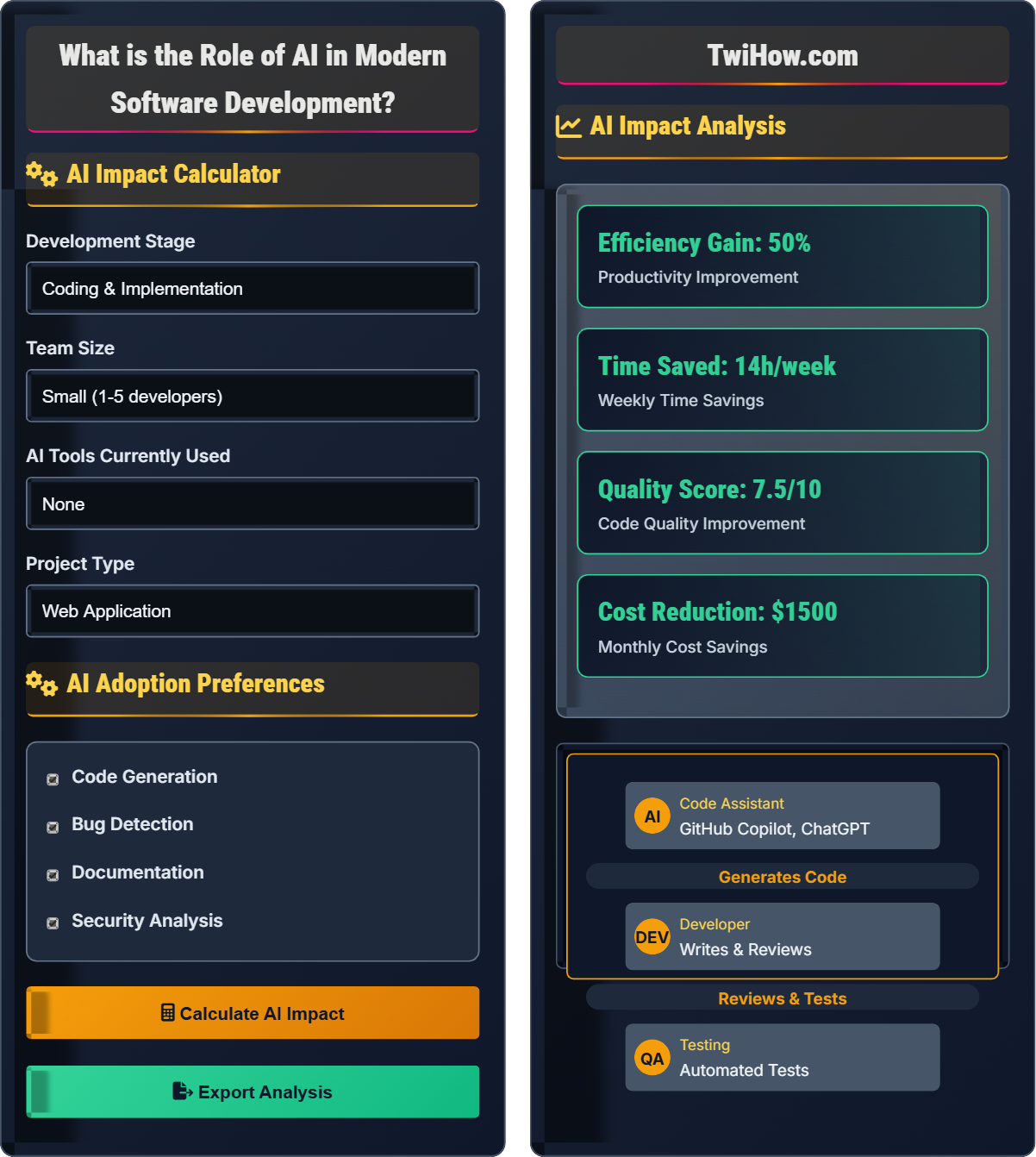
Show AI Impact CalculatorAI is revolutionizing software development by automating repetitive tasks, enhancing code quality, and accelerating development cycles. From intelligent code completion to automated testing and bug detection, AI tools are becoming integral to modern development workflows.
The integration of AI in development encompasses multiple areas including code generation, documentation assistance, security scanning, and project management. These tools help developers focus on higher-level problem-solving while automating routine tasks.
Key areas of AI impact:
- Code Generation: AI-powered assistants for writing code
- Quality Assurance: Automated testing and bug detection
- Documentation: Automatic documentation generation
- Security: Vulnerability detection and code review
Modern AI tools like GitHub Copilot, ChatGPT, and specialized IDE integrations are transforming how developers approach problem-solving and implementation.
AI Impact Calculator
AI Adoption Preferences
AI Impact Analysis
AI Adoption Recommendations
Based on your inputs, focus on implementing AI tools for code generation and testing. Start with GitHub Copilot for code assistance and SonarQube for automated quality checks.
Gradually expand to documentation and security tools as your team adapts to AI-enhanced workflows.
| Risk | Severity | Mitigation |
|---|---|---|
| Code Quality | Medium | Manual review required |
| Security | High | Additional security checks |
| Dependency | Medium | Balanced usage |
| Training | Low | Team education |
AI in Modern Software Development
AI is transforming multiple aspects of software development:
Where:
- AI Assistance: Code generation, bug detection, refactoring
- Human Creativity: Problem-solving, architecture, innovation
- Automation Benefits: Time savings, consistency, quality
AI is applied throughout the development lifecycle:
- Code Generation: Intelligent code completion and full function generation
- Bug Detection: Automated identification of potential issues
- Testing: Auto-generation of test cases and scenarios
- Documentation: Automatic comment and documentation creation
- Security: Vulnerability scanning and security analysis
- Refactoring: Code optimization and improvement suggestions
Benefits of AI in development:
- Increased Productivity: Faster code generation and reduced repetitive tasks
- Improved Quality: Automated testing and error detection
- Enhanced Learning: Exposure to different coding patterns and solutions
- Consistency: Standardized code formatting and practices
- Accelerated Onboarding: New developers get up to speed faster
- Full-Stack Automation: AI handling entire feature development
- Natural Language Programming: Describe requirements in plain English
- Intelligent Debugging: AI predicting and fixing bugs automatically
- Autonomous Testing: Self-generating and executing test suites
- Code Architecture: AI suggesting optimal system designs
AI Development Fundamentals
Machine learning, natural language processing, code generation, automated testing, intelligent assistance.
Success = (Tool Quality × Team Adoption) / (Integration Complexity × Training Time)
Where Tool Quality = Accuracy + Reliability, Team Adoption = Training + Acceptance.
- Always review AI-generated code
- Maintain human oversight in critical systems
- Balance automation with creativity
Implementation Strategies
IDE integration, API access, training data, computational resources, security considerations.
- Assess current development processes
- Select appropriate AI tools for your stack
- Configure and integrate tools with existing systems
- Train team members on proper usage
- Start with non-critical tasks
- Monitor and measure impact
- Data privacy and security implications
- Intellectual property concerns
- Team acceptance and training requirements
- Cost-benefit analysis
AI in Development Quiz
Which of the following is NOT a primary benefit of using AI in software development?
While AI tools significantly improve code quality and help identify many bugs, they cannot completely eliminate all bugs. Software complexity, unique requirements, and novel problems still require human judgment and testing. AI serves as an assistive tool that enhances human capabilities rather than replacing all human oversight.
The answer is B) Complete elimination of all bugs.
AI in development is a powerful augmentation tool, not a replacement for human expertise. It excels at pattern recognition, repetitive tasks, and providing suggestions based on vast training data. However, complex problem-solving, architectural decisions, and ensuring correctness for unique requirements still require human intelligence. Understanding the limitations of AI helps developers use these tools effectively while maintaining appropriate oversight.
Augmentation: Enhancing human capabilities with AI assistance
Pattern Recognition: Identifying recurring code structures
Human Oversight: Reviewing and validating AI-generated code
• Always review AI-generated code
• Use AI as a tool, not a replacement
• Maintain critical thinking skills
• Verify AI suggestions before implementation
• Use AI for boilerplate code generation
• Focus on complex logic that requires human insight
• Blindly accepting all AI suggestions
• Not understanding generated code
• Over-relying on AI for complex decisions
How should the code review process be adapted when AI-generated code is involved? Explain specific practices and considerations.
Adapted Code Review Practices:
1. AI-Generated Code Verification: Reviewers must verify that AI-generated code meets functional requirements and doesn't introduce security vulnerabilities.
2. Quality Assessment: Evaluate the quality of AI suggestions, checking for proper error handling, performance considerations, and adherence to team standards.
3. Understanding Requirements: Ensure the AI-generated code addresses the intended problem and doesn't make incorrect assumptions.
4. Originality Check: Verify that the code doesn't inadvertently copy protected intellectual property from training data.
5. Human Oversight: Reviewers must understand the code well enough to explain it, even if AI helped generate it.
6. Documentation: Include notes about AI usage in pull requests to inform other team members.
7. Training Considerations: Reviewers should be trained on how to effectively evaluate AI-generated code and understand common patterns and pitfalls.
These adaptations ensure that AI tools enhance rather than compromise code quality and security.
The code review process remains critical even with AI assistance. Reviewers must adapt their approach to account for the unique characteristics of AI-generated code, including potential hallucinations, inappropriate copying, and optimization for training data patterns rather than specific requirements. The human element in code review becomes even more important as a quality gate for AI-assisted development.
AI Hallucination: AI generating plausible but incorrect code
Human Oversight: Review and validation of AI output
Quality Gate: Process ensuring code meets standards
• Always verify AI-generated code
• Maintain same standards for AI and human code
• Document AI usage in reviews
• Test AI-generated code thoroughly
• Ask clarifying questions about unclear AI suggestions
• Focus reviews on logic and requirements
• Approving AI code without proper review
• Not understanding the generated code
• Assuming AI code is always correct
Your development team of 8 members is considering adopting GitHub Copilot for code generation. Half the team is enthusiastic about AI tools, while the other half is skeptical. The team works on a critical financial application where security and correctness are paramount. How would you approach the introduction of AI tools while addressing team concerns and maintaining code quality?
Gradual Adoption Strategy:
1. Pilot Program: Start with 2-3 volunteers who are enthusiastic about AI tools. Focus on non-critical, non-security-sensitive parts of the application to demonstrate benefits safely.
2. Clear Guidelines: Establish strict guidelines for AI usage, including which types of code can be AI-assisted and mandatory review processes.
3. Security Protocols: Implement additional security scanning for AI-generated code and establish protocols to ensure no sensitive data is exposed to AI models.
4. Training Program: Provide comprehensive training on responsible AI usage, including how to verify and validate AI-generated code.
5. Transparent Process: Make the AI adoption process transparent, sharing metrics and lessons learned with the entire team.
6. Opt-Out Option: Allow team members to opt out initially while encouraging participation through demonstrated success.
7. Quality Measures: Maintain or increase code review standards for AI-assisted code, with additional scrutiny for security-critical components.
This approach respects team concerns while demonstrating the value of AI tools in a controlled, safe manner.
Introducing AI tools in a development team requires careful change management, especially in environments where security and correctness are critical. The key is to start small, demonstrate value safely, and maintain rigorous quality standards. Addressing team concerns proactively through transparent processes and clear guidelines helps build trust and adoption over time.
Change Management: Process of guiding organizational change
Pilot Program: Limited trial of new technology or processQuality Standards: Criteria for acceptable code quality
• Start with non-critical components
• Maintain strict quality controls
• Address security concerns first
• Demonstrate clear benefits early
• Provide comprehensive training
• Measure and share adoption metrics
• Forcing adoption without addressing concerns
• Not maintaining quality standards
• Ignoring security implications
You're working on a performance-critical application and an AI tool suggests a code optimization that claims to improve performance by 40%. How would you validate this claim and decide whether to implement the optimization? Include specific testing and verification steps.
Validation Process:
1. Code Analysis: Examine the suggested optimization to understand how it works and whether it introduces any correctness issues or side effects.
2. Unit Testing: Create comprehensive unit tests to ensure the optimized code produces identical results to the original implementation.
3. Performance Baseline: Establish a baseline performance measurement using realistic test data and scenarios.
4. Controlled Benchmarking: Run the original and optimized code under identical conditions with multiple test runs to account for variability.
5. Statistical Analysis: Use statistical methods to determine if performance improvements are significant and not due to random variation.
6. Stress Testing: Test the optimized code under various load conditions to ensure stability and identify edge cases.
7. Memory Analysis: Check for any memory usage changes that might offset performance gains.
8. Profiling: Use profiling tools to verify that the expected bottlenecks were addressed.
9. Integration Testing: Ensure the optimization doesn't negatively impact other parts of the system.
10. Rollback Plan: Have a plan ready to revert the optimization if issues arise in production.
Only implement the optimization after thorough validation confirms the performance benefits without introducing new issues.
Performance optimizations, whether suggested by AI or humans, require rigorous validation before implementation. Performance claims must be verified through systematic testing, as AI might optimize for specific scenarios that don't reflect real-world usage. The validation process ensures that optimizations provide genuine benefits without compromising correctness, stability, or maintainability.
Performance Baseline: Reference measurement for comparison
Statistical Significance: Evidence that results are not due to chance
Regression Testing: Ensuring changes don't break existing functionality
• Always validate performance claims
• Test under realistic conditions
• Maintain correctness over performance
• Use multiple test scenarios
• Profile before and after optimization
• Monitor real-world performance after deployment
• Accepting performance claims without validation
• Not testing edge cases
• Ignoring correctness for performance
Which of the following is the most important ethical consideration when using AI in software development?
Intellectual property and licensing is the most important ethical consideration when using AI in software development. AI models are trained on vast amounts of publicly available code, raising questions about whether generated code infringes on copyrights or incorporates proprietary algorithms. Organizations must ensure they have proper licenses for any code generated by AI tools and consider the implications of using AI-generated code in commercial products.
Other considerations like cost, job displacement, and learning curves are important but don't carry the same legal and ethical implications as IP concerns.
The answer is C) Intellectual property and licensing.
The legal landscape around AI-generated code is still evolving, with ongoing debates about copyright, fair use, and licensing. Developers and organizations must be aware of these issues to avoid potential legal complications. This is particularly important for companies developing commercial software where IP violations could result in significant legal and financial consequences.
Intellectual Property: Legal rights over creative works
Copyright: Protection for original works of authorship
Licensing: Permission to use copyrighted materials
• Understand licensing terms of AI tools
• Document AI usage in code
• Consider IP implications
• Consult legal counsel on AI usage
• Maintain records of AI-assisted development
• Stay updated on IP regulations
• Not understanding licensing requirements
• Assuming all AI code is freely usable
• Ignoring IP implications of training data
FAQ
Q: Will AI replace software developers?
A: AI will not replace software developers but will augment their capabilities. While AI can generate code, debug, and perform routine tasks, it lacks the creativity, problem-solving skills, and domain expertise needed for complex software development. Developers will evolve to focus more on architecture, design, and higher-level problem-solving while using AI as a powerful tool. The most successful developers will be those who learn to effectively collaborate with AI tools rather than compete against them.
Q: What ROI can we expect from AI tools in development?
A: Typical ROI from AI development tools ranges from 20-40% productivity gains, though this varies by implementation. Common benefits include 30-50% faster code completion, 20-30% reduction in bug fixes, and 25-40% faster onboarding of new team members. However, realize that ROI depends on proper implementation, team training, and appropriate use cases. The investment in AI tools should be balanced with training costs and potential disruptions during adoption.
Q: Should I learn to use AI tools as a student?
A: Yes, but with caution. Learn AI tools as productivity aids while maintaining strong foundational programming skills. AI tools can help you learn by providing examples and explanations, but don't rely on them to skip understanding core concepts. The most valuable skill is knowing when and how to use AI tools appropriately. Focus on understanding the underlying principles so you can effectively validate and improve AI-generated code. Employers will expect you to be proficient with these tools while still demonstrating deep technical knowledge.